
Create Reseller Authorization
Easily create a reseller authorization (Channel Partner Private Offer / CPPO) using the Suger App within your Salesforce Console.
Overview
A reseller authorization — also called a Channel Partner Private Offer (CPPO) — is how you give a reseller or channel partner permission to sell your product on a cloud marketplace on your behalf.
Here’s how it works in plain terms:
- You (the ISV) create a reseller authorization that sets the price you’re willing to give the reseller.
- The reseller then creates their own private offer to the end customer, using your authorization as the basis — at whatever markup they choose.
- The end customer buys from the reseller through the marketplace, and billing flows through accordingly.
Think of it as a wholesale price you set for your channel partner, who then handles the last mile to the customer.
For more details on resale, see Resale with Suger.
Prerequisites
- The Suger App must be installed, connected, and set up with the Suger widget on your opportunity pages. If you haven’t done that yet, work through Install the Suger App first.
- You need the Suger User, Suger User - Marketplace, or a cloud-specific marketplace permission set assigned to your Salesforce account. If you can’t see the New Offer button on an opportunity, your permission set is likely missing — see Permission Sets.
- The product you want to authorize must already exist in Suger. If it doesn’t, create it in the Suger Console first. See Products.
Create a Reseller Authorization
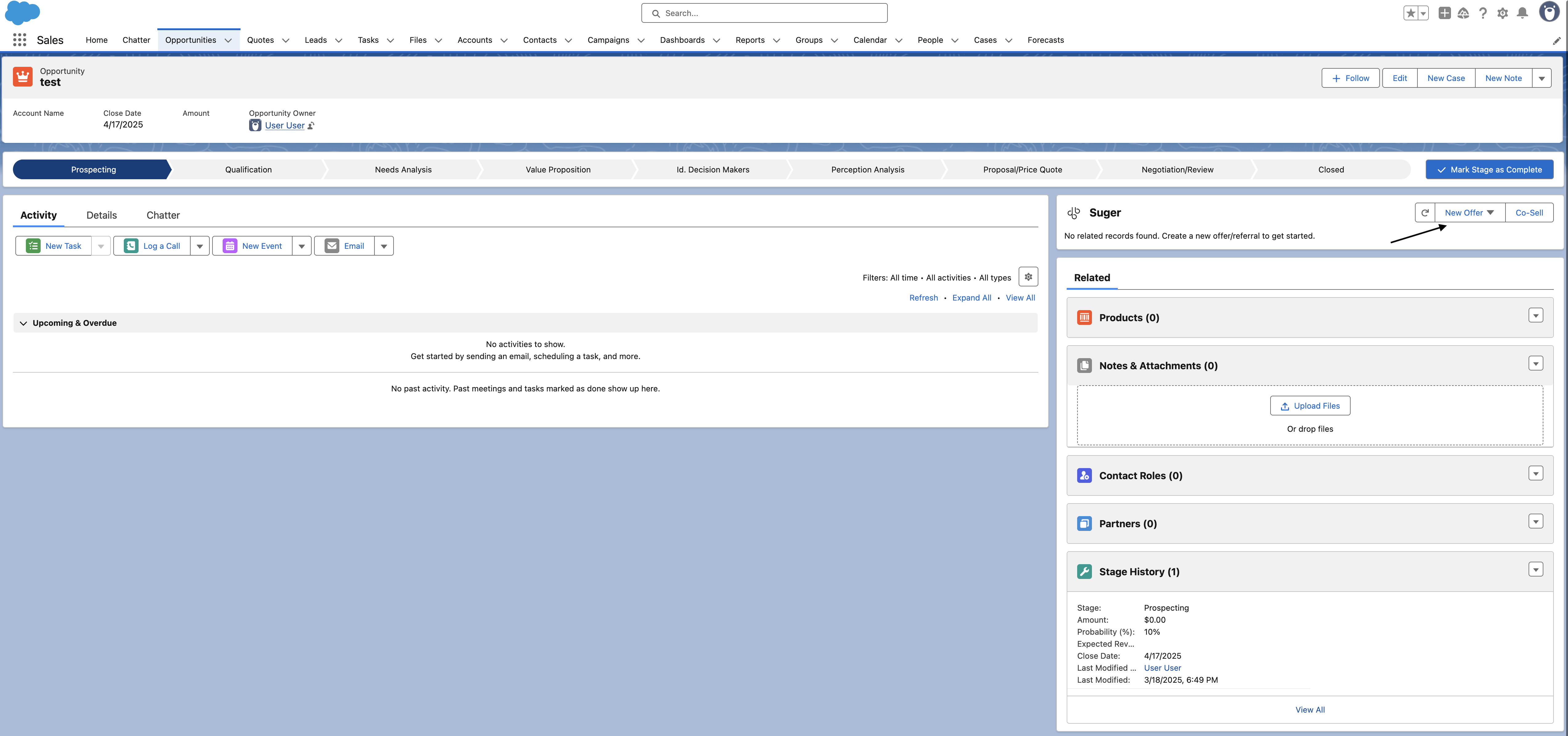
- Navigate to the opportunity’s detail page (the opportunity associated with your reseller) and click the New Offer dropdown button at the top of the Suger App. If you don’t see the widget, it may not be added to your page layout yet — see Page Components.
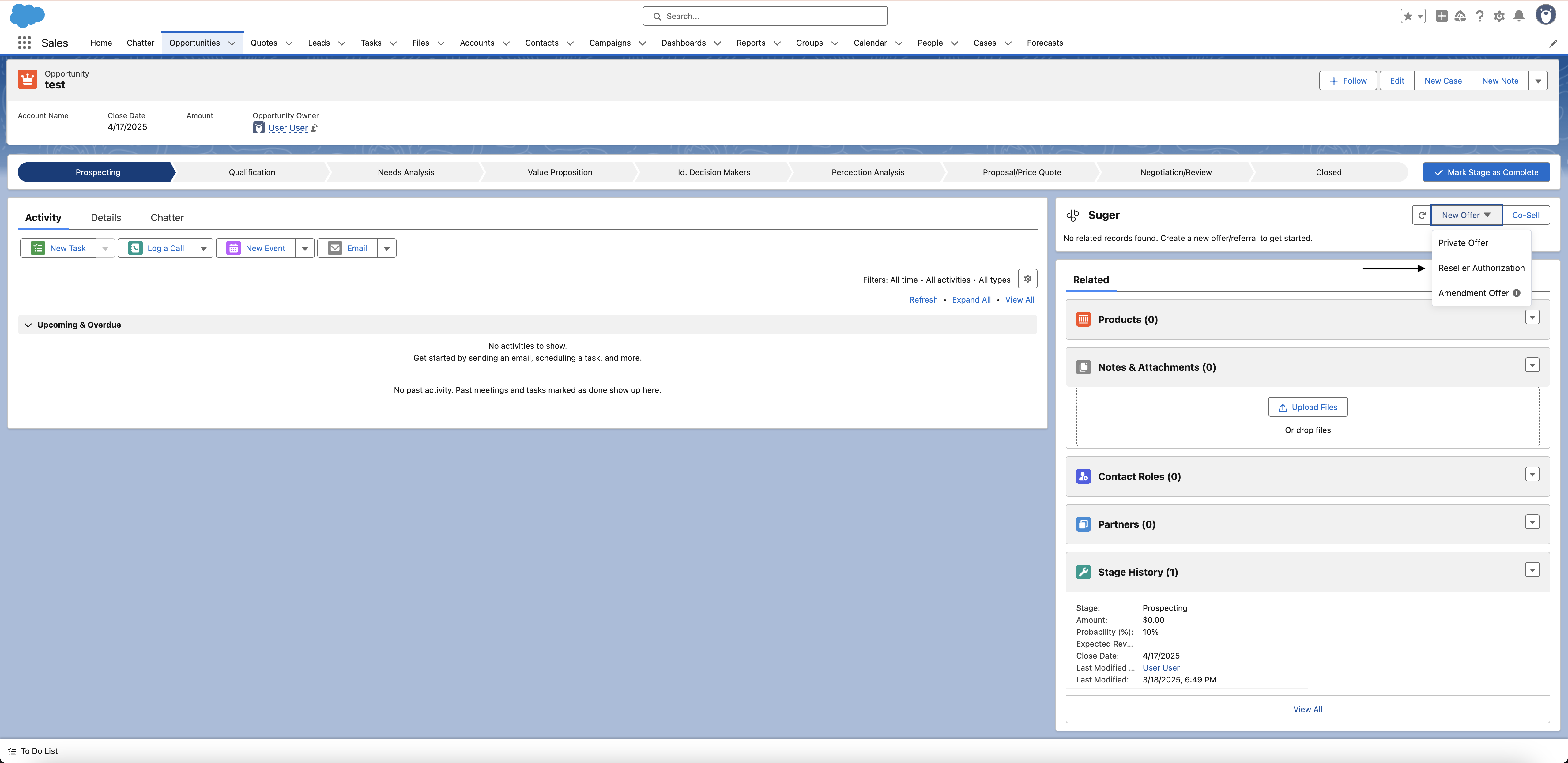
- Locate and click the “Reseller Authorization” button.
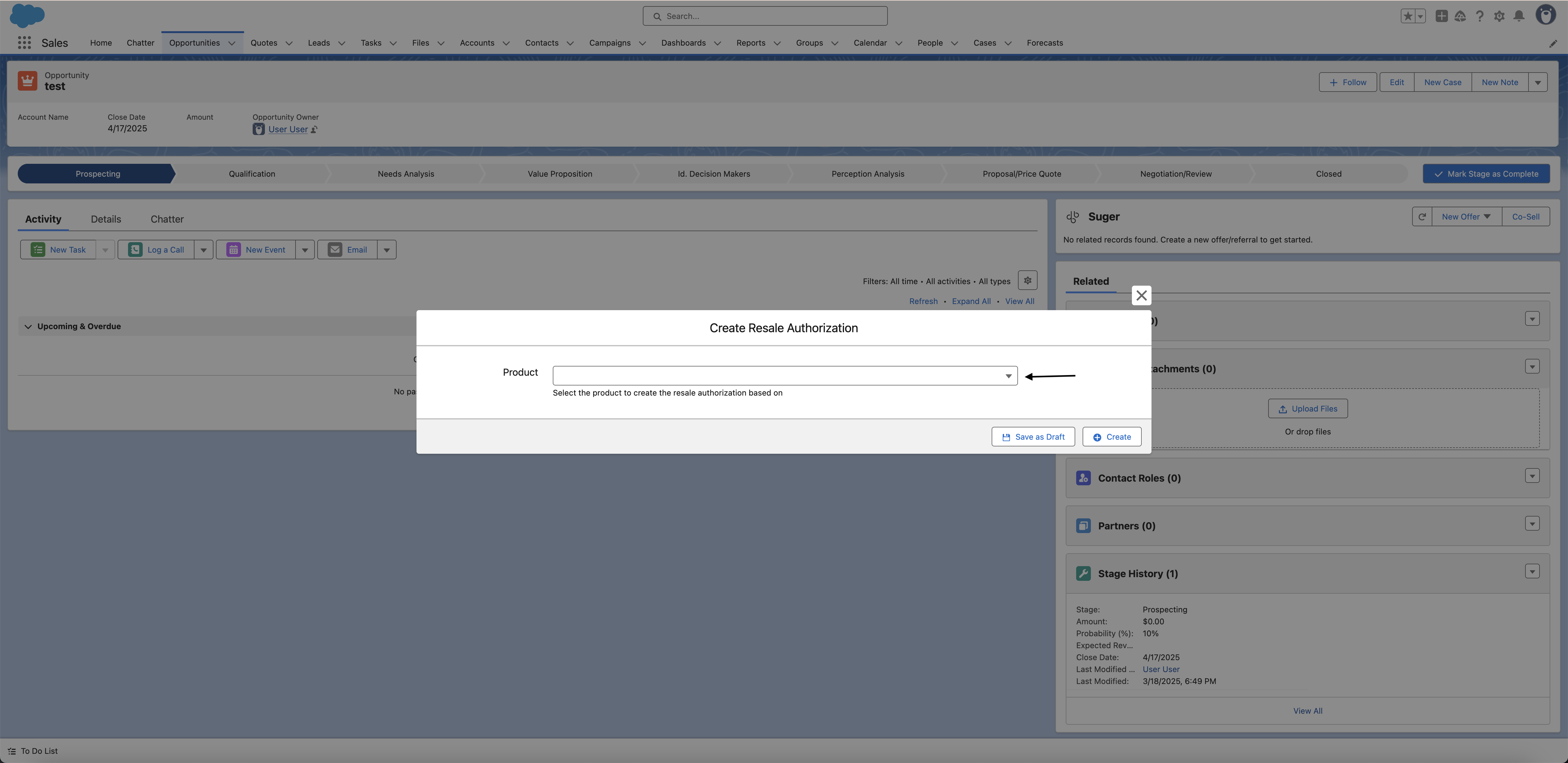
- Choose the product on which the Reseller Authorization will be based and complete the required fields in the form. Note that the required fields may vary depending on the cloud marketplace and type of product. The product list shows only the products available in your Suger account — if you are assigned a cloud-specific permission set (e.g., Suger Marketplace - AWS), you will only see products for that cloud.
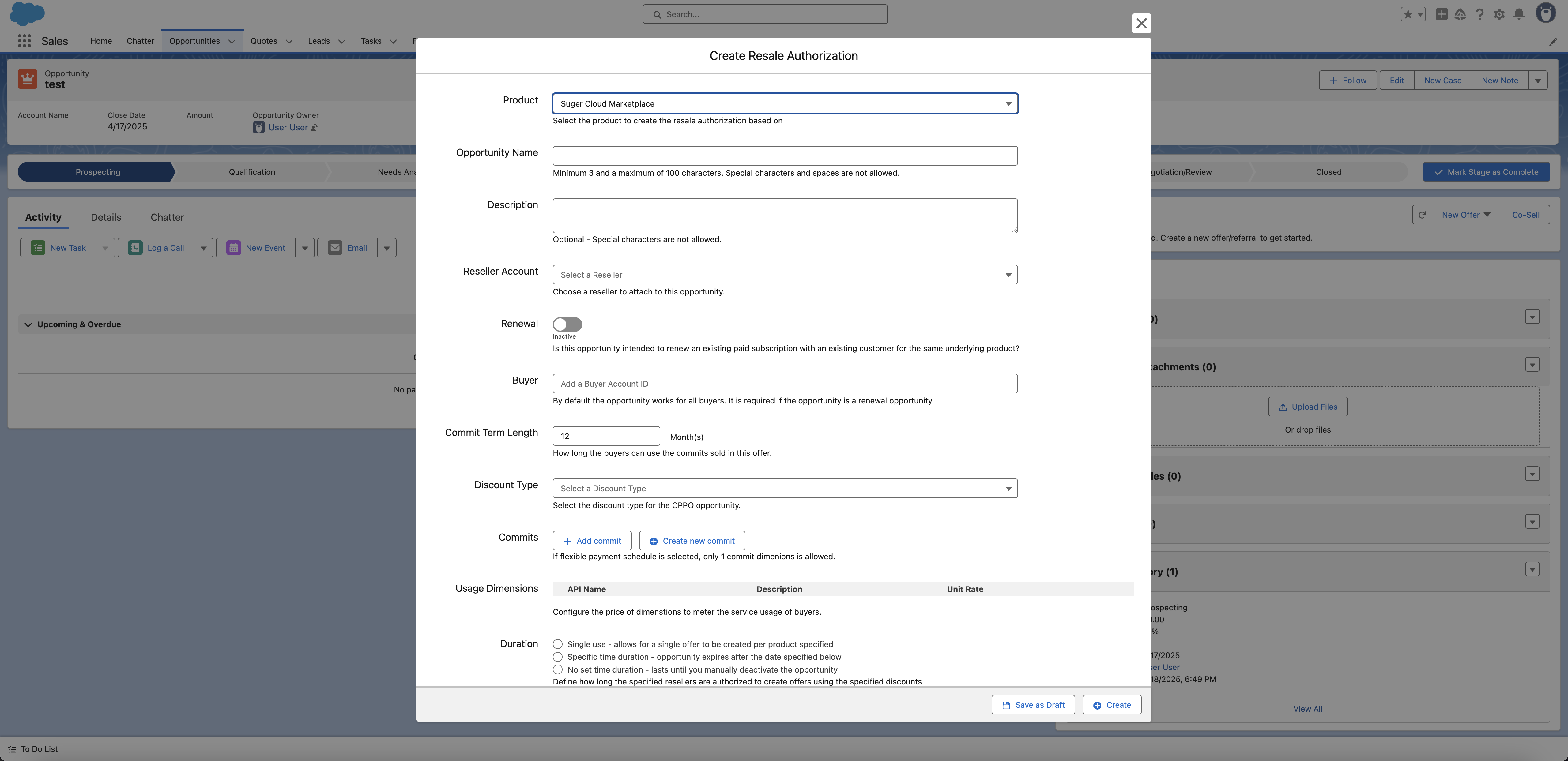
- Once all necessary information is filled in, submit the form to create the offer.
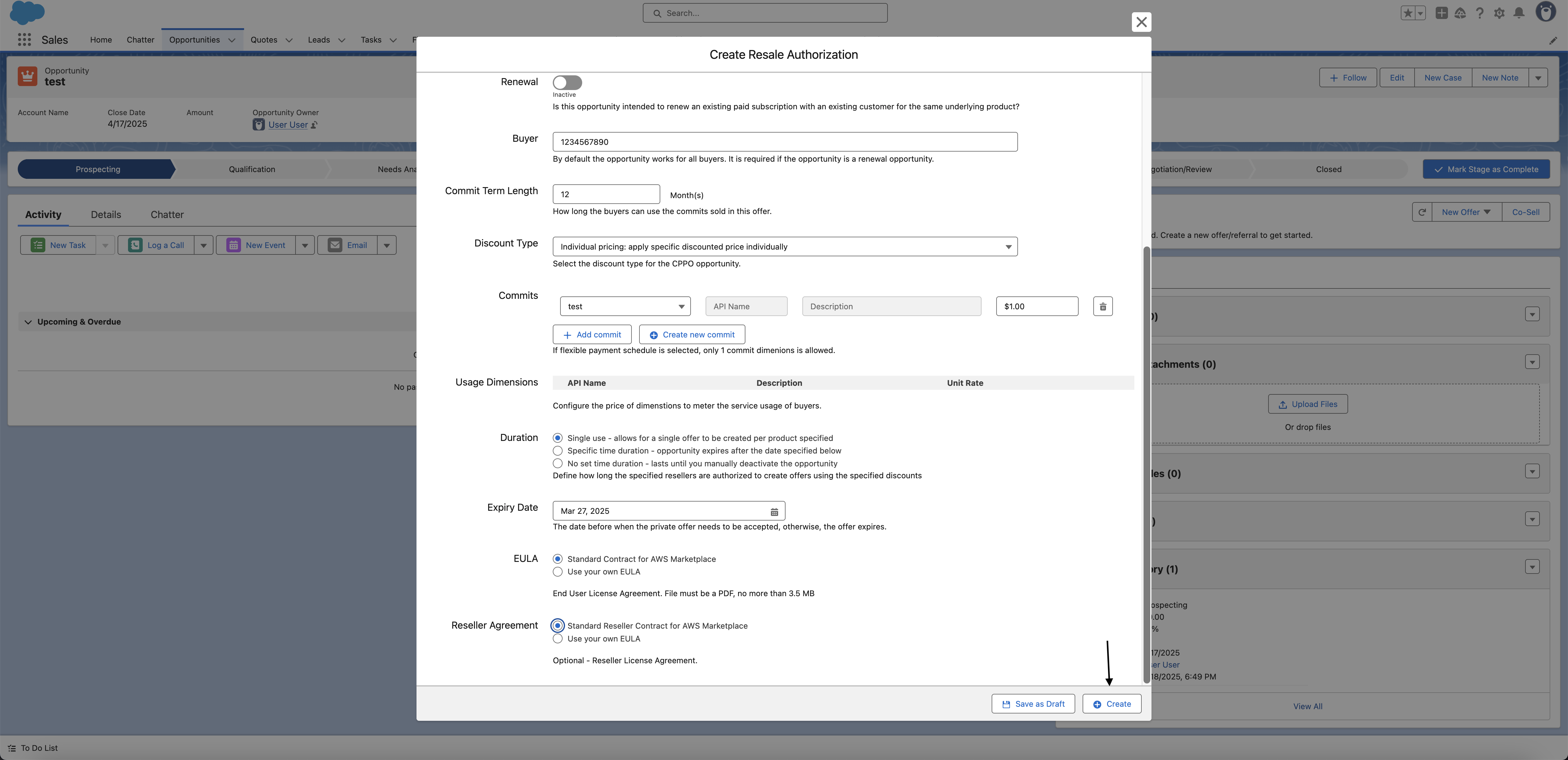
- You are all set!
What happens next?
After you submit the reseller authorization:
- Suger creates the reseller authorization record in your Salesforce org, linked to the opportunity.
- The authorization is sent to the cloud marketplace for processing.
- Once confirmed by the marketplace, the reseller receives access to the authorization and can create their own private offer to the end customer.
- You can track the status of the authorization from the offer record in Salesforce or in the Suger Console.
Troubleshooting common issues
| Issue | Possible cause | Resolution |
|---|---|---|
| No New Offer button visible on the opportunity | Suger permission set not assigned, or the Suger widget is not on the page | Check your permission set. If the widget is missing, add it. |
| Reseller Authorization option is not in the New Offer dropdown | The product type or cloud does not support CPPO, or your permission set restricts access | Confirm your product supports reseller authorization for the target cloud. Check your permission set assignment. |
| Product list is empty | No products have been set up in Suger, or your permission set restricts which clouds you can see | Confirm products exist in the Suger Console. Cloud-specific permission sets only show products for that cloud. |
| Form fields are blank — not pre-filled from the opportunity | Field mapping has not been configured | Field mapping is an optional admin setup. Contact your Salesforce admin to configure it. |
| Reseller authorization was created but does not appear on the opportunity | Sync between Suger and Salesforce is delayed | Refresh the page after a few minutes. If it still doesn’t appear, confirm the authorization was created in the Suger Console. |
Frequently Asked Questions (FAQs)
Q: What’s the difference between a reseller authorization and a private offer?
A private offer goes directly to an end customer. A reseller authorization goes to a channel partner (reseller), who then creates their own private offer to the end customer. Use a reseller authorization when you’re selling through a partner, not directly to the buyer.
Q: Does the reseller see my cost price when I create a reseller authorization?
Yes — the reseller sees the price you set in the authorization. They can then mark it up when creating their own offer to the end customer, but they cannot go below the price you’ve authorized.
Q: Which cloud marketplaces support reseller authorization (CPPO) from Salesforce?
Check which products appear in the product selector — if products for a specific cloud are missing, that cloud may not yet support CPPO from Salesforce. Contact Suger support to confirm.
Q: Can I track whether the reseller has acted on the authorization?
Yes. You can check the status of the reseller authorization from the offer record in Salesforce or in the Suger Console.
Q: Do I need a separate opportunity for each reseller I authorize?
That depends on your Salesforce setup and sales process. Suger links the reseller authorization to whichever opportunity you create it from. If you have multiple resellers, most teams create a separate opportunity per reseller to keep records clean.