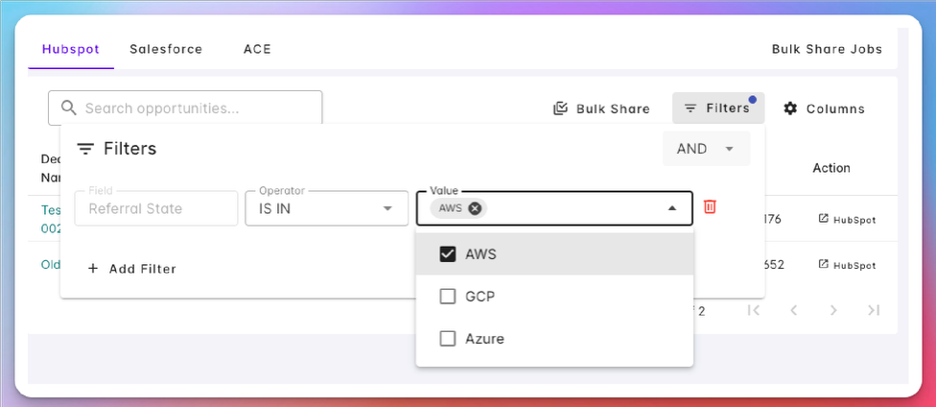
HubSpot Referral State
Track which cloud partners each HubSpot deal has been shared with, using a custom Referral State property.
Overview
The HubSpot Referral State property is a custom HubSpot deal property that records the referral status of a deal — that is, which cloud partners (AWS, Azure, GCP) the deal has already been shared with for co-sell. Once configured, Suger keeps this property in sync so you can filter your HubSpot deals by their referral state directly in the Suger Console.
Setting this up has three parts: create the custom property in HubSpot, configure it in Suger, then use it to filter your deals.
Create the Custom Property in HubSpot
Before configuring the property in Suger, create a custom property in HubSpot. If you already have a suitable property, you can skip this section.
Step 1: Create a property group
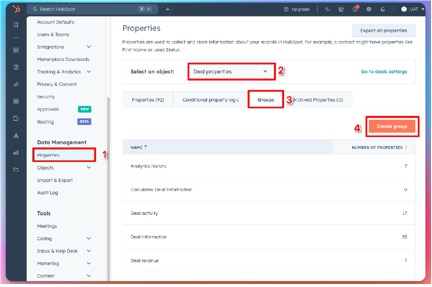
- In HubSpot, go to Settings and open the Properties menu under Data Management in the left sidebar.
- Select Deal object properties and click the Groups tab.
- If an existing group meets your needs, use it. Otherwise, click New Group to create one.
Step 2: Create the new property
- In Settings, open the Properties menu under Data Management and select Deal object properties.
- Switch to the Properties tab and click New Property.
- Ensure the object type is set to Deal and choose the appropriate group (the one you created earlier, if applicable).
- Label the property Referral State (or any name you prefer).
- Set the field type to Multiple Checkboxes with at least three options: AWS, Azure, and GCP.
- Click Create. Your new property now appears in the property list.
Configure in Suger
Step 1: Set the Deal Referral State property
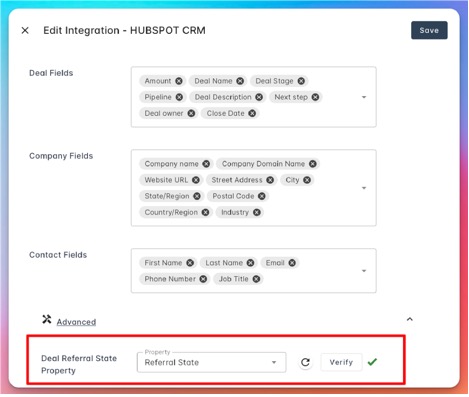
- Edit the HubSpot integration in the Suger Console.
- In the Advanced section, find the Deal Referral State Property option.
- Enter the label of the property you created in HubSpot.
- If the property is not listed, click the refresh button to reload it.
- Click Verify. If everything is correct, click Save to apply the settings.
Step 2: Sync referral state with HubSpot
- Click the Sync button on the HubSpot integration.
- It takes several minutes to update the referral state of all deals.
Use the Property in Suger
Once the referral state is syncing, you can filter your HubSpot deals in the Suger Console based on whether they have already been shared.
Filter out deals that were shared before
- Click Co-Sell in the left sidebar and switch to the HubSpot tab.
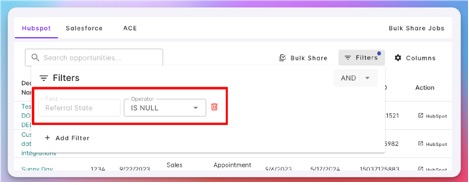
- Click Filters and add a new filter.
- Set the field name to Referral State (or your own property name if different).
- Set the operator to IS NULL.
Filter deals already shared with cloud partners
- Click Co-Sell in the left sidebar and switch to the HubSpot tab.
- Click Filters and add a new filter.
- Set the field name to Referral State (or your own property name if different).
- Set the operator to IS IN and select the cloud partners (AWS, Azure, GCP) you want to include.