
Getting Started
Suger Insulin is an AI-powered workspace built into the Suger console for ISVs selling through cloud marketplaces.
Insulin gives you conversational AI, reusable agents, Custom Apps, knowledge bases, connected third-party tools, and automated jobs. Whether you need help drafting offers, analyzing revenue data, managing co-sell opportunities, coordinating across Gmail, Salesforce, HubSpot, Slack, or Teams, or building a lightweight internal app, Insulin brings AI assistance directly into your marketplace workflow.
Key Capabilities
- Chat — Have multi-turn conversations with AI, complete with streaming responses, extended thinking, and tool execution. See Chat.
- Agents — Install catalog agents or create your own. Each agent can have its own instructions, model, integration allowlist, skills, and knowledge bases. See Agents.
- Channels — Create group chats with team members for collaborative AI-assisted conversations. See Channels.
- Jobs — Set up manual, scheduled, or event-triggered automations that run agents with optional filter expressions. See Jobs.
- Marketplace — Browse and install pre-built agents and skills from the catalog. See Marketplace.
- Custom Apps — Build interactive apps with AI, connect them to approved integrations, preview them, and share them with your team. See Custom Apps.
- Knowledge Bases — Add files, websites, connectors, and pasted content so agents can retrieve trusted context. See Knowledge Bases.
- Workspace Tools — Use sandboxes, browser sessions, file explorer, Git tools, and terminals when an agent or app needs a working environment.
Who It’s For
Insulin is designed for ISVs and their teams who use Suger to manage cloud marketplace listings across AWS, Azure, GCP, and Snowflake. It helps sales, operations, engineering, and product teams work faster by bringing AI assistance into daily marketplace workflows.
Adoption Path
Most teams adopt Insulin in this order:
- Connect systems — Open Settings and connect the tools agents and apps should use. Personal connections are available to your user-level agents and apps. Organization connections are managed by admins and can power organization-level resources.
- Start with chat — Open a conversation with the built-in Insulin assistant or a catalog agent. Ask it to explain what it can access before asking it to act.
- Install or create agents — Use Marketplace to install a specialized agent, or create a custom agent with a focused system prompt, allowed integrations, and optional knowledge bases.
- Build Custom Apps — Use Custom Apps when a workflow needs a reusable interface, dashboard, or form instead of a one-off chat answer.
- Collaborate and automate — Use Channels for shared conversations and Jobs for repeatable or event-triggered work.
Accessing Insulin
- Sign in to the Suger console
- Click Insulin in the left sidebar
- You are taken to the standalone Insulin workspace
No additional setup, API keys, or integrations are required.
The Interface
The Insulin workspace has three main areas:
- Sidebar (left) — Shows agent conversations and navigation such as Jobs, Skills, and Settings. The Insulin workspace uses a desktop-style app surface, so additional apps such as Marketplace, Custom Apps, Knowledge Bases, File Explorer, Browser, and Git may open as workspace windows.
- Chat area (center) — The main conversation view where you interact with agents. Messages stream in real time as the agent responds.
- Input bar (bottom) — Type your message here. You can also attach files, images, or code references as context.

Your First Conversation
When you open Insulin for the first time, you start with the default Insulin agent — a general-purpose assistant that acts as your chief of staff for marketplace operations.
- Type a message in the input bar, such as: “What can you help me with?”
- Press Enter or click the send button
- The agent responds with streaming text
That’s it. You’re now having a conversation with Insulin.
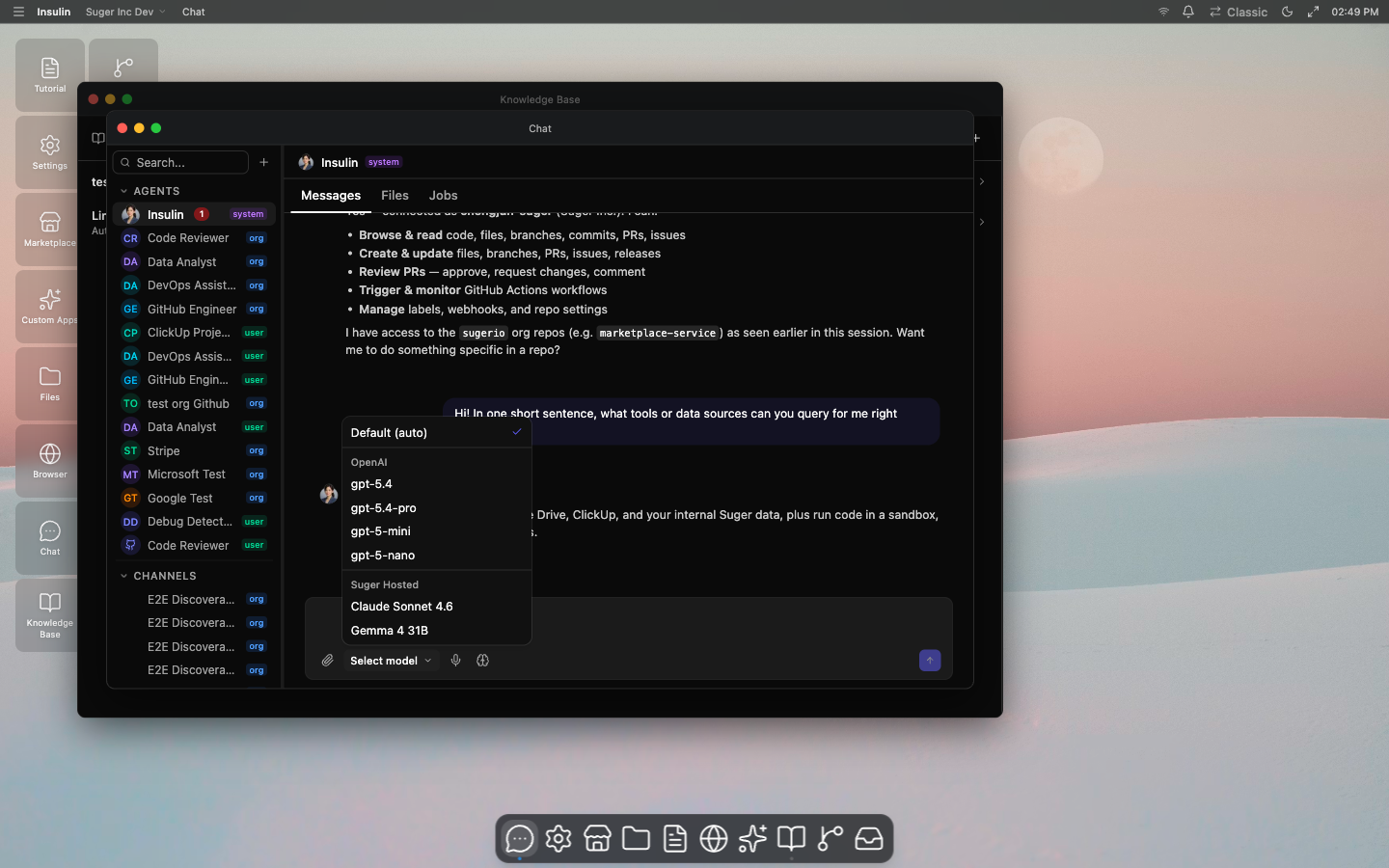
Selecting a Model
Click the model selector in the input bar to choose which AI model powers the conversation. Options include models from Claude, GPT, and Gemini families. Your selection persists for the current conversation.
Extended Thinking
Toggle Extended Thinking in the input bar to enable the agent’s step-by-step reasoning before it responds. When enabled, you can see the agent’s thought process displayed above its final answer. This is useful for complex questions where you want to understand how the agent arrived at its response.
Switching Agents
To use a different agent in your conversation:
- Click the agent name at the top of the chat area, or start a new conversation
- Select an agent from the list — you can browse installed catalog agents, custom agents, or agents shared with you
- The conversation continues with the selected agent’s personality and capabilities
See Agents for the agent catalog model and how to create your own.
Roles and Permissions
Insulin uses role-based access control (RBAC) for agents, channels, Custom Apps, knowledge bases, jobs, sandboxes, skills, and marketplace actions. Understanding these roles helps you collaborate effectively with your team.
Ownership Levels
Every agent and channel has an ownership level that determines its visibility:
| Level | Description |
|---|---|
| User | Private to the creator. Only visible to others when explicitly shared. |
| Org | Owned by your organization. Private by default, but can be shared to other members of the organization explicitly. |
| System | Built-in by Suger. Available to all users. Cannot be deleted or modified. |
Organization Roles
Every user in your Suger organization has an org-level role that determines what they can do across Insulin:
| Org Role | Permissions |
|---|---|
| ADMIN | Full access. Can create organization-level resources, manage settings, and manage organization-level integrations. |
| EDITOR | Can create and manage their own resources. Read-only access to sandboxes and settings. |
| VIEWER | Read-only access to all resources. |
Resource Roles and Exceptions
When an agent or channel is shared, each participant is assigned a resource-level role. Roles are hierarchical — higher roles inherit all permissions of lower roles.
| Role | View | Chat | Edit | Share | Delete |
|---|---|---|---|---|---|
| OWNER | Yes | Yes | Yes | Yes | Yes |
| ADMIN | Yes | Yes | Yes | Yes | No |
| EDITOR | Yes | Yes | Yes | No | No |
| USER | Yes | Yes | No | No | No |
| VIEWER | Yes | No | No | No | No |
- OWNER — The creator of the agent or channel. Only owners can delete user-level or org-level resources. Ownership can be transferred.
- ADMIN — Can manage sharing (invite/revoke members and assign roles) and edit configuration.
- EDITOR — Can modify the agent’s system prompt, model, skills, or channel settings.
- USER — Can chat with the agent or participate in the channel, but cannot change any configuration.
- VIEWER — Read-only access. Can view resources but cannot send messages or trigger actions.
Important exceptions:
- User-level agents, channels, and Custom Apps are private to their creator unless shared flows explicitly allow otherwise.
- Organization admins do not automatically get elevated access to every organization channel; channel access is controlled by channel membership and org-wide sharing.
- Organization-level agent and Custom App integration changes require organization administrator privileges.
- Organization-level agents can only use organization-level integrations. User-level agents use user-level integrations.
Next Steps
- Learn about Chat features like tool calls, plan approvals, and context chips
- Explore the Agents available to you
- Connect integrations and build a reusable workflow with Custom Apps