
Metronome
Automate the usage metering from Metronome to all cloud marketplaces.
Overview
If you currently rely on Metronome as your metering/billing service and are looking to expand your business in cloud marketplaces, Suger offers the ideal solution to bridge the gap. With our no-code, fully automated integration, you can seamlessly meter usages from your existing Metronome instance to clients in all cloud marketplaces. There is no need for migration or extensive engineering efforts, making the process smooth and hassle-free.
Org-Level vs User-Level
Org-Level Only: Metronome integration is available at the organization level only. All users in the organization share the same Metronome connection for usage metering.
When it comes to adopting Suger with Metronome together, you have two options available. However, we highly recommend Option 2, and here’s why:
| Option 1 | Option 2 (recommend) | |
|---|---|---|
| Architecture | ||
| Description | Metronome offers officially integrating with AWS Marketplace and sends usage metering to AWS Marketplace metering service directly. Here is the official guidance. | Suger provides pre-built integration to connect Metronome & cloud marketplaces. Hourly cron jobs automatically fetch aggregated usage events and report them to cloud marketplace in the right formats. |
| ✅ Pros |
|
|
| 🚫 Cons |
|
|
Create Integration
In your Suger Console Integration, you will see the Metronome integration connection. Click the Connect button to create an integration with your Metronome instance. This will open an dialog for you to input
- API Token: The Metronome API token.
- Billing Mode: Select one of
quantity,amount_hourlyoramount_daily. Details about their difference can be found here
Once the integration process is finished, you can proceed by clicking the VERIFY button. This action triggers the Suger service to test the connection to the APIs of your Metronome instance. If everything is configured correctly, the integration status will be updated as VERIFIED.
Edit Integration
Editing an existing Metronome integration is supported. Click the Edit button to open the dialog of editing Metronome integration as shown below.
-
Enable Auto Report Usage. You can choose to enable or disable the automatic usage report feature for Metronome. Enabling this feature allows Suger to run an hourly cron job to retrieve the aggregated usage events from Metronome and report them as UsageRecordGroups to the Suger metering API. On the other hand, disabling this feature means that no cron job will be scheduled for this purpose.
-
Billing Mode:
quantity,amount_hourlyoramount_daily. Details about their difference can be found hereFollowing features are available when the billing mode is
amount_hourlyoramount_daily:-
Enable Report Finalized Invoice Only: If enabled, Suger will only report finalized invoices to cloud marketplaces. By default, Suger will also report draft invoices to cloud marketplaces.
-
Enable Invoice End Date Check: If enabled, Suger will check the
end dateof the invoice. If theend dateis not in the entitlement time window, Suger will not report the usage to cloud marketplaces. -
Enable Auto Credit Back for Voided Invoices: If enabled, Suger will automatically add reported amount of voided invoices to the entitlement as credit. By default, Suger will not add the voided invoices to the entitlement as credit.
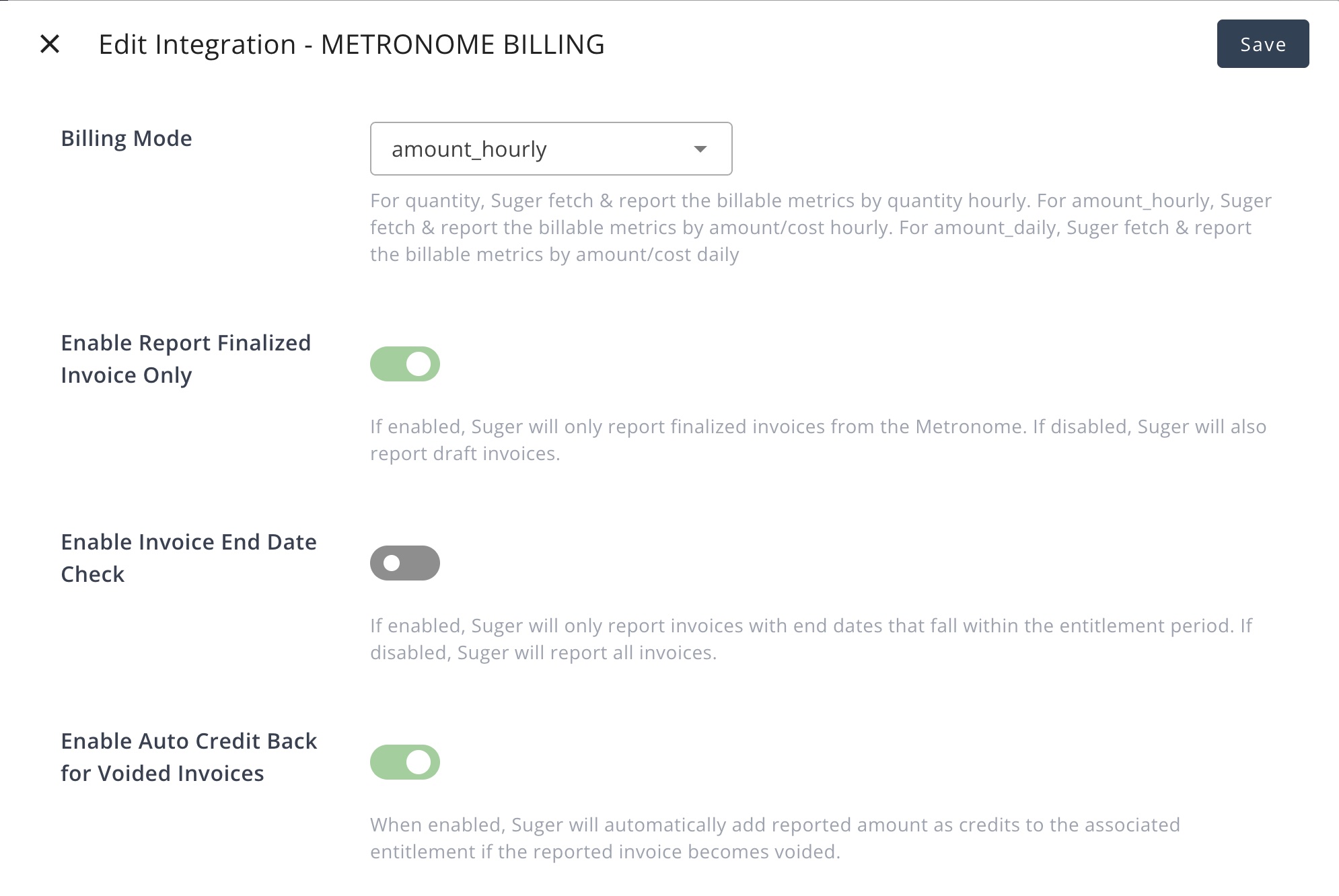
-
-
Enable Billable Metric Whitelist. If enabled, only the billable metrics in the whitelist will be metered & reported from Metronome to cloud marketplaces. Otherwise all the metrics listed in the
Billable Metric Full Listwill be metered & reported to cloud marketplaces. -
Billable Metric Whitelist. Applicable only when the
Enable Billable Metric Whitelistis true. -
Billable Metric Full List. The full list of billable metrics fetched from Metronome for all available Metronome customers. It is auto fetched from Metronome, not editable.
Delete Integration
The Metronome integration can be deleted like all other integrations. Once the deletion is triggered, all integration info including the API token will be deleted immediately & permanently from Suger. No time window or methods to recover.
Billing Mode
There are three billing modes available for Suger-Metronome integration: quantity, amount_hourly or amount_daily.
-
quantity: Suger fetch & report the billable metrics by quantity every one HOUR. Use the original Metronome billable metrics as the source dimension keys in the configuration of metering dimension conversion
-
amount_hourly: Suger fetch & report
invoice total amountevery one HOUR. Theinvoice total amountis converted to the dimensionmetronomewith fixed unit price as $1. Usemetronomeas the only source dimension key in the configuration of metering dimension conversion. -
amount_daily: Suger fetch & report the
invoice total amountevery one DAY. The total amount is converted to the dimensionmetronomewith fixed unit price as $1. Usemetronomeas the only source dimension key in the configuration of metering dimension conversion.