
Create Co-Sell
Submit a co-sell referral to AWS, Azure, or GCP directly from a Salesforce opportunity using the Suger App.
Overview
A co-sell referral is how you formally ask AWS, Azure, or GCP to work with you on a deal. When you submit a referral, the cloud provider’s sales team can see the opportunity and engage to help you close it — for example, by introducing you to the right contacts, validating the opportunity, or contributing resources. In plain terms, you’re sharing a deal with your cloud partner so they can help you win it.
After adding the Suger App to your Salesforce Console, you can create co-sell referrals from opportunities with ease.
Prerequisites
- The Suger App must be installed, connected, and set up with the Suger widget on your opportunity pages. If you haven’t done that yet, work through the Getting Started and Salesforce Admin Setup steps first.
- You need the Suger User, Suger User - Cosell, or a cloud-specific co-sell permission set assigned to your Salesforce account. If you can’t see the Co-Sell button on an opportunity, your permission set is likely missing or incorrect.
Create a Co-Sell
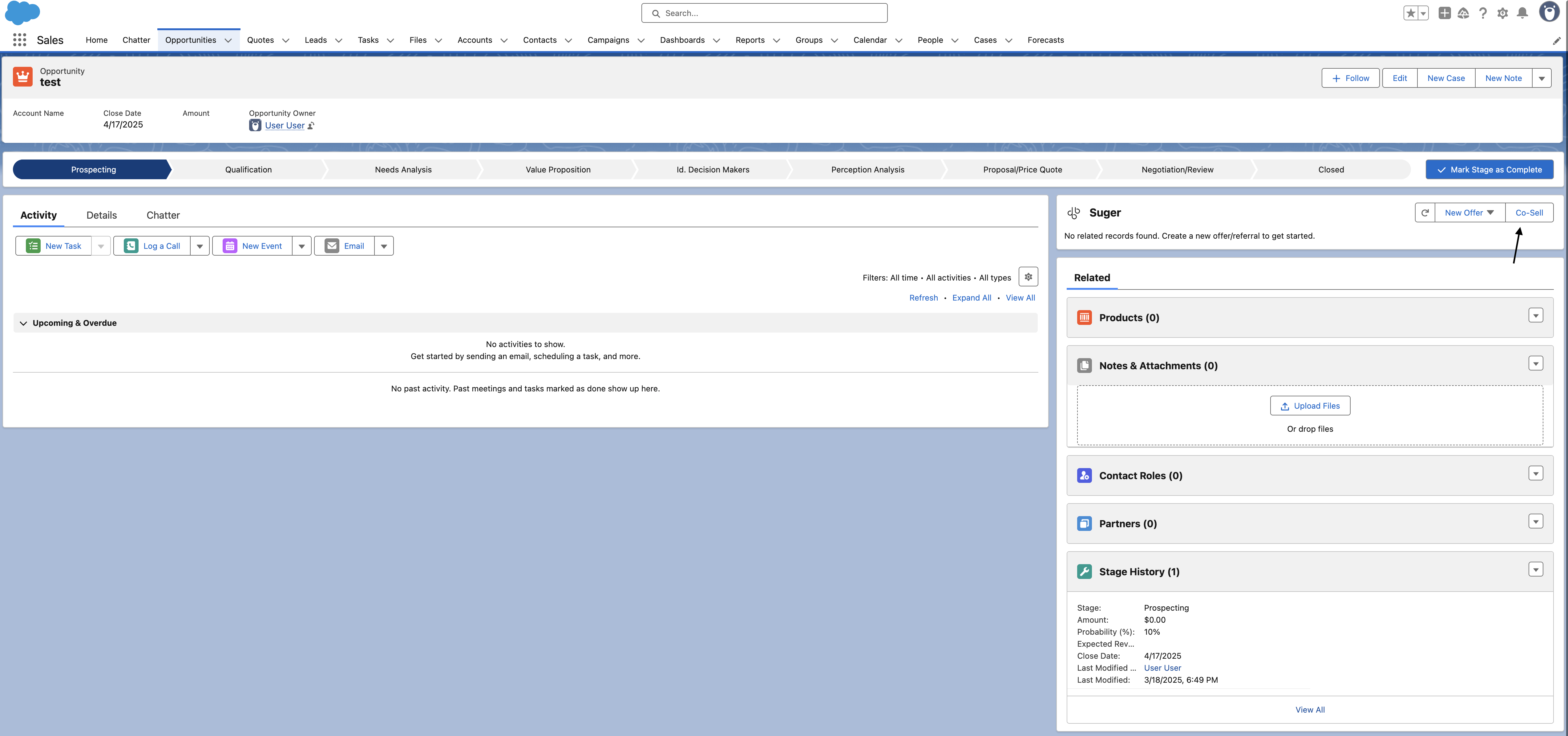
- Navigate to the opportunity’s detail page and click the Co-Sell button at the top of the Suger App. If you don’t see the widget, it may not be added to your page layout yet.
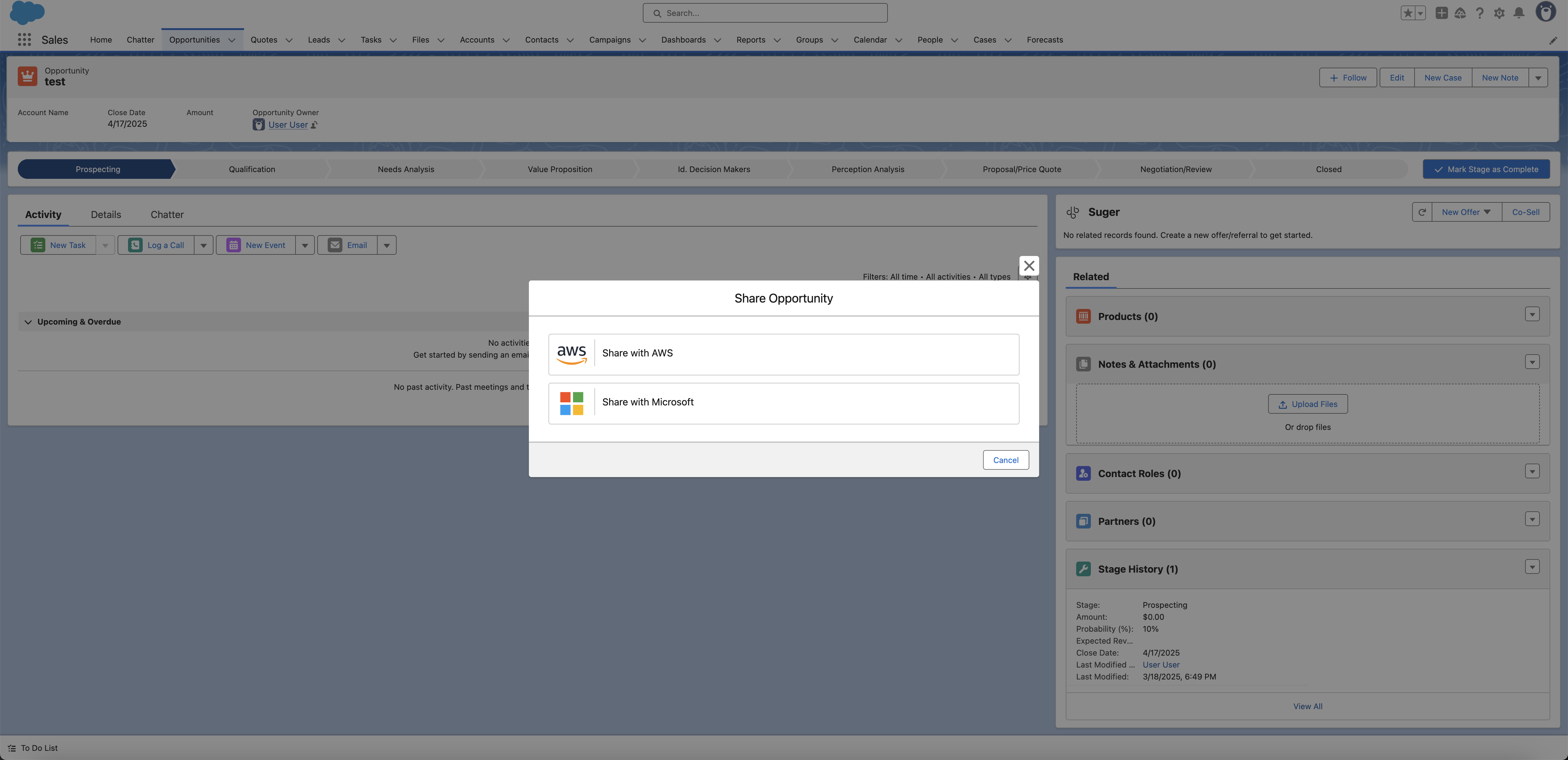
- Choose the cloud partner you want to submit the referral to — AWS, Azure, or GCP — and fill the form with the necessary information. Required fields vary depending on which cloud partner you selected.
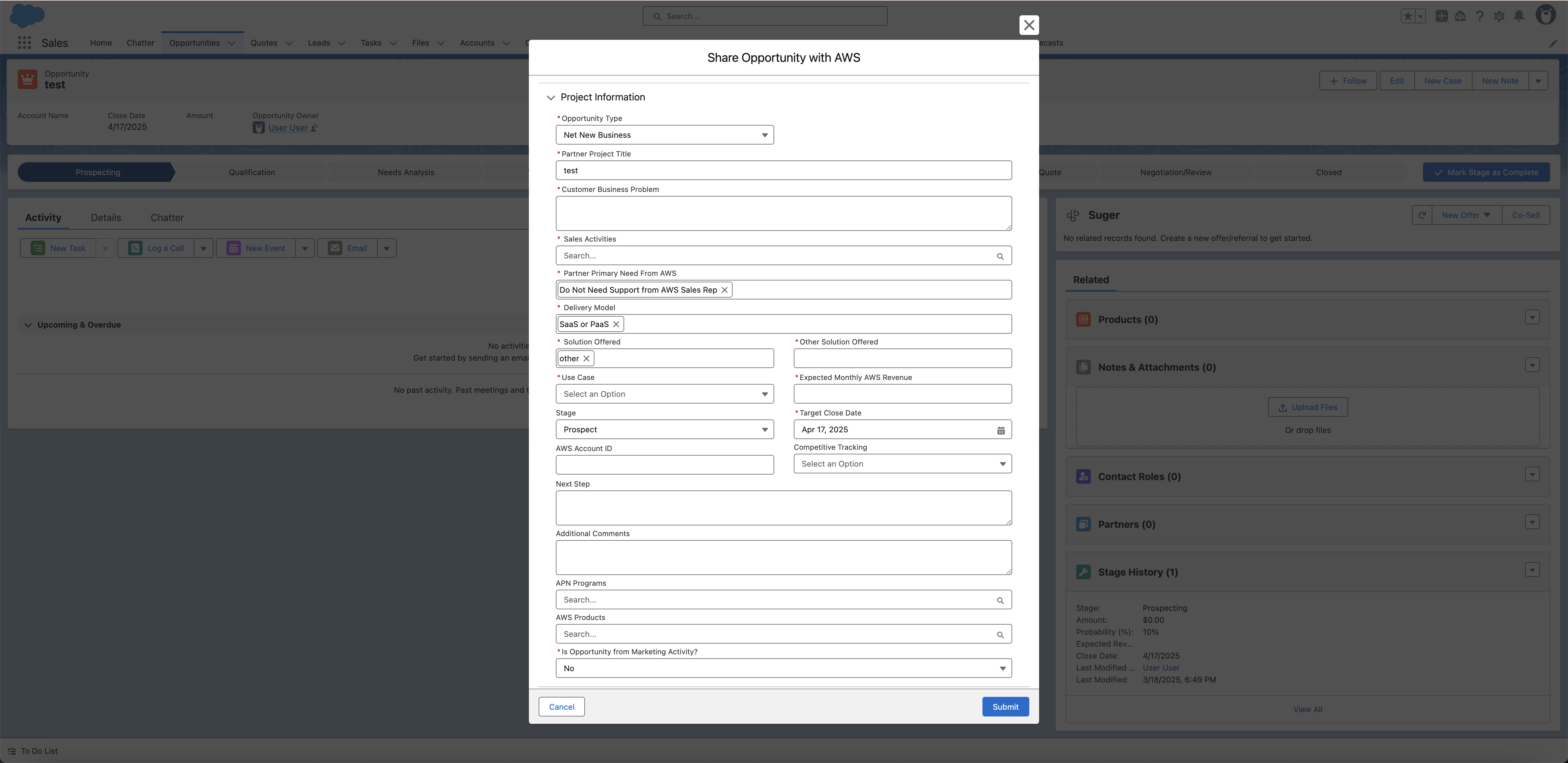
- Once all necessary information is filled in, submit the form to create the co-sell.
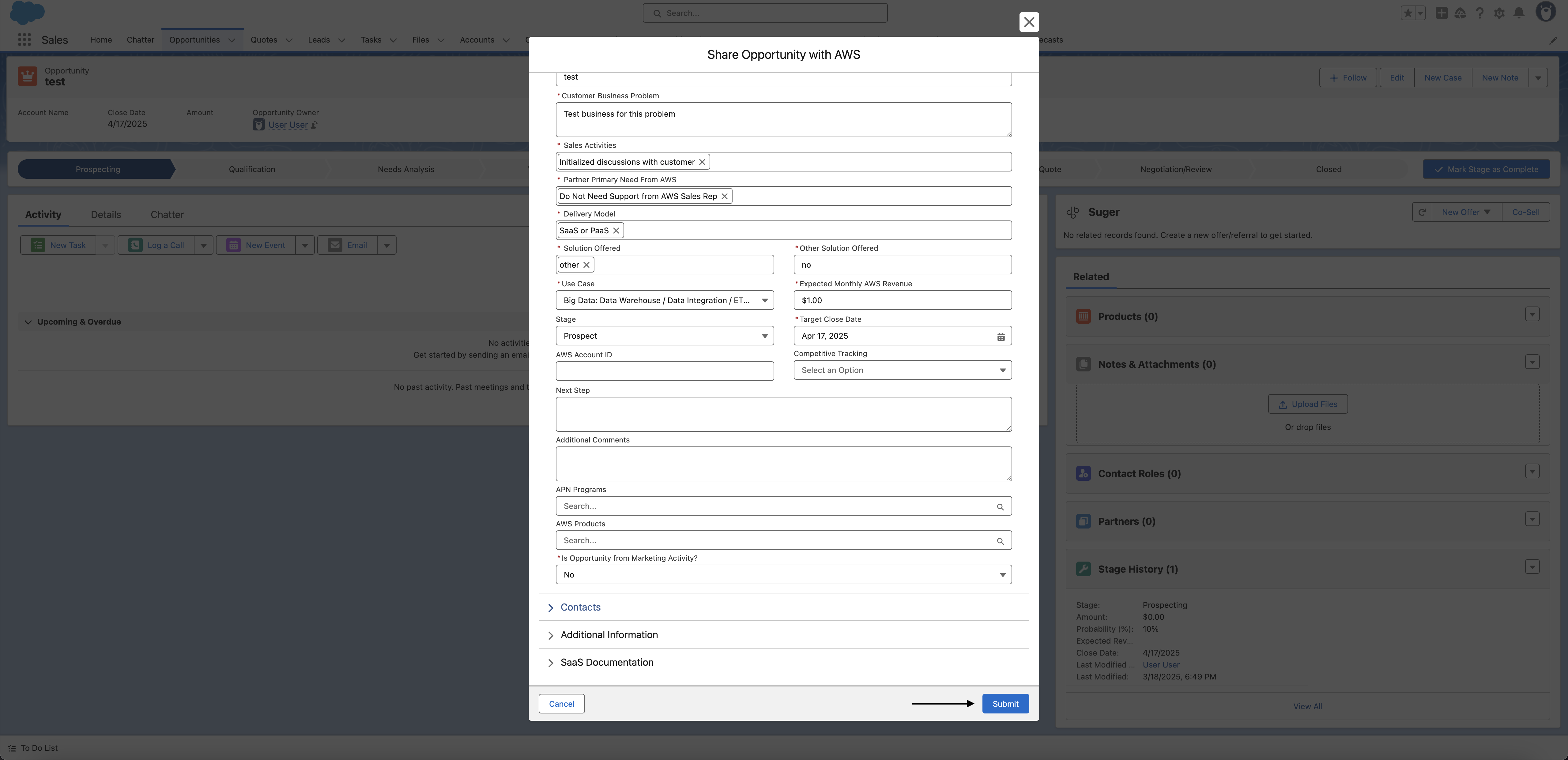
- You are all set!
What happens next
After you submit the referral:
- Suger creates a referral record in your Salesforce org, linked to the opportunity.
- The referral is sent to the cloud partner’s system — for example, AWS Partner Central (ACE), Azure Partner Center, or Google Cloud Partner Network.
- The cloud partner reviews the referral and may accept, reject, or request more information.
- Any future updates you make to the Salesforce opportunity are automatically synced to the referral — you do not need to manually push updates to the cloud partner. Suger scans your pipeline once per hour and updates the referral based on changes to the linked deal.
- If the cloud partner scores or updates the referral on their side (for example, AWS assigning an engagement score), those updates appear on the referral record in Salesforce after the next sync.
Create Salesforce Records from a Suger Referral
For Suger (PRM) deal-reg referrals, you can create a linked Salesforce Opportunity or Account directly from the referral — no need to navigate away and create the record manually.
From the referral record (Actions sidebar):
On the referral’s detail page, the Opportunity and Account cards do more than create records — they are how you attach the referral to the right Salesforce record and correct it later. Which actions the card offers depends on whether a record is linked yet:
| Action | Shown when | What it does |
|---|---|---|
| Create | Nothing linked yet | Opens a pre-filled form with fields populated from the referral’s customer and deal information (such as company name, contact, and deal amount). Review or adjust the values, then submit. The new Opportunity or Account is automatically linked to the referral. |
| Link | Nothing linked yet | Attaches an Opportunity or Account that already exists in Salesforce, without creating anything new. |
| View | A record is linked | Opens the linked Opportunity or Account record. |
| Edit | A record is linked | Edits the linked record in place from the referral. |
| Unlink | A record is linked | Detaches the record from the referral. The Salesforce record itself is not deleted — the card returns to its unlinked state, so you can then Link the correct one. |
In day-to-day use Link and Unlink matter more than Create: the Opportunity or Account usually already exists in Salesforce, and the work is pointing the referral at the right one — or repointing it when a referral landed on the wrong record. Create is for the case where the deal genuinely has no Salesforce record yet.
View is available to anyone who can see the referral. Create, Link, Edit, and Unlink require referral write access — with a read-only permission set (for example Suger User Cosell Read) you will only see View.
Linking an offer: the referral’s Offer card carries the same Link/View/Edit/Unlink actions, and its Link action opens a searchable offer picker — search by offer name, ID, or external ID. The search runs on the server against your organization’s full offer list rather than filtering a preloaded page, so it still finds the right offer in an org with a large offer catalog.
After accepting an inbound Suger referral:
When you accept an inbound Suger referral, you are prompted to create linked Salesforce records as an optional next step. You can create an Opportunity, an Account, or both. Fields are pre-filled from the referral data where available. Skipping this step is fine — you can always use the Create button on the cards later.
Suger partner-to-partner (PRM) referrals are also included in the periodic Salesforce backfill, not only in single-record syncs — so a deal-reg referral that was created or changed between syncs still arrives in Salesforce on the next backfill run, without anyone pushing it across by hand.
Contacts on an AWS referral
AWS referrals carry contacts from three different sides of the deal, and the app keeps them separate so it is always clear who owns a given name.
On the AWS referral detail page
Contacts are grouped into three accordion sections, ordered by who owns the record — the customer, then AWS, then you:
| Section | Who is in it |
|---|---|
| Customer Contacts | The end customer’s people — the contact details submitted with the referral. |
| Cloud Contacts (AWS) | AWS-side people on the deal, such as the partner development manager. |
| ISV Contacts | Your own people on the deal — the partner contacts you supplied when sharing the referral. |
Each section shows its own empty state (“No contacts found”) when there is nobody in that group yet, so an empty Cloud Contacts (AWS) section usually just means AWS has not assigned anyone to the opportunity.
ISV Contacts rows carry an Edit button for changing the person filling a role. AWS owns the role, so editing preserves it: the role renders as static text and only first name, last name (each up to 80 characters), email, and phone can be changed. A role can never be renamed or removed — you replace the person in it, or fill it when it is still empty.
Phone is optional, but when given it must be in international format with a + and the country code, for example +12025550170. A number without the + is refused with “Enter the phone in international format with a + prefix.” rather than having a country code guessed for it — the same rule as in the Suger Console.
The two ISV roles render with their plain-English names rather than AWS’s internal codes:
| AWS role | Shown as |
|---|---|
PartnerAccountManager | Partner Account Manager |
OpportunityOwner | Partner Opportunity Owner |
AWS-side roles in Cloud Contacts (AWS) are deliberately not relabelled — AWS keeps adding to that list (PDM, WWPSPDM, ISVSM and others), and a fixed map would silently drop any role it did not know about.
On the AWS co-sell form
The AWS create form mirrors AWS Partner Central’s Add contact details step: one customer contact, plus two partner contacts whose roles are fixed for you.
| Section on the form | Role |
|---|---|
| Customer contact | The customer’s contact. Its Customer Title is free text — you type whatever the person’s title is. |
| Partner Contact - Owner | Fixed role: Opportunity Owner. |
| Additional Partner Contact - Account Manager | Fixed role: Partner Account Manager. |
For the two partner contacts, the role is part of the section heading rather than a field you pick, so there is nothing to select — fill in the name, email, and phone and the role goes across correctly. Leaving a partner contact blank is fine: empty partner contacts are dropped when the referral is submitted.
Your team on a Suger (PRM) referral
The Share with Suger wizard and the Accept dialog both collect the people on your side of a partner-to-partner deal in a Your Team table rather than as a row of inputs:
- Add Contact opens a picker where you choose a Salesforce User, a Salesforce Contact, or an existing Suger contact — or enter someone manually. At least one contact is required.
- The table shows Name, Email, and Title. Only Title is editable inline; name and email come from the record the row is backed by, so a hand-edit cannot drift from it. Pick a different person instead of editing a name.
- Each row’s action menu offers Delete.
There is no role picklist on these rows — the roles are implied by the deal’s two sides, so there is nothing to select.
APN Programs on an AWS referral
APN Programs is a multi-select on the AWS referral. The package carries the full AWS list of eighteen programs, including Cloud Adoption Framework Program (CAF), P3, WWPS NDPP, and Model Provider PARC:
| APN Immersion Days | ISV Immersion Day SFID Program | Partner Opportunity Acceleration Funded |
| APN Solution Space | ISV Workload Migration | The Next Smart |
| ATO (Authority to Operate) | Migration Acceleration Program | VMware Cloud on AWS |
| AWS Marketplace Campaign | Model Provider PARC | Well-Architected |
| Cloud Adoption Framework Program (CAF) | P3 | Windows |
| Partner Launch Initiative | Workspaces/AppStream Accelerator Program | WWPS NDPP |
Seventeen of the eighteen are selectable when you share a referral outbound — every one above except Model Provider PARC. All eighteen are selectable when you edit a referral that AWS originated.
The referral detail page shows the selected programs under APN Programs in Project Detail, semicolon-separated (Model Provider PARC; Well-Architected). The Apex Action accepts that value as-is — it trims each program, so a string copied from the detail page works whether or not you remove the spaces.
Timestamps on the referral detail page
Every referral pane shows how fresh the partner’s copy is, read from Suger’s unified external timestamps rather than from each partner’s own payload:
| Pane | Date rows |
|---|---|
| AWS | Created Date, Last Updated Date |
| GCP | Creation Date, Last Updated Date |
| Azure | Created Date and Last Updated Date |
Both render as YYYY-MM-DD HH:MM — for example 2026-09-02 16:12 — on a 24-hour clock, in your own timezone. That is the same YYYY-MM-DD the other dates on the pane use (Estimated Close Date, Target Close Date, Submitted Date), so a whole pane reads in one format; the time of day is kept because a “last updated” without an hour cannot tell you whether the partner’s copy moved this morning or last week.
An Azure draft that Partner Center has never seen renders both blank. The Opportunity card on the referral also shows the CRM-side Stage, so the partner’s stage and your Salesforce stage can be compared without opening the Opportunity record.
Notes & Attachments on a Referral
Every referral detail view (AWS, Azure, GCP, and Suger deal-reg) has a Notes & Attachments section at the bottom of the page, so the deal’s supporting materials — private offer PDFs, deal-registration confirmations, customer requirement documents, call notes — live on the referral itself instead of scattered across email and drives.
What you can do:
- Upload Files — attach one or more files to the referral. Files are stored as standard Salesforce Files, so they also appear in Files home, global search, and reports.
- New Note — write a titled note with basic formatting (bold, italic, underline, lists). Notes are standard Salesforce enhanced notes: you can open and edit them later with the native note editor, and they render identically there.
- Preview / Download / Delete — each row’s action menu opens the native file preview, downloads the original file, or removes the item from the referral. A file that is only attached to this referral is permanently deleted; a file that is also attached to other records is detached from this referral only (the file itself is kept, along with its other locations). Delete is only offered on items you added yourself (Salesforce file ownership rules); other people’s items are managed by their owners or by an admin through standard Files pages.
Permissions: the section follows your referral permissions. With read-only access
(for example the Suger User Cosell Read permission set) you can view, preview, and download
items, but the upload, note, and delete controls are hidden.
Troubleshooting common issues
| Issue | Possible cause | Resolution |
|---|---|---|
| No Co-Sell button visible on the opportunity | Suger permission set not assigned, or the Suger widget is not on the page | Check your permission set. If the widget is missing, add it to your page layout. |
| Only one or two cloud partners appear in the partner selector | Your permission set restricts co-sell access to specific clouds | If you need access to additional clouds, ask your Salesforce admin to update your permission set. |
| Form fields are blank — not pre-filled from the opportunity | Field mapping has not been configured | Field mapping is an optional admin setup. Contact your Salesforce admin to configure it. |
| Referral was submitted but does not appear on the opportunity | Sync between Suger and Salesforce is delayed | Referral records sync on a schedule. Refresh the page after a few minutes. If it still doesn’t appear, confirm the referral was created in the Suger Console. |
| An AWS referral’s Engagement Score reads Not provided by AWS | AWS has not scored this opportunity yet | The referral shows AWS’s own score once AWS scores the opportunity. The field API name is Suger__AWS_EngagementScore__c if you want to use it in automations. The Suger Predicted Engagement Score in the Suger widget is Suger’s own prediction, not AWS’s: it is never written to the referral, so it does not fill this field. Azure and GCP supply no score of their own, so their referral cards show a Suger Predicted Engagement Score row instead. |
| A referral created directly in AWS ACE is not showing in Salesforce | ACE referrals only sync to Salesforce after an update event | The referral appears in Salesforce after AWS accepts it or after you manually edit something. To link it to a specific opportunity, enter the Salesforce opportunity ID in the Partner CRM Unique Identifier field in ACE. |
| A referral has a Partner CRM Unique Identifier in ACE but is not linked to the opportunity | Something other than a Salesforce Opportunity ID is in the field | Either spelling of the Salesforce Opportunity ID works — the 15-character case-sensitive form and the 18-character form are both normalized before matching, so you can paste whichever one your org surfaces. If the link still doesn’t form, check that the value really is an Opportunity ID and that the opportunity exists in the connected org. |
| After Accept or Reject on an AWS engagement invitation, the referral does not change | AWS refused the request | Hover the icon on the invitation’s status badge: it reads Update Failed: followed by AWS’s reason. The referral keeps its previous status, and the message clears when a later accept or reject succeeds. |
| Changes to the Salesforce opportunity stop reaching its AWS referral, which shows Update Failed with a reason starting CRM sync rejected: | Suger’s AWS update check rejected the values the sync derived from the opportunity — for example, Once the opportunity reaches Committed stage or beyond, ‘Other’ is no longer accepted — please select a valid solution identifier. The referral keeps its status, and nothing is sent to AWS. | To read the full reason, hover the error icon beside the referral’s status on its card in the Suger widget, or, on a partner-originated referral, open its Status panel. Correct what the reason names: the value mapped from the opportunity, or the referral data it conflicts with (in the example, a valid solution). The sync re-checks the opportunity on every scheduled run, and once the values pass, a later sync clears the message. |
Frequently Asked Questions
Q: What’s the difference between a co-sell referral and a private offer?
A co-sell referral shares your deal with the cloud provider’s partner team so they can help you close it. A private offer is a custom-priced contract you send directly to a buyer. They serve different purposes — co-sell is about getting the cloud partner involved in the deal; a private offer is the actual transaction.
Q: Do I need to manually update the referral every time the opportunity changes?
No. Suger automatically syncs changes from your Salesforce opportunity to the referral once per hour. If you update the close date, stage, or any mapped fields on the opportunity, those changes flow through to the cloud partner automatically.
Q: Can I submit a referral to more than one cloud partner for the same opportunity?
Yes. You can submit separate co-sell referrals to AWS, Azure, and GCP from the same opportunity — just click Co-Sell again and select a different partner.
Q: Can I see the AWS engagement score on the opportunity page rather than just on the referral record?
Not by default, but it is possible. Your Salesforce admin can set up a formula field on the Opportunity object that pulls in the score from the referral record. The field API name is Suger__AWS_EngagementScore__c. That field holds only AWS’s own score for the opportunity. The Suger Predicted Engagement Score shown in the Suger widget is not stored on the referral, so a formula cannot pull it in.
Q: What happens if I created a referral directly in AWS ACE instead of through Salesforce? Will it show up?
Yes, but not immediately. It appears in Salesforce after AWS accepts it or you manually edit something in ACE. To connect it to the right Salesforce opportunity, enter the opportunity’s Salesforce ID in the Partner CRM Unique Identifier field in ACE — Suger will then associate them automatically.
Spotted something wrong or out of date on this page? Tell us and we'll correct it.