
Google Gemini
Overview
By integrating your Gemini account with Suger, you can utilize your own Gemini API key. This allows you to access certain AI-powered features within Suger, with billing for API usage handled directly by Google.
Org-Level vs User-Level
When to use Org-Level: Use org-level integration when you want organization-wide API key management with a centralized billing approach.
When to use User-Level: Use user-level integration when each user wants to use their own Gemini API key with personal billing.
Create Integration (Org-Level)
- Navigate to the Suger Console Integration page.
- Find the Gemini integration and click the
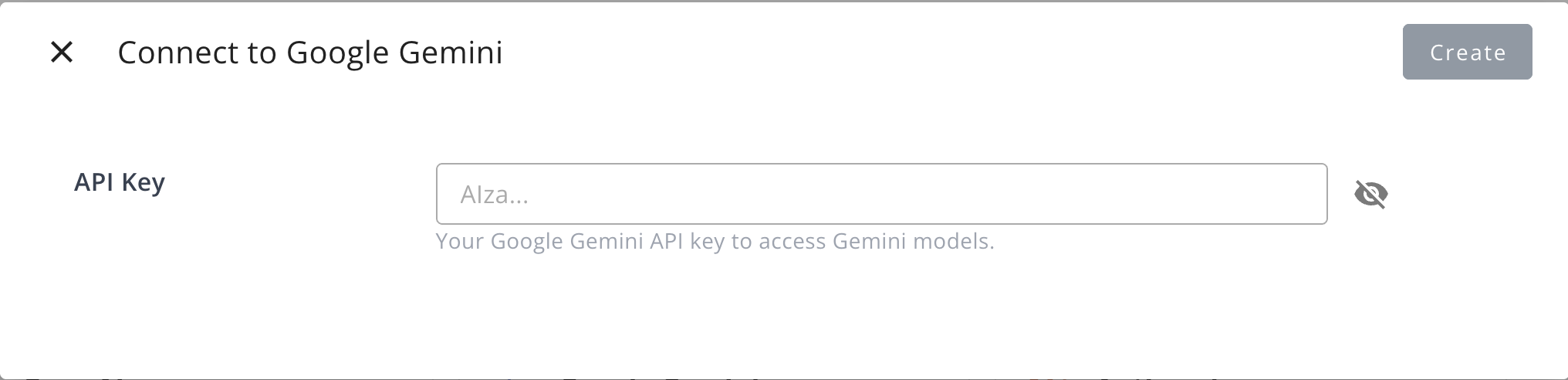
Connectbutton. - In the dialog that appears, provide the following information:
- API Key: Your Gemini API key for accessing Gemini models.
Create User Integration
Use user-level integration for personal Gemini access.
- Click
Connect Nowbutton in the User Integrations section - You will be redirected to Google to authorize
- Enter your personal Gemini API key when prompted
- Return to Suger to confirm connection
Edit Integration
Editing the Gemini integration is not supported. To change the API key, you must delete the current integration and create a new one.
Delete Integration
You can delete the Gemini integration at any time. Please be aware that this action is irreversible and will permanently remove the integration credentials.