
Private Plan
Add a privately-priced plan to a live Azure SaaS product, restricted to specific customer tenants.
Overview
A private plan is an extra plan you attach to an already-published Azure SaaS product. It carries its own pricing and is only visible and purchasable by the Azure Active Directory (AAD) Tenant IDs you list — everyone else keeps seeing your public plans unchanged.
Use a private plan when you want to offer a specific customer negotiated pricing on your live listing without creating a whole new product, and without exposing that pricing publicly.
Requirements
Adding a private plan is available only when all of the following are true for the product:
- The partner is Azure.
- The product is live (status
PUBLIC) and has been published to Azure Marketplace. - The product is a SaaS product type —
SAAS,Flat Rate, orPer User.
If any of these are not met, the Add Private Plan action does not appear.
The new plan inherits the product’s pricing model (Flat Rate or Per User). All plans on an Azure offer must share the same pricing model, so you cannot switch models on a private plan.
Add a Private Plan
- Open the product’s detail page in Suger Console.
- Click More actions in the toolbar, then choose Add Private Plan.
- Fill in the Add Private Plan to Azure Product dialog (fields below).
- Click Submit.
Suger publishes the plan to Azure Marketplace automatically. The submission runs asynchronously — the new plan may take several hours to appear on Azure Marketplace, because Azure re-publishes and re-reviews the offer on their side.
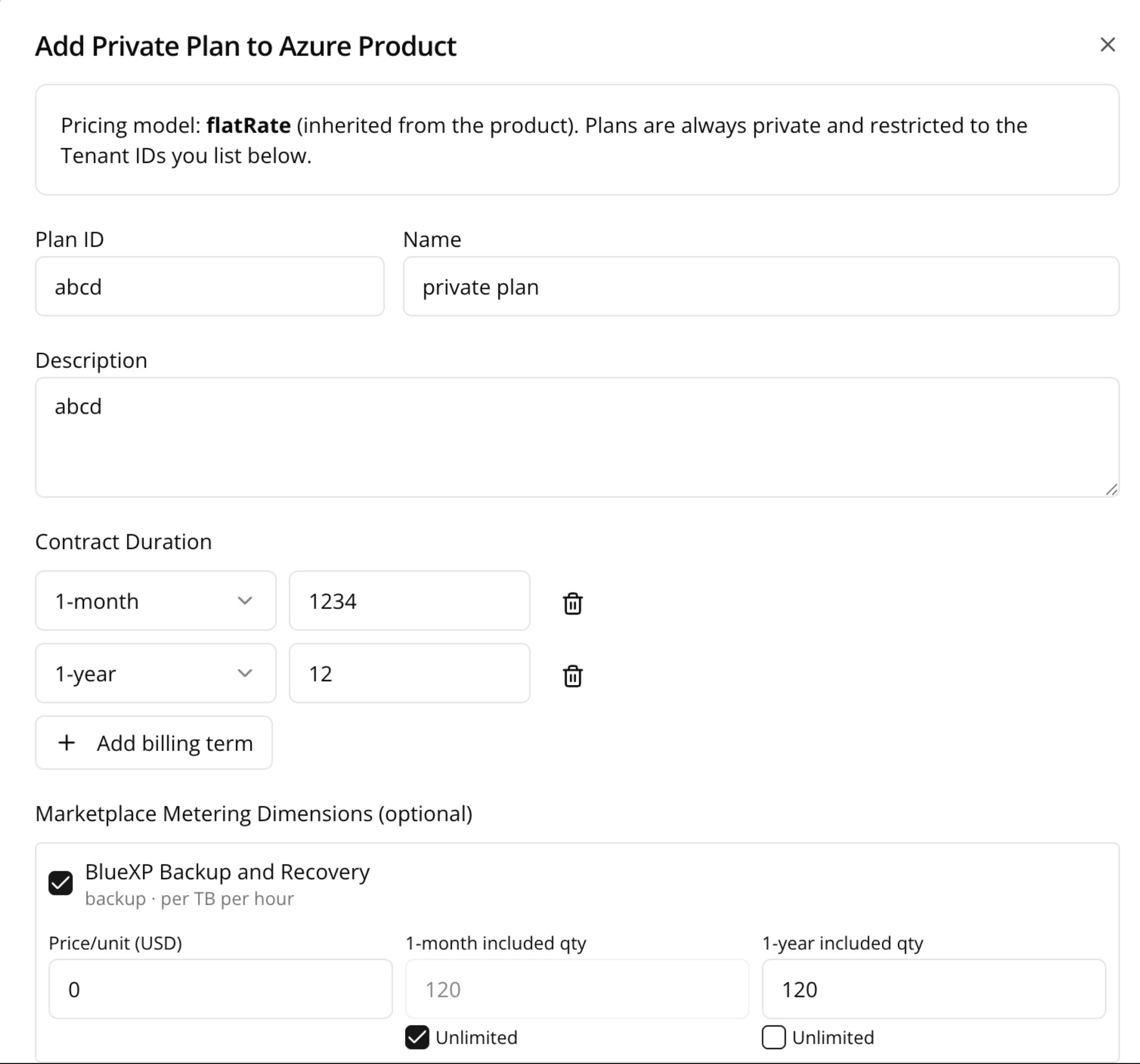
Dialog fields
| Field | Required | Notes |
|---|---|---|
| Plan ID | Yes | Unique identifier for the plan, e.g. netapp_enterprise_annual. Lowercase letters, numbers, _ and - only; max 50 characters. It cannot be changed after the plan is published. |
| Name | Yes | Display name shown to the customer. Max 50 characters. |
| Description | Yes | Plan description. Max 3000 characters. |
| Minimum / Maximum users | Only for Per User products | The seat range this plan allows. |
| Contract Duration | Yes | One or more billing terms, each with a price in USD. Available terms: 1-month, 1-year, 2-year, 3-year. Use Add billing term to offer more than one duration; each term can be used once. |
| Marketplace Metering Dimensions | Optional | Shown only for Flat Rate products that define custom usage meters. Set the per-unit price and the quantity included in each billing term for every dimension, or mark a dimension Unlimited. |
| Restricted Audience (Tenant IDs) | Yes (at least one) | The Azure AAD Tenant IDs allowed to see and buy this plan. Enter each Tenant ID as a UUID (xxxxxxxx-xxxx-xxxx-xxxx-xxxxxxxxxxxx) with an optional customer name label. Use Add Tenant ID to allow more than one tenant. |
The plan is always created as private and restricted to the tenants you list — buyers outside that allow-list never see it.
Manage Private Plans
Existing private plans are listed under the Manage private plans section of the Azure product detail card. Each private plan shows a Private badge, and a Not available badge once its distribution has been stopped.
Azure does not allow deleting a published plan, so instead of deleting you stop and restore distribution.
Stop distribution
Takes the plan off the market. Click Stop distribution on the plan row and confirm.
- Existing entitlements keep working — customers already on the plan are not affected.
- Only new purchases are blocked.
- Marketplace propagation typically takes several hours.
Restore distribution
Makes a stopped plan purchasable again. Click Restore distribution on a stopped plan row and confirm. The plan becomes purchasable once Azure Marketplace re-publishes the product, which again typically takes several hours.