
ACE Eligibility
Become ACE eligible so you can co-sell with AWS and receive referrals through the APN Customer Engagement (ACE) Program.
Overview
The AWS Partner Network (APN) Customer Engagement (ACE) Program helps AWS Partners support customers and drive successful engagements on AWS. Qualifying partners who have demonstrated their ability to drive customer engagements on AWS become eligible to receive:
- Leads — referrals of inbound prospects generated by AWS.
- Opportunities — pre-qualified opportunities with AWS customers or potential AWS customers.
The ACE Program also gives AWS Partners access to sales opportunities, funding options, and more. The goal for co-selling with AWS is to get into ISV Accelerate, which can open up new opportunities and strengthen your partnership with AWS.
Check whether you are already ACE eligible
If you believe you are already ACE eligible, you can verify it:
- Sign in to AWS Partner Central.
- Scroll to the AWS Partner Paths section.
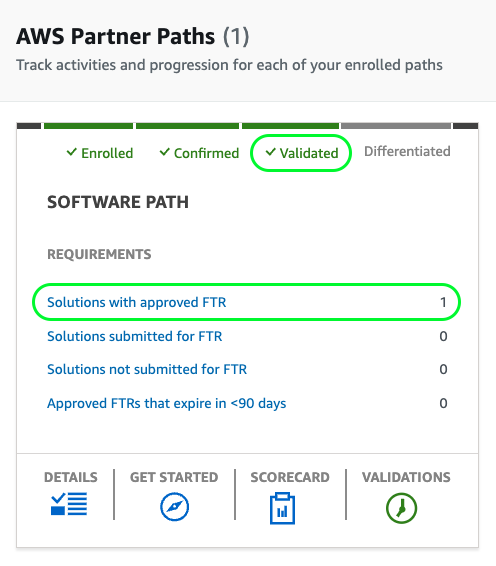
- Confirm that your Software Path is Validated and shows a Solution with an approved FTR.
If you are not ACE eligible yet, follow the steps below.
Necessary Team Members
During the process, the following roles are crucial:
- APN Admin — logs in to the APN Portal and grants permission to the necessary team members.
- Technical Manager — provides information for the Foundational Technical Review (FTR) and submits it.
- Sales team member — provides information about the opportunities submitted for validation on the APN Portal.
Steps to Become ACE Eligible
Step 1: Join the AWS Partner Network (APN)
Create an AWS Partner Network (APN) account. Make sure the Alliance lead is the person creating this account — the Alliance lead will be the primary owner of the APN account.
Step 2: Enroll in the AWS Software Partner Path
Once registered with the AWS Partner Network, enroll in the Software Partner Path.
Step 3: Create a Partner Solutions Finder listing
Create your listing through AWS Partner Central → My Company → Company Profile.
Step 4: Accept ACE terms and conditions
You must accept the AWS terms and conditions to co-sell with AWS and access APN programs and benefits:
- Navigate to the Home page in AWS Partner Central and scroll down.
- Review and accept the terms when prompted.
You can review the terms in advance at AWS Partner terms and conditions.
Step 5: Pay the APN membership fee
Pay the APN Program fee via your company’s designated AWS account.
- Log in to your company’s AWS account Billing and Cost Management console.
- In the navigation panel, choose Payments.
- In the Payments due table, select the invoice you want to pay and choose Complete payment.
- On the Complete a Payment page, your default payment method is selected if it is eligible to pay the invoice.
- To use a different payment method or choose an eligible one, choose Change.
- Confirm that the summary matches what you want to pay, and choose Verify and pay.
- After your bank processes the payment, you are redirected to the Payments page.
Step 6: Share at least 10 sales opportunities
All AWS Partners must submit at least 10 opportunities and get them validated by the AWS team. Follow these steps:
- Log in to the APN Portal.
- Click the Sell tab.
- Choose Opportunity Management.
- Click Create, or use the Bulk option to bulk import all the opportunities.
- Submit the opportunities.
- Get at least 10 opportunities validated and accepted by AWS.
To bulk import opportunities:
- Click Bulk imports, scroll to the bottom, and click Start Import.
- Download the Excel template, fill in the relevant information, and import it.
- Once you have submitted the 10 opportunities, wait until the Status = Approved.
- Once the 10 submitted opportunities are approved, qualify them by updating the Stage field to Qualified.
Step 7: Submit a Foundational Technical Review (FTR)
What is an FTR? A Foundational Technical Review on AWS assesses the architecture, security, and performance of your cloud infrastructure. It ensures your AWS environment follows best practices, meets security standards, and is optimized for performance and cost. Addressing any gaps in these areas helps you build a solid foundation for your AWS deployments and mitigate operational risks.
How to complete the FTR:
- Go to AWS Partner Central → Offerings → Edit → select Yes → Next, then complete all required fields for the listing.
- If the offering is not listed, create a new one by clicking New and completing all required fields.
- AWS reviews your submitted documents and confirms FTR approval or emails instructions for remediation.
- Upon successfully completing the FTR, you gain immediate access to AWS Partner benefits, including a “qualified software” badge, funding, marketing resources, and more.
Step 8: Check your Software Partner Path
Once you have completed the steps above, check your Software Partner Path. Make sure it is in Validated status and shows 1 Solution with an approved FTR.
Step 9: Confirm with the AWS Partner Development team
Finally, connect with the AWS Partner Development team to sign off on all completed requirements.