

Fours Code
Execute JavaScript code dynamically.
Fours Code will execute the JavaScript code when running the workflow.
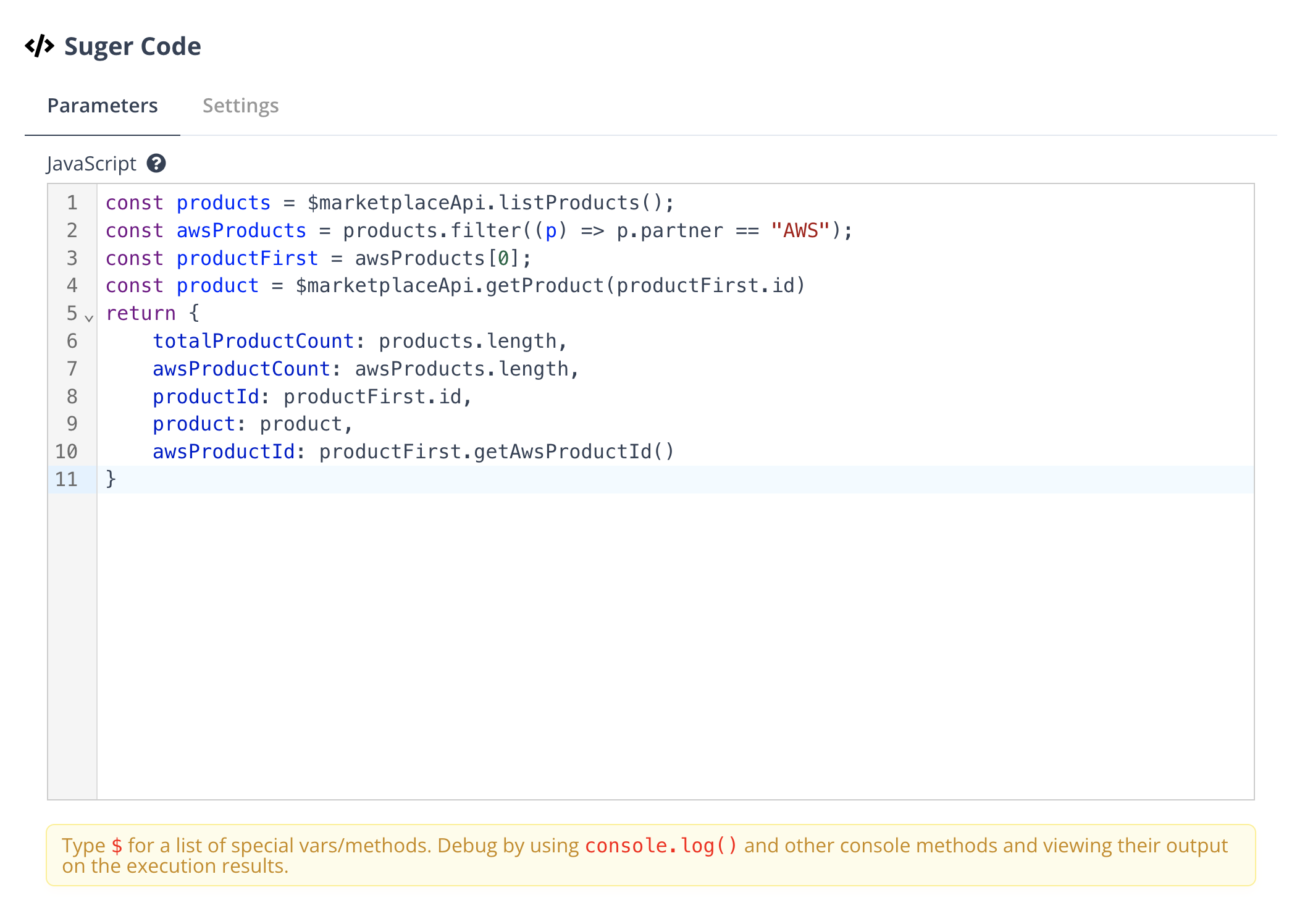
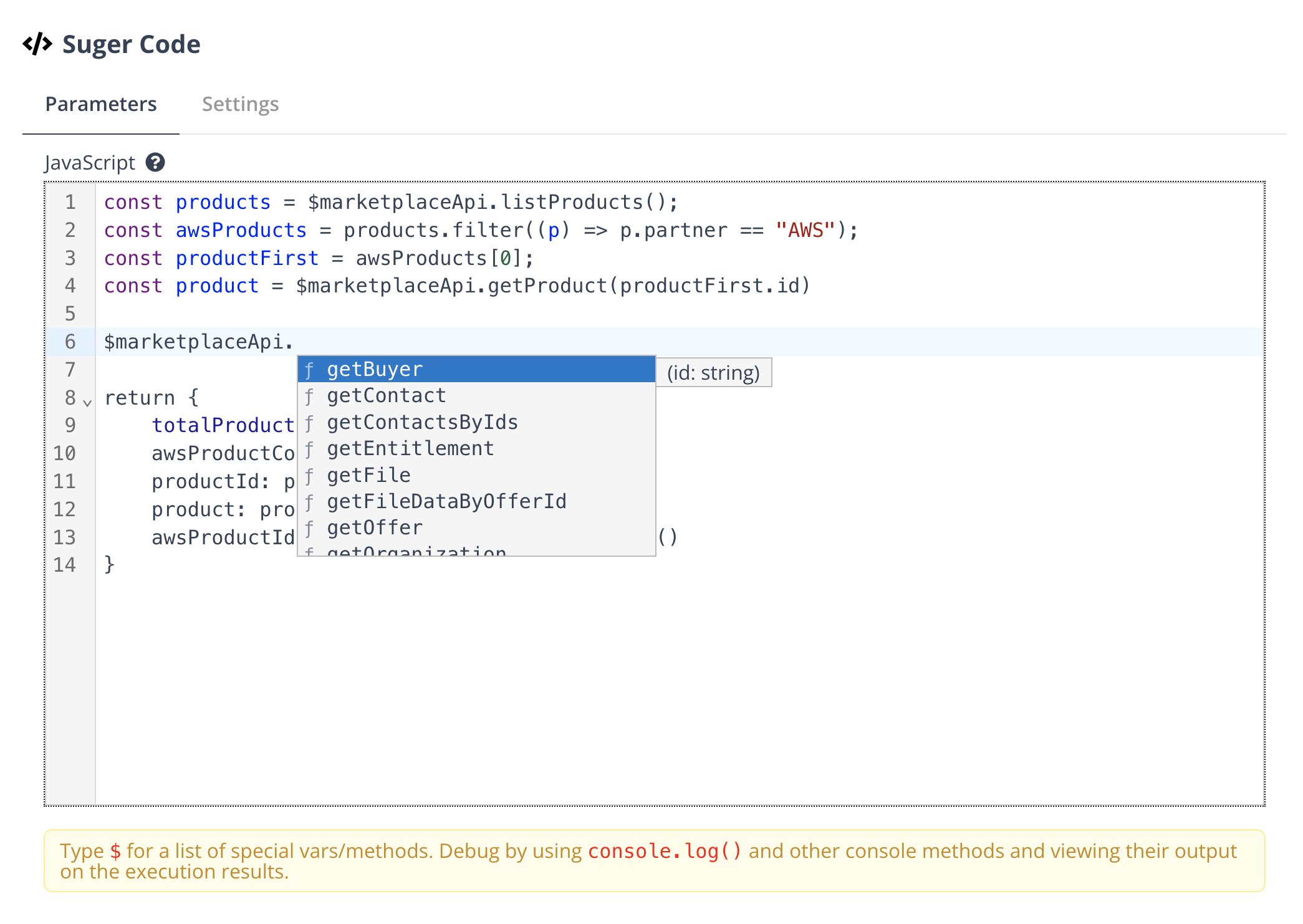
There are many Fours APIs available that can be called in the code. Type $ in the code editor to get the auto-complete suggestions.
Marketplace API
http
Send an HTTP request to Fours’ REST API.
Parameters
- path string: The path to send the request to.
- method string: The method to send the request with.
- options object: The options for the request.
- body string: The body of the request.
- reader
binary | json: The reader to read the body with. - additionalHeaders
{ [key: string]: string }: The additional headers to send with the request. - fileName string: The file name to save the response to.
Return format
string: The response body.
Example
Create a contact using POST request.
return $marketplaceApi.http("contact", "post", {
  body: JSON.stringify({ name: "John Doe", emailAddress: "john@suger.io" }),
});
Get a contact using GET request.
return $marketplaceApi.http("contact/id_of_the_contact", "get");getOrganization
Get the organization you are executing the workflow for.
Parameters
None.
Return format
object: The organization.
Example
const organization = $marketplaceApi.getOrganization();
return { organization };
getProduct
Get a product by ID.
Parameters
- id string: The ID of the product.
Return format
object: The product.
Example
const product = $marketplaceApi.getProduct("id_of_the_product");
return { product };
listProducts
List all products.
Parameters
None.
Return format
object array: The list of products.
Example
const products = $marketplaceApi.listProducts();
return { products: products };
listProductsByPartner
List all products by partner.
Parameters
- partner string: The partner to list products for, available partners are AWS, AZURE, GCP.
Return format
object array: The list of products.
Example
const products = $marketplaceApi.listProductsByPartner("AWS");
return { products: products };
getOffer
Get an offer by ID.
Parameters
- id string: The ID of the offer.
Return format
object: The offer.
Example
const offer = $marketplaceApi.getOffer("id_of_the_offer");
return { offer };
listOffers
List offers.
Parameters
- limit number: The limit of the offers to list.
- offset number: The offset of the offers to list.
Return format
object array: The list of offers.
Example
const offers = $marketplaceApi.listOffers(10, 0);
return { offers: offers };
listOffersByPartner
List offers by partner.
Parameters
- partner string: The partner to list offers for, available partners are AWS, AZURE, GCP.
- limit number: The limit of the offers to list.
- offset number: The offset of the offers to list.
Return format
object array: The list of offers.
Example
const offers = $marketplaceApi.listOffersByPartner("AWS", 10, 0);
return { offers: offers };
listOffersByProduct
List offers by product.
Parameters
- productId string: The ID of the product.
- limit number: The limit of the offers to list.
- offset number: The offset of the offers to list.
Return format
object array: The list of offers.
Example
const offers = $marketplaceApi.listOffersByProduct("id_of_the_product", 10, 0);
return { offers: offers };
listOffersByContact
List offers by contact.
Parameters
- contactId string: The ID of the contact.
Return format
object[]: The list of offers.
Example
const offers = $marketplaceApi.listOffersByContact("id_of_the_contact");
return { offers: offers };
getEntitlement
Get an entitlement by ID.
Parameters
- id string: The ID of the entitlement.
Return format
object: The entitlement.
Example
const entitlement = $marketplaceApi.getEntitlement("id_of_the_entitlement");
return { entitlement };
listEntitlements
List entitlements.
Parameters
- limit number: The limit of the entitlements to list.
- offset number: The offset of the entitlements to list.
Return format
object[]: The list of entitlements.
Example
const entitlements = $marketplaceApi.listEntitlements(10, 0);
return { entitlements: entitlements };
listEntitlementsByPartner
List entitlements by partner.
Parameters
- partner string: The partner to list entitlements for, available partners are AWS, AZURE, GCP.
- limit number: The limit of the entitlements to list.
- offset number: The offset of the entitlements to list.
Return format
object[]: The list of entitlements.
Example
const entitlements = $marketplaceApi.listEntitlementsByPartner("AWS", 10, 0);
return { entitlements: entitlements };
listEntitlementsByProduct
List entitlements by product.
Parameters
- productId string: The ID of the product.
- limit number: The limit of the entitlements to list.
- offset number: The offset of the entitlements to list.
Return format
object[]: The list of entitlements.
Example
const entitlements = $marketplaceApi.listEntitlementsByProduct(
  "id_of_the_product",
  10,
  0
);
return { entitlements: entitlements };
listEntitlementsByBuyer
List entitlements by buyer.
Parameters
- buyerId string: The ID of the buyer.
Return format
object[]: The list of entitlements.
Example
const entitlements = $marketplaceApi.listEntitlementsByBuyer("id_of_the_buyer");
return { entitlements: entitlements };
listEntitlementsByOffer
List entitlements by offer.
Parameters
- offerId string: The ID of the offer.
Return format
object[]: The list of entitlements.
Example
const entitlements = $marketplaceApi.listEntitlementsByOffer("id_of_the_offer");
return { entitlements: entitlements };
getBuyer
Get a buyer by ID.
Parameters
- id string: The ID of the buyer.
Return format
object: The buyer.
Example
const buyer = $marketplaceApi.getBuyer("id_of_the_buyer");
return { buyer };
listBuyers
List all buyers.
Parameters
None.
Return format
object[]: The list of buyers.
Example
const buyers = $marketplaceApi.listBuyers();
return { buyers: buyers };
listBuyersByContact
List buyers by contact.
Parameters
- contactId string: The ID of the contact.
Return format
object[]: The list of buyers.
Example
const buyers = $marketplaceApi.listBuyersByContact("id_of_the_contact");
return { buyers: buyers };
listBuyersByPartner
List buyers by partner.
Parameters
- partner string: The partner to list buyers for, available partners are AWS, AZURE, GCP.
Return format
object[]: The list of buyers.
Example
const buyers = $marketplaceApi.listBuyersByPartner("AWS");
return { buyers: buyers };
getContact
Get a contact by ID.
Parameters
- id string: The ID of the contact.
Return format
object: The contact.
Example
const contact = $marketplaceApi.getContact("id_of_the_contact");
return { contact };
getContactsByIds
Get contacts by IDs.
Parameters
- contactIds string[]: The IDs of the contacts.
Return format
object[]: The list of contacts.
Example
const contacts = $marketplaceApi.getContactsByIds([
  "id_of_the_contact1",
  "id_of_the_contact2",
]);
return { contacts: contacts };
listContacts
List all contacts.
Parameters
- limit number: The limit of the contacts to list.
- offset number: The offset of the contacts to list.
Return format
object[]: The list of contacts.
Example
const contacts = $marketplaceApi.listContacts(10, 0);
return { contacts: contacts };
getFile
Get a file by ID.
Parameters
- id string: The ID of the file.
Return format
object: The file.
Example
const file = $marketplaceApi.getFile("id_of_the_file");
return { file };
getFileDataByOfferId
Get the EULA file of an offer.
Parameters
- offerId string: The ID of the offer.
Return format
object: The EULA file, which consists of the file name and file data.
Example
const eulaFile = $marketplaceApi.getFileDataByOfferId("id_of_the_offer");
return { eulaFile };
listFiles
List all files.
Parameters
None.
Return format
object[]: The list of files.
Example
const files = $marketplaceApi.listFiles();
return { files: files };
listRevenueRecordsByPartner
List revenue records by partner.
Parameters
- partner string: The partner to list revenue records for, available partners are AWS, AZURE, GCP.
- limit number: The limit of the revenue records to list.
- offset number: The offset of the revenue records to list.
- startTime string: The start time of the revenue records to list.
- endTime string: The end time of the revenue records to list.
Return format
object[]: The list of revenue records.
Example
const revenueRecords = $marketplaceApi.listRevenueRecordsByPartner(
  "AWS",
  10,
  0,
  "2021-01-01",
  "2021-01-31"
);
return { revenueRecords: revenueRecords };
updateBuyerInfo
Update the buyer info.
Parameters
- buyerId string: The ID of the buyer.
- info object: The buyer info to update.
Return format
object: The updated buyer info.
Example
const buyer = $marketplaceApi.getBuyer("id_of_the_buyer");
buyer.info.customerId = "newCustomerId";
const updatedInfo = $marketplaceApi.updateBuyerInfo(
  "id_of_the_buyer",
  buyer.info
);
return { buyerInfo: updatedInfo };
updateEntitlementMetaInfo
Update the entitlement meta info.
Parameters
- entitlementId string: The ID of the entitlement.
- metaInfo object: The meta info to update.
Return format
object: The updated entitlement meta info.
Example
const entitlement = $marketplaceApi.getEntitlement("id_of_the_entitlement");
if (entitlement.metaInfo.customMetaInfo == null) {
  entitlement.metaInfo.customMetaInfo = {};
}
const customMetaInfo = JSON.parse(
  JSON.stringify(entitlement.metaInfo.customMetaInfo)
);
customMetaInfo["key"] = "value";
entitlement.metaInfo.customMetaInfo = customMetaInfo;
entitlement.metaInfo.updateMessage = "updated";
const metaInfo = $marketplaceApi.updateEntitlementMetaInfo(
  "id_of_the_entitlement",
  entitlement.metaInfo
);
return { metaInfo: metaInfo };
HubSpot API
query
Search objects in HubSpot.
Parameters
- objectType string: The type of the object to search.
- query string: The query to search the object.
- properties string[]: The properties to return.
- filterGroups object[]: The filter groups to filter the object.
- limit number: The limit of the objects to return.
- after string: The cursor to continue the search.
- sorts object[]: The sorts to sort the objects.
- sortStrings string: The sort strings to sort the objects.
Return format
object: Search result. Which contains the following fields:
- total number: The total number of objects.
- results object[]: The list of objects.
- paging object: The paging information.
Example
// Try finding an existing account by name/email.
const objectType = "contacts";
const query = "hubspot";
const properties = ["name", "email"];
let filterGroups = [
  {
    filters: [
 {
   propertyName: "email",
   operator: "CONTAINS_TOKEN",
   value: "*@hubspot.com",
 },
    ],
  },
];
const limit = 1;
let sorts = [
  {
    propertyName: "createdate",
    direction: "DESCENDING",
  },
];
let sortStrings = [];

let allResults = [];
let after = "0";
let continueFetching = true;
while (continueFetching) {
  const response = $hubspotApi.query(
    objectType,
    query,
    properties,
    filterGroups,
    limit,
    after,
    sorts,
    sortStrings
  );

  if (response && response.results) {
    allResults = allResults.concat(response.results);
    after =
 response.paging && response.paging.next.after
   ? response.paging.next.after
   : null;
    continueFetching = after !== null;
  } else {
    continueFetching = false;
  }
}

return allResults.map((allResults) => ({ json: allResults }));
getRecordById
Get an object by ID.
Parameters
- objectType string: The type of the object to get.
- recordId string: The ID of the object to get.
- properties string[]: The properties to return.
Return format
object: The object.
Example
const objectType = "contacts";
const recordId = "71805951324";
const properties = ["firstname", "lastname"];
const response = $hubspotApi.getRecordById(objectType, recordId, properties);
return { json: response };
create
Create an object.
Parameters
- objectType string: The type of the object to create.
- properties object: The properties of the object to create.
Return format
object: The created object.
Example
const deal = $hubspotApi.create("deals", {
  dealname: "sugerCodeAssociateTest",
  dealstage: "qualifiedtobuy",
  amount: 1000,
});
return { deal };
associate
Associate an object with another object.
Parameters
- fromObjectType string: The type of the object to associate.
- fromObjectID string: The ID of the object to associate.
- toObjectType string: The type of the object to associate with.
- toObjectID string: The ID of the object to associate with.
Return format
boolean: Whether the association is successful.
Example
const fromObjectType = "deals";
const fromObjectID = "71805951324";
const toObjectType = "companies";
const toObjectID = "71805951324";
const response = $hubspotApi.associate(
  fromObjectType,
  fromObjectID,
  toObjectType,
  toObjectID
);
return { json: response };
Google Sheet API
read
Read a sheet.
Parameters
- documentId string: The ID of the document.
- sheetName string: The name of the sheet to read.
- headerRowIndex number: The index of the header row.
- dataRowStartIndex number: The index of the first row of data to read.
Return format
object[]: The list of rows.
Example
const rows = $googleSheetApi.read("id_of_the_document", "sheet_name", 1, 2);
return { rows: rows };
update
Update a sheet.
Parameters
- documentId string: The ID of the document.
- sheetName string: The name of the sheet to update.
- headerRowIndex number: The index of the header row.
- rows object[]: The list of rows to update.
Return format
object[]: The list of updated rows.
Example
const rows = $googleSheetApi.update("id_of_the_document", "sheet_name", 1, [
  { row_number: 1, name: "Lola", age: 4, breed: "Corgi" },
]);
return { rows: rows };
clear
Clear a sheet.
Parameters
- documentId string: The ID of the document.
- sheetName string: The name of the sheet to clear.
- sheetRange string: The range of the sheet to clear.
Return format
boolean: Whether the sheet is cleared.
Example
const response = $googleSheetApi.clear(
  "id_of_the_document",
  "sheet_name",
  "A1:Z100"
);
return { json: response };
Netsuite API
listRecords
List records.
Parameters
- path string: The path of the record to list.
- query string: The query to list the records.
- limit number: The limit of the records to list.
- offset number: The offset of the records to list.
Return format
object[]: The list of records.
Example
const customers = $netsuiteApi.listRecords(
  "/customer",
  "email CONTAINS 'suger'",
  10,
  0
);
return { customers: customers };
getRecord
Get a record.
Parameters
- path string: The path of the record to get.
- expandSubResources boolean: Whether to expand the sub resources.
Return format
object: The record.
Example
const customer = $netsuiteApi.getRecord("/customer/123");
return { json: customer };
createRecord
Create a record.
Parameters
- path string: The path of the record to create.
- record object: The record to create.
- standardFields object: The standard fields of the record.
- customFields object: The custom fields of the record.
Return format
string: The ID of the created record.
Example
const customerId = $netsuiteApi.createRecord("/customer", {
  standardFields: {
    name: "user_name",
  },
  customFields: {
    custcol_owner: "owner_name",
  },
});
return { customerId: customerId };
updateRecord
Update a record.
Parameters
- path string: The path of the record to update.
- record object: The record to update.
- standardFields object: The standard fields of the record.
- customFields object: The custom fields of the record.
- replaces string[]: The fields to replace.
Return format
boolean: Whether the record is updated.
Example
const success = $netsuiteApi.updateRecord("/customer/123", {
  standardFields: {
    name: "user_name",
  },
});
return { json: success };
deleteRecord
Delete a record.
Parameters
- path string: The path of the record to delete.
Return format
boolean: Whether the record is deleted.
Example
const success = $netsuiteApi.deleteRecord("/customer/123");
return { json: success };
getSchema
Get the schema of a record.
Parameters
- path string: The path of the record to get the schema.
Return format
object: The schema of the record.
Example
const schema = $netsuiteApi.getSchema("/customer");
return { json: schema };
query
Execute a query on Netsuite.
Parameters
- query string: The query to execute.
- params object: The parameters of the query.
Return format
object[]: The list of records.
Example
const records = $netsuiteApi.query("SELECT * FROM customer");
return { json: records };
Spotted something wrong or out of date on this page? Tell us and we'll correct it.