
Revenue Records
Revenue Records is the ledger behind every metric in the workspace. It shows the unified revenue records that Suger normalizes from each channel, alongside the raw source records they were built from.
Overview
Open Revenue → Revenue Records. The page has a trend chart, two tabs, and a wide, exportable table — there are no summary cards here; the totals live on the Overview lifecycle cards.
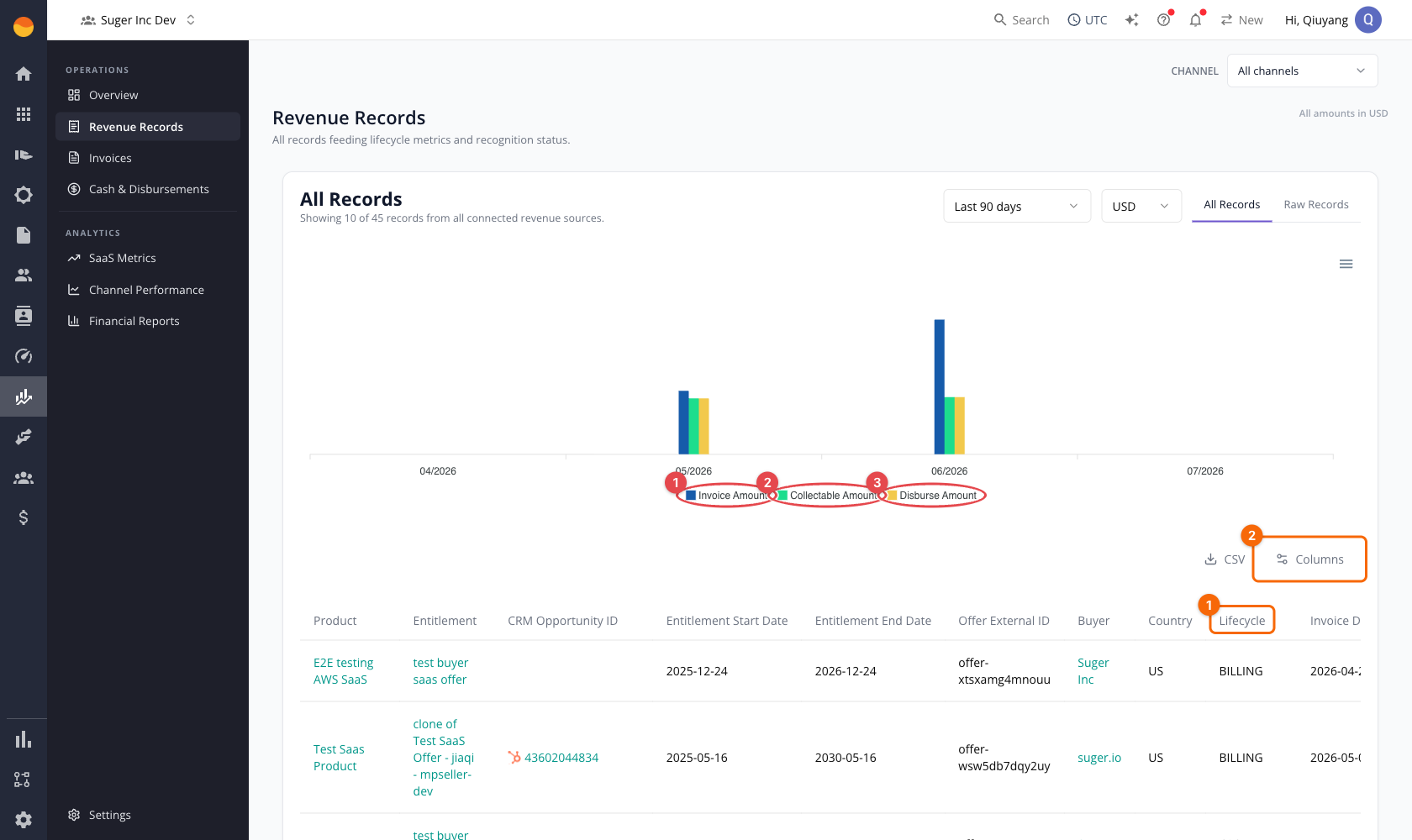
The chart series are circled in red — ① Invoice Amount, ② Collectable Amount, ③ Disburse Amount — and in orange, ① the per-row Lifecycle stage column (Billing, Cash Collected, Disbursed) and ② the Columns control for customizing the table.
Two tabs switch between the normalized and source views:
- All Records — one normalized row per revenue event, with a consistent set of columns across every channel.
- Raw Records — the source-level records exactly as each channel reported them.
Scope the page
- Set the date range (defaults to the last 90 days).
- Choose a currency — records are grouped and charted in the selected currency.
- Optionally narrow to one channel with the workspace Channel filter at the top.
The chart above the table plots Invoice Amount, Collectable Amount, and Disburse Amount by month for the current scope. Use its menu to Download SVG, PNG, or CSV of the charted series.
All Records
The All Records table has one normalized row per revenue event. Columns include the product and entitlement, CRM opportunity, buyer and country, lifecycle stage (Billing, Cash Collected, Disbursed), invoice date and amount, partner fee (amount and percent), collectable amount, due date and payment term, disburse date and amount, payout currency, tax, refund details, category, channel, sales motion, reseller, and the payment, earning, invoice, bank-trace, and disbursement reference identifiers.
To work with the table:
- Type in search to narrow the list. Search runs on the server across the whole result set, not just the rows on screen.
- Select Columns to show or hide columns and focus on what you need.
- Select the expand control at the end of a row to open its full normalized detail.
- Select CSV to export the current view.
Search is a case-insensitive substring match — a fragment matches anywhere in the value, so acme finds Acme Corp. It covers seven fields: the record ID, buyer name, invoice ID, buyer ID, entitlement ID, disbursement reference, and offer external ID. A term that matches none of those returns nothing, even if it appears in another column. Search terms are capped at 256 characters.
Several columns carry an in-product tooltip explaining what the value is — hover the column header. Two are worth reading before you reconcile:
- Tax Amount — for AWS this is tax AWS collected from the buyer and remits itself. It is informational, never disbursed, and excluded from your collectable amount. A negative value is tax returned to the buyer on a refund.
- Disburse Date — GCP records fall back to their expected payout date here, because Google never reports an actual one. See GCP Revenue.
Reading the AWS partner fee
On AWS rows, the partner fee amount and the partner fee percentage are deliberately not the same calculation, so the percentage will not reproduce if you divide the dollar figure by the invoice amount:
| Figure | What it includes |
|---|---|
| Partner fee (amount) | AWS’s listing fee plus the VAT AWS charges you on that listing fee. |
| Partner fee (%) | The listing fee without its VAT, over a base that has the seller-remitted tax removed. |
The percentage is built this way on purpose: including a tax charged to you in a rate meant to describe AWS’s cut inflates it. Read the dollar figure as what AWS actually kept, and the percentage as AWS’s effective rate. The listing-fee VAT is a separate thing from the buyer tax on the invoice — see Invoices for the two AWS tax lines.
Buyer payment term
The Buyer Payment Term column prefers the term the channel itself supplied. Only when the channel supplies none does Suger derive one, as Net N days from the gap between the invoice date and the payment due date. For AWS, that supplied term is the buyer net term snapshotted onto the record when the agreement was accepted, so it keeps reading correctly even if the buyer’s terms change later. See AWS Revenue.
Raw Records
The Raw Records tab shows source-level records for the channels you’ve connected, so you can compare what a channel reported against Suger’s normalized row. Cloud marketplace channels render a per-channel detail table; direct (Stripe) billing renders a payment-transactions view.
If a connected channel has no raw-record view, the tab shows Raw records are not available for that channel. If no channels are connected, it shows No connected channels are available for raw records.
KPI calculation formulas
Revenue Records has no summary KPIs; its chart totals the records currently in scope (channel, date range, currency).
| Charted series | Applies to | Formula | Calculation details |
|---|---|---|---|
| Invoice Amount | AWS, Azure, GCP, Stripe | Σ invoice amount | Common across channels. |
| Collectable Amount | AWS | Σ collectable amount exactly as AWS reported it | AWS is the one channel Suger does not recompute: it preserves the collectable amount AWS supplies. That amount is net of marketplace fees and includes seller-remitted tax — the tax AWS disburses to you, which you then remit onward. Tax AWS collects and remits itself is informational and never affects it. |
| Collectable Amount | Azure, GCP | Σ (invoice amount − channel fee) | Channel fee only; no tax deduction. |
| Collectable Amount | Stripe | Σ invoice amount | Direct billing treats the full invoice as collectable. |
| Disburse Amount | AWS, Azure, GCP, Stripe | Σ disbursed amount | Counts only records the provider has marked disbursed. |
See Overview for how these amounts roll up into the lifecycle stage cards, and Revenue Settings for base-currency and FX handling.
Spotted something wrong or out of date on this page? Tell us and we'll correct it.