
Integration
Grant Suger the necessary access to manage your Snowflake Marketplace on your behalf, no more no less.
Overview
To sell on Snowflake marketplace, you first need to be a Snowflake Marketplace provider. There are several requirements to meet before you can list products/services on Snowflake Marketplace. Snowflake lists them under requirements to become a provider.
Once you are a Snowflake Marketplace provider, you can list your products on Snowflake Marketplace and integrate with Suger to manage your marketplace offerings.
Become A Snowflake Marketplace Provider
-
You must use a full Snowflake account. Trial accounts can share data with specified consumers, but not on the Snowflake Marketplace.
-
You must not be using a Reader Account.
-
You must have the ACCOUNTADMIN role or be assigned a role with provider privileges. See Privileges required for working with listings.
-
You must meet the Legal requirements for providers and consumers of listings. See Review and accept the Snowflake Provider and Consumer Terms.
-
If your account is in a U.S. government region, you must also accept the cross-region disclaimer. Snowflake covers it under requirements to become a provider.
Integration Prerequisite
Suger relies on key-pair authentication to get access to your Snowflake account. Follow the steps below to prepare resources required for Suger integration.
-
Configure Key Pair Authentication. Follow the official guideline to create a key pair. You can generate an encrypted key pair or unencrypted key pair.
-
Click the
Connectbutton of Snowflake Marketplace integration on the Integrations page in Suger console. -
Input the
Account,UserandPrivate Keyof your Snowflake account.
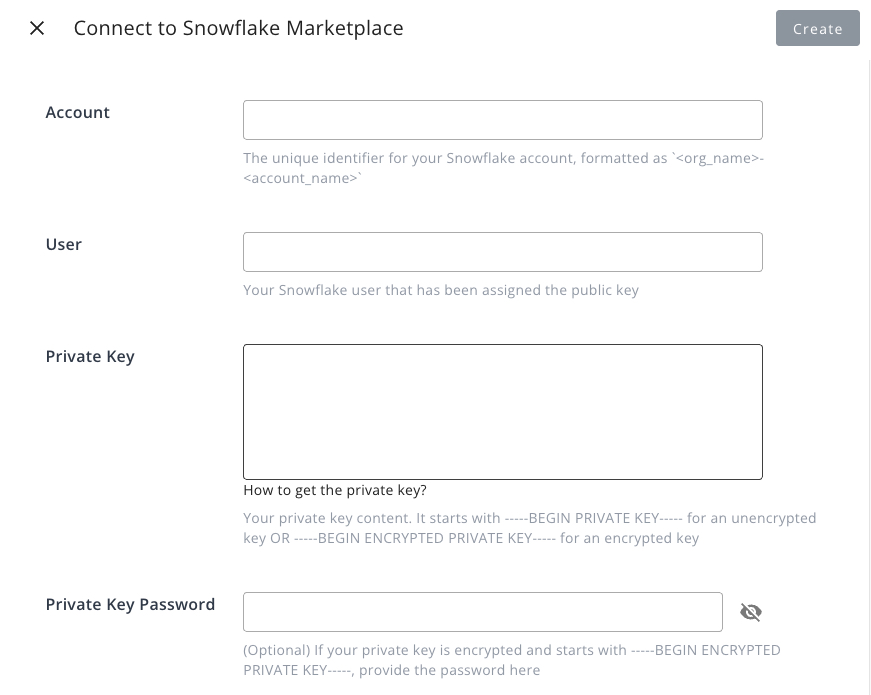
- Click the
Connectbutton to complete the integration.
Give the role its listing privileges
The user you connect acts under a Snowflake role, and the sync reads each listing with DESCRIBE LISTING, SHOW PRICING PLANS IN LISTING and SHOW OFFERS IN LISTING. If that role is not granted the privileges those commands need, Snowflake refuses them per listing with an insufficient privileges error.
The sync does not fail when that happens — it carries on and imports what it can. The cost is silent and per listing:
- The listing still appears in Suger, but without the detail those commands provide.
- Its product type is inferred from the share type rather than read from the listing, so it can be less specific than it should be.
- Its pricing plans may be missing.
- Its private offers are not imported or updated. Listing a listing’s offers takes
MODIFY(orOWNERSHIP) on that listing, not justUSAGE. Without it, Suger skips that listing’s offers and carries on with your other listings and the rest of the sync, including revenue. Snowflake’s error message suggestsMANAGE GRANTS, but the grant that fixes it isMODIFYon the listing.
Nothing in the console announces this, so if a Snowflake listing shows up with a surprising product type, no pricing plans or none of its private offers, check the connected role’s privileges first. Use ACCOUNTADMIN, or a role granted the privileges required for working with listings, then re-sync.
Edit Integration
Editing an existing Snowflake Marketplace integration is not supported. The practical way is to delete it and then re-connect it with new inputs.
Delete Integration
The Snowflake Marketplace integration can be deleted like all other integrations. Once the deletion is triggered, all integration info including the Private Key will be deleted immediately & permanently from Suger. No time window or methods to recover.
Spotted something wrong or out of date on this page? Tell us and we'll correct it.