
Overview
The Overview dashboard is the home of the Multi-Channel Revenue workspace. It shows the health of your revenue lifecycle — from bookings through billing, cash collection, and disbursement — across every connected channel in one view.
Overview
Open the workspace from Revenue → Overview. The left sidebar groups the workspace into two areas:
- Operations — Overview, Revenue Records, Invoices, Cash & Disbursements, Bank Reconciliation, Revenue Recognition.
- Analytics — SaaS Metrics, Channel Performance, Financial Reports.
Settings is available at the bottom of the sidebar.
Scope what you see
Two controls at the top of most pages scope everything below them:
- Channel — filter to a single channel (AWS, Azure, GCP, or Stripe) or view All channels. The Settings page is never channel-scoped.
- Date range — the Overview defaults to the last 90 days. Options are Quarter to date (named for the current quarter, e.g. Q3 2026), Year to date, the last 7, 30, 90, or 180 days, the last 1 or 2 years, all time, or a custom start/end date.
Set both before reading the cards below — every amount, ratio, and chart on the page reflects the current channel and date range.
How revenue reaches the lifecycle cards
Every channel reports revenue in its own shape. Suger normalizes each source into one revenue record, and the four lifecycle stage cards sit on the path that record travels:
Oracle and Snowflake are drawn with dashed outlines because neither is a fully-managed Overview channel. Oracle is ingest-only — its records flow in from the OCI publisher disbursement report, but Oracle is not a connection you can configure in Revenue Settings. Snowflake appears as a channel on Revenue Records, but not in the Overview channel filter.
The cash stage is not a single line off Invoices: Cash & Disbursements is built from two inputs — the normalized revenue records and the payment transactions behind them — which Suger batches together into one row per payout, then links back to the invoices each payout covers.
Revenue lifecycle stage cards
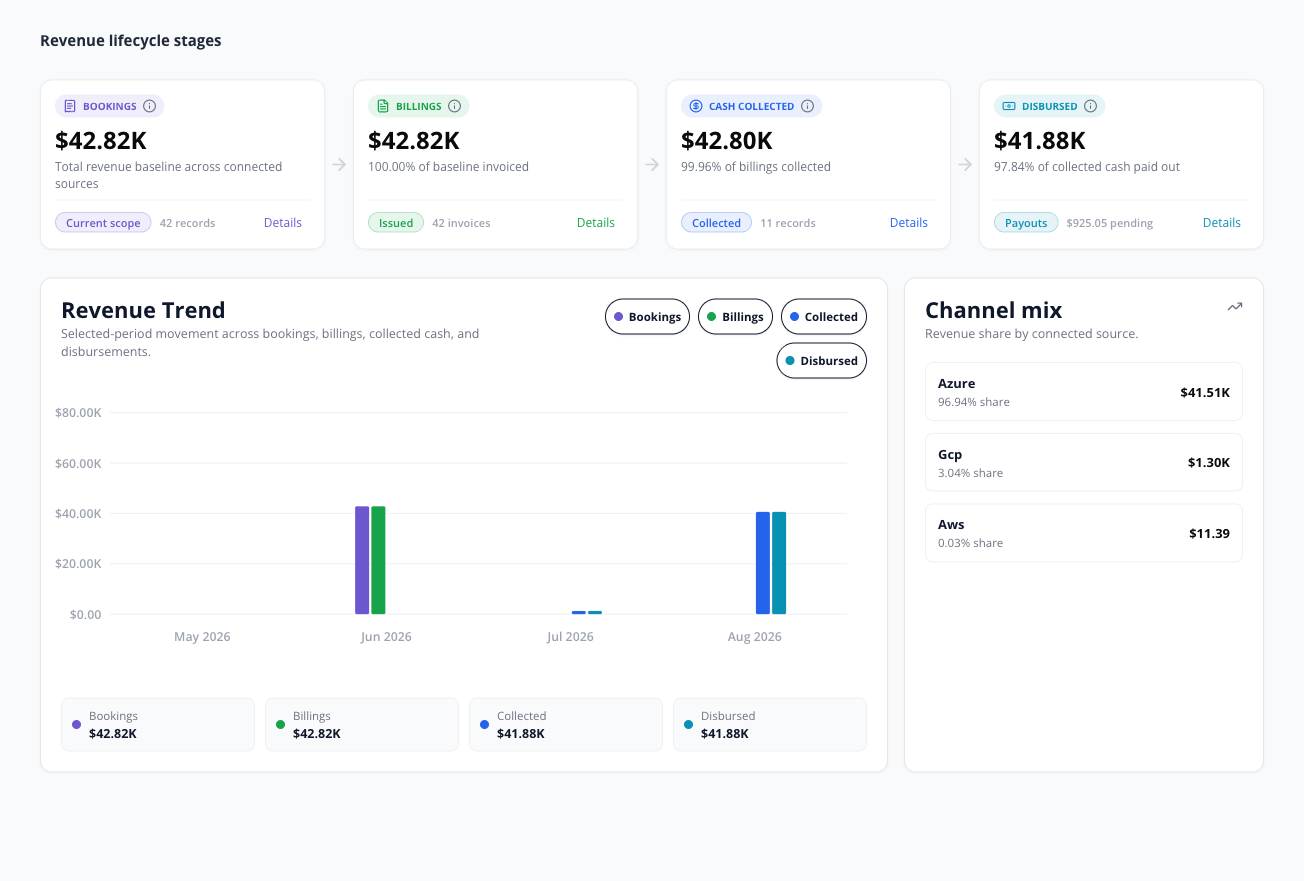
Four cards trace one dollar of revenue through its lifecycle: Bookings, Billings, Cash Collected, and Disbursed. Each shows a base-currency amount for the selected channel and date range, with a supporting ratio and record count. Every card carries an in-product tooltip — hover its info icon for a one-line explanation of the metric.
A record’s lifecycle stage is a stored column the database computes for itself. Nothing in Suger writes it by hand: Postgres derives it from what the record carries — a disbursement date, or a collected date, a collected amount, or a paid/partially-paid marker — and rewrites the stored value whenever those fields change. A record therefore advances as new data syncs in, not because someone set a status on it.
Bookings, Billings, and Cash Collected each sum the same per-record amount, resolved by a fallback chain: the first non-zero of the record’s base amount, then its invoice amount, then its collectable amount, then its disburse amount. Disbursed uses a different chain — its disburse amount first, then its collectable amount, and only then that shared base-amount chain.
| Card | What it represents |
|---|---|
| Bookings | That amount summed over every record in scope. No status and no record type is excluded, and refunds are not netted out — Bookings is a gross baseline, not net revenue. See the caveat below: this tile is derived from revenue records, not from signed-contract value. |
| Billings | The same sum, restricted to records that have actually been invoiced — they carry an invoice amount, an invoice date, or a later lifecycle stage. Shown with the share of bookings invoiced and the invoice count. |
| Cash Collected | Restricted to records marked paid or partially paid, or already disbursed. The channel is holding this cash — it has not yet been paid out to you, and channel fees are deducted before payout. |
| Disbursed | The disbursed amount on records that carry a disbursement stage, date, or amount, with the pending disbursement amount beside it. This card resolves its amount by its own chain — disburse, then collectable, then the shared chain. |

Reading the cards left to right (circled above): ① Bookings is the revenue baseline, ② Billings shows billings ÷ bookings (e.g. 100.00% of baseline invoiced), ③ Cash Collected shows cash collected ÷ billings (e.g. 61.36% of billings collected), and ④ Disbursed shows disbursed ÷ cash collected, with the amount still pending beside it (e.g. $623.04 pending). Pending is cash collected minus disbursed, never below zero.
Select Details on any card to jump to the page that backs it — Bookings and Billings open Revenue Records and Invoices, Disbursed opens Cash & Disbursements.
To find revenue that needs attention, work from the pages that own it: past-due balances and aging buckets live on Invoices, and payouts that are overdue, flagged, or failed live on the Issues card in Cash & Disbursements.
Revenue trend and channel mix
- Revenue Trend plots Bookings, Billings, Collected, and Disbursed over the selected period as grouped bars. Toggle any series on or off using the legend.
- Channel mix lists each channel’s share of revenue and its amount for the period. Channels are ranked by amount, so your largest revenue source sits at the top, and the panel shows at most six channels.
Each trend series is placed on the timeline by a different date, and all but one fall through a chain of dates until they find one the record actually carries:
- Bookings — service start date → billing-period start → invoice date → provider update → last update.
- Billings — invoice date only. A record with no invoice date is absent from this series.
- Collected — collected date → disburse date → payment due date → invoice date.
- Disbursed — disburse date → provider update → last update.
The same record therefore lands in a different bucket in each series, and a record can appear in one series and not yet in another. Buckets are cut in UTC — by day for the 7- and 30-day ranges, and by month for every longer range.
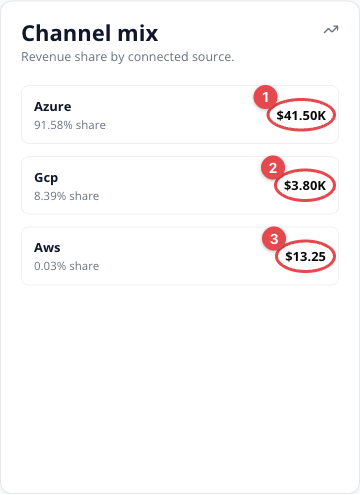
In the example above, ① Azure contributes the most revenue for the period, followed by ② GCP and ③ AWS — the share percentage and base-currency amount are shown for each connected channel.
KPI calculation formulas
All amounts are converted to your base currency (see Revenue Settings for how the base currency is chosen). Values are aggregated across the selected channel and date range.
Bookings, Billings, and Cash Collected sum the same per-record stage amount: the first non-zero of the record’s base amount, invoice amount, collectable amount, or disburse amount. Disbursed resolves its own amount first — see its row below.
| KPI | Applies to | Formula | Calculation details |
|---|---|---|---|
| Bookings | AWS, Azure, GCP, Stripe | Σ stage amount over every record in scope | No status or record-type exclusion, and refunds are not netted. Bucketed by the first available of service-start, billing-period-start, invoice, or provider-update date. Represents revenue attributed to the channel, not signed-contract value. |
| Billings | AWS, Azure, GCP, Stripe | Σ stage amount where the record has been invoiced | “Invoiced” means the record carries an invoice amount, an invoice date, or a lifecycle stage past billing. |
| Cash Collected | AWS, Azure, GCP, Stripe | Σ stage amount where the record is paid, partially paid, or disbursed | The full amount the channel or Stripe confirmed the buyer paid. Channel fees (and AWS seller-remitted tax) are netted later, at the Disbursed stage — not from this card. |
| Disbursed | AWS, Azure, GCP, Stripe | Σ (disburse amount → collectable amount → stage amount) where a disbursement stage, date, or amount exists | Counts only records the provider has recorded as paid out. This is the one card that does not use the shared stage amount first: it takes the disburse amount, falls back to the collectable amount, and only then falls back to the stage amount chain above. |
| % of baseline invoiced | AWS, Azure, GCP, Stripe | billings ÷ bookings × 100 | The ratio printed under the Billings card. |
| % of billings collected | AWS, Azure, GCP, Stripe | cash collected ÷ billings × 100 | The ratio printed under the Cash Collected card. |
| % of collected disbursed | AWS, Azure, GCP, Stripe | disbursed ÷ cash collected × 100 | The ratio printed under the Disbursed card. |
| Pending disbursement | AWS, Azure, GCP, Stripe | max(0, cash collected − disbursed) | Never negative. Because Cash Collected is gross, for fee-bearing channels this still includes the fees the channel retains. |
Spotted something wrong or out of date on this page? Tell us and we'll correct it.