

Deployed on AWS Badge
Understand what the “Deployed on AWS” badge means, how AWS determines eligibility, and how to submit your architecture for review.
Overview
The AWS Deployed badge is a designation AWS applies to eligible AWS Marketplace products that run entirely on AWS infrastructure. It helps buyers quickly identify products that are deployed on AWS and whether they align with their AWS procurement and cloud governance requirements.
The badge appears on your AWS Marketplace listing and in search results.
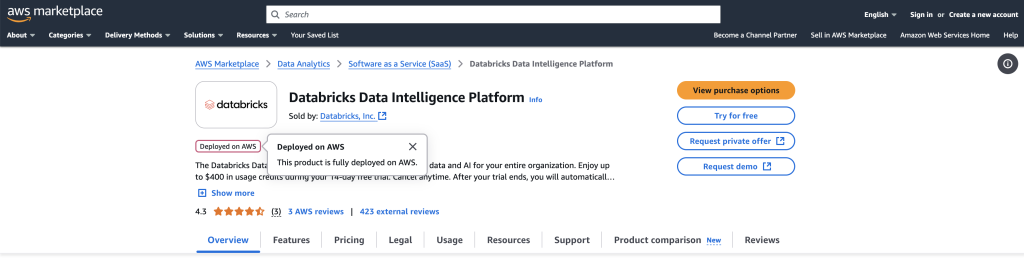
To learn more, see the AWS announcement (May 2025).
Why the badge matters
The badge can have a direct impact on how buyers evaluate and purchase your product.
It can help you win enterprise deals
Many large companies pre-commit to spending a certain amount with AWS through programs such as Enterprise Discount Programs (EDPs) and Private Pricing Addendums (PPAs) — negotiated spend commitments in exchange for discounts. When a buyer with one of these agreements purchases your product, they usually want that purchase to count toward it, and only badged products qualify. If your buyers don’t have (or don’t prioritize) an AWS spend commitment, this may not matter much to your go-to-market.
It builds buyer confidence
For procurement, security, and cloud governance teams, the badge provides a quick indication that AWS has reviewed the architecture information associated with the product and determined that it qualifies for the designation.
Requirements
At a high level, AWS needs to verify one thing: your product runs entirely on AWS. There’s no partial credit — if any part of either plane runs somewhere else, even a small part, the product doesn’t qualify.
To qualify for the AWS Deployed badge:
- Your application plane (where customer workloads and data are processed) runs on AWS — in your account, the buyer’s account, or both.
- Your control plane (where you manage, operate, and provision the product) also runs on AWS.
- Any third-party services that store, process, or transmit customer application data also run on AWS — with three documented exceptions: content delivery networks (CDNs), DNS services, and corporate identity providers (like Okta or Azure AD).
- Agents or gateways used for security, monitoring, data replication, or migration are allowed to run outside AWS (including on-premises), as long as they only send data to AWS for storage and analysis.
You demonstrate this by submitting an architecture diagram as part of your AWS Marketplace listing. For more details, see AWS’s architecture guidelines.
Prepare your architecture diagram
Your diagram (PNG or JPG) should:
- Group and label every component as either application plane or control plane.
- Show where each component physically runs — your AWS account, the buyer’s AWS account, or elsewhere.
- Focus on logical structure — components don’t need to name specific AWS or third-party services.
You can submit a high-level diagram (main components and data flows) or a low-level, detailed one — both are acceptable. See AWS’s full diagram guidance and examples for the complete criteria.
Submit your architecture details
Condensed from AWS’s own Update architecture details guide — check that page directly if these steps ever look out of date.
- Sign in to the AWS Marketplace Management Portal.
- On the Build menu, choose SaaS, then select your product from the SaaS products table.
- From the Request changes dropdown, choose Update architecture details.
- Choose the hosting pattern that matches your architecture. If the pattern you choose is one AWS considers deployed on AWS, you’ll be prompted for two more things:
- Upload your architecture diagram.
- Specify where your application plane runs (your account, the buyer’s account, or both).
- Choose Update architecture details to submit.
Track your request
- To check status, choose your product in the SaaS products table, then open the Request log tab — it shows as Under review, then updates to Succeeded once AWS finishes.
- To see your actual assessment result, open the Architecture details tab on the same product.
There’s no fixed published turnaround time. Your listing only needs to exist in the portal — it doesn’t need to be publicly live — so you can submit while it’s still in Limited status, which gives you time to address any AWS feedback before you go public.
If you don’t qualify yet
This is normal, especially if any part of your stack touches a third-party service that isn’t AWS-native. Your options:
- Migrate the non-AWS component onto AWS. A common example: if you call an external AI inference API, moving that call to a native AWS service such as Amazon Bedrock can resolve this while keeping similar model capabilities — one path forward, not the only one.
- Decide you don’t need the badge. If your buyers aren’t drawing down AWS spend commitments, there’s no real downside to skipping this and listing normally.
Frequently asked questions
Can I sell on AWS Marketplace without the badge?
Yes. The badge is optional and is not required to publish or transact through AWS Marketplace.
When should I submit my architecture for review, before or after my listing goes live?
Your listing needs to exist in the AWS Marketplace Management Portal (AMMP), but it does not need to be publicly live. You can submit architecture details as a change request for listings that are still in a Limited state. If earning the badge is important for launch, consider submitting while your listing is still in Limited so you have time to address any feedback from AWS.
My product uses third-party services. Can I still qualify?
It depends on what those services do with your buyers’ data. AWS allows the following outside of AWS with no conditions: CDNs, DNS services, and corporate identity providers (like Okta or Azure AD). Security/monitoring agents and gateways are also allowed outside AWS as long as they only send data to AWS. For more details, see the SaaS architecture guidelines on AWS.
What does the review process look like?
AWS does not publicly document the review process for the badge. What AWS does describe is the submission process — you update your architecture details and upload your diagram in the AMMP, and AWS reviews what you have submitted. If you have questions about review status or timelines, contact your AWS Marketplace representative or reach out to AWS Seller Operations directly.
What if my hosting pattern changes after I get the badge?
You’re required to update your architecture details if your hosting pattern changes. The badge reflects your current, submitted architecture — it isn’t a one-time assessment you can drift away from.
Do I need to submit architecture details for every listing?
Yes. AWS evaluates eligibility separately for each AWS Marketplace product. Qualifying one listing does not automatically qualify your other listings. If you have multiple products, you need to submit architecture details for each one individually.
Spotted something wrong or out of date on this page? Tell us and we'll correct it.