
ServiceNow
Connect ServiceNow so Suger AI can work with your incidents, change requests, and service catalog.
Overview
ServiceNow is an IT service management platform covering incidents, problems, change management, and a service catalog. Connecting it lets the Suger AI agent read and act on your ITSM records from a Suger workflow or chat.
Org-Level vs User-Level
Org-Level: Supported, using the OAuth 2.0 client-credentials grant against your own ServiceNow instance.
User-Level: Not currently available. ServiceNow’s OAuth client must be registered inside your own instance rather than centrally, so there is no single Suger app your users could sign in to. Supporting per-user connections would mean each user’s sign-in borrowing your instance’s client — a dependency Suger does not yet model.
How the connection works
The OAuth client is registered in your ServiceNow instance, and Suger acts as the OAuth Application User you attach to it. Suger exchanges the client ID and secret for an access token against your instance and re-mints it as needed — there is no Suger-owned ServiceNow app, because the authorize endpoint is per-instance.
Create Integration (Org-Level)
Prerequisites
- Washington DC release or later. Earlier releases do not support the client-credentials grant at all.
- The system property
glide.oauth.inbound.client.credential.grant_type.enabledset totrue. - An OAuth Application User on the OAuth record. Suger acts as this user, so its roles set the ceiling on everything the integration can do. Grant it the
itilrole at minimum; a few operations additionally needadmin(see Suger AI Tools). - Permission to create an application registry entry (typically the
adminrole). - The Suger Admin role — connecting, disconnecting, and running an integration’s actions are all admin-only in Suger.
- A decision on auth scope enforcement — see Auth scope below. Suger requests no ServiceNow auth scope, so leaving enforcement on with no scope selected produces a connection that authenticates but cannot call anything.
Step 1 — Enable the client-credentials grant
ServiceNow does not ship this property; you create it.
-
Go to All → System Properties → All Properties.
-
Make sure your application scope is Global — the property has no effect in a scoped app.
-
Click New and enter:
Field Value Name glide.oauth.inbound.client.credential.grant_type.enabledType `true Value trueApplication Global
To confirm, filter the list on Name is that value — you should get exactly one row reading true. Filtering with >= returns the next property alphabetically instead, which looks like a match but isn’t.
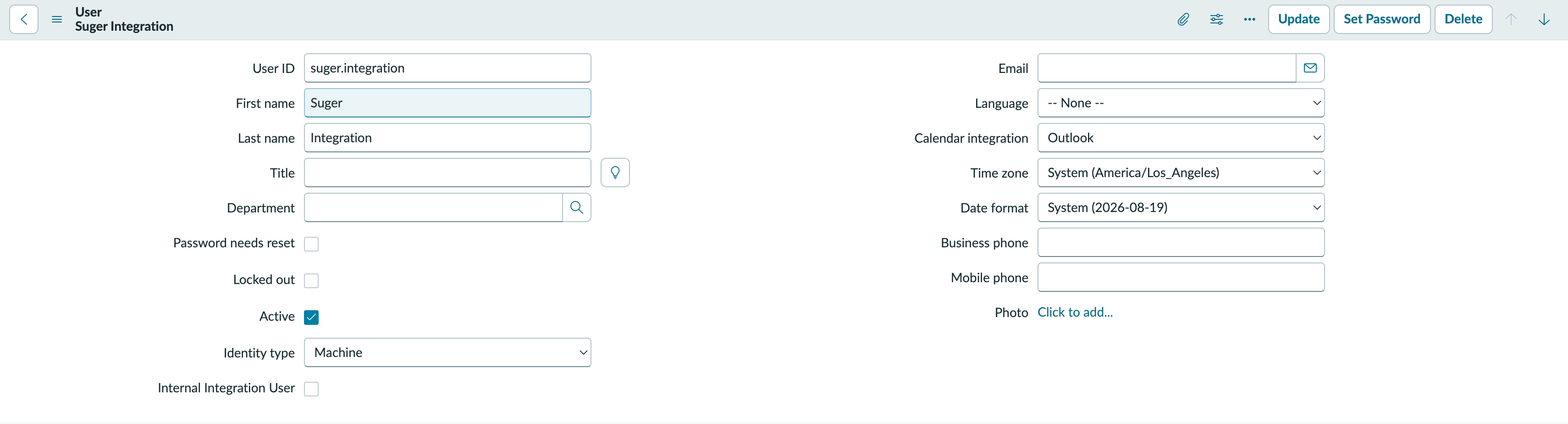
Step 2 — Create the integration user
The client-credentials token acts as this user, so its roles are the ceiling on everything Suger can do. Use a dedicated account, never a real person’s.
- Go to All → User Administration → Users and click New.
- Set User ID to something identifiable, for example
suger.integration. - Set Identity type to Machine. Leave Internal Integration User unchecked — that flag exists to bypass WS-Security on SOAP interfaces and is not what you want here.
- Submit. No password is needed; this account never signs in interactively.
- Reopen the record. In the Roles related list click Edit, add
itil, and save. Several inherited roles appear beneath it — that is normal.
Step 3 — Register the inbound integration
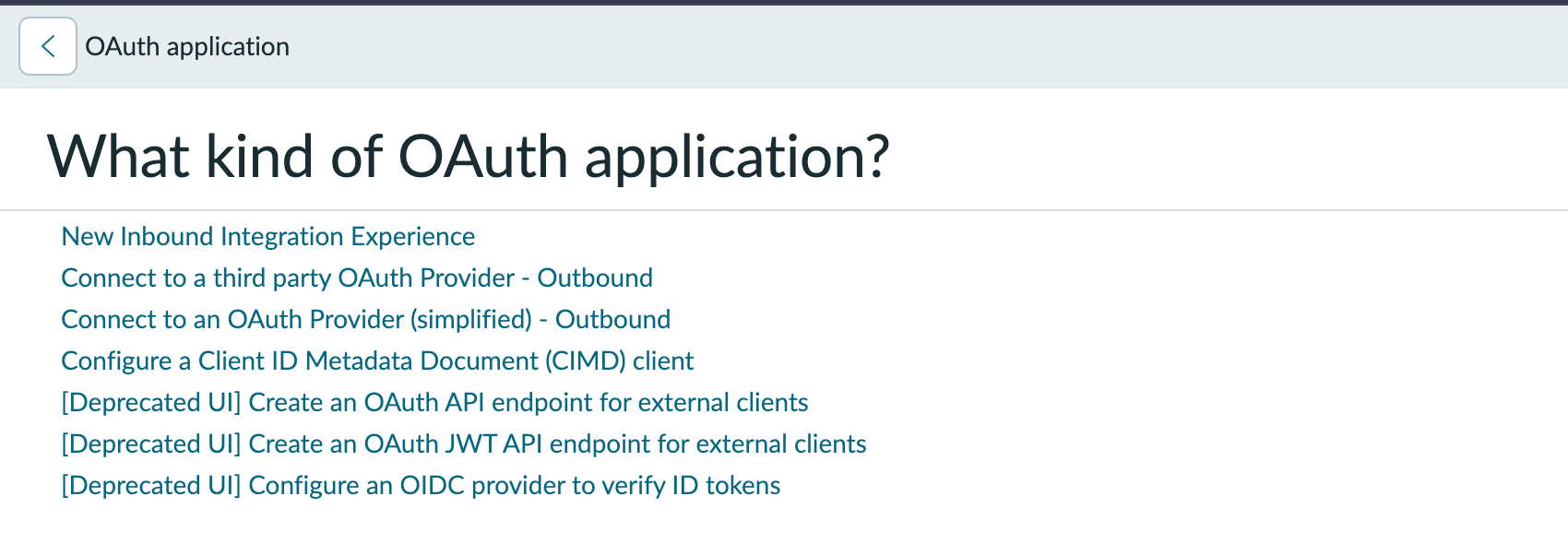
- Go to All → System OAuth → Application Registry and click New.
- Choose New Inbound Integration Experience. The
[Deprecated UI]entries below it still work, but they hide the OAuth application user field behind Configure → Form Layout.
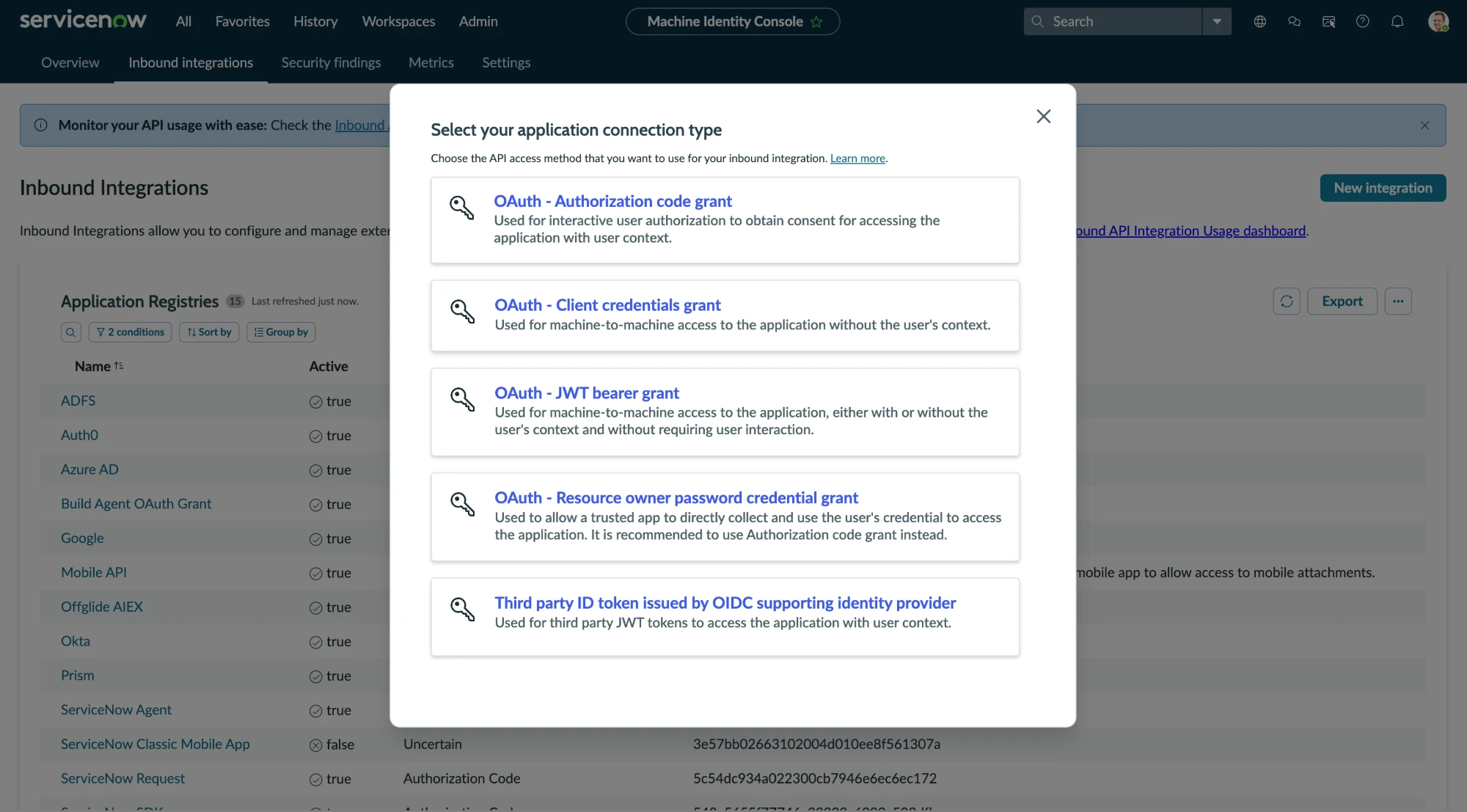
- In the Machine Identity Console, click New integration, then pick OAuth - Client credentials grant — “machine-to-machine access to the application without the user’s context”.
-
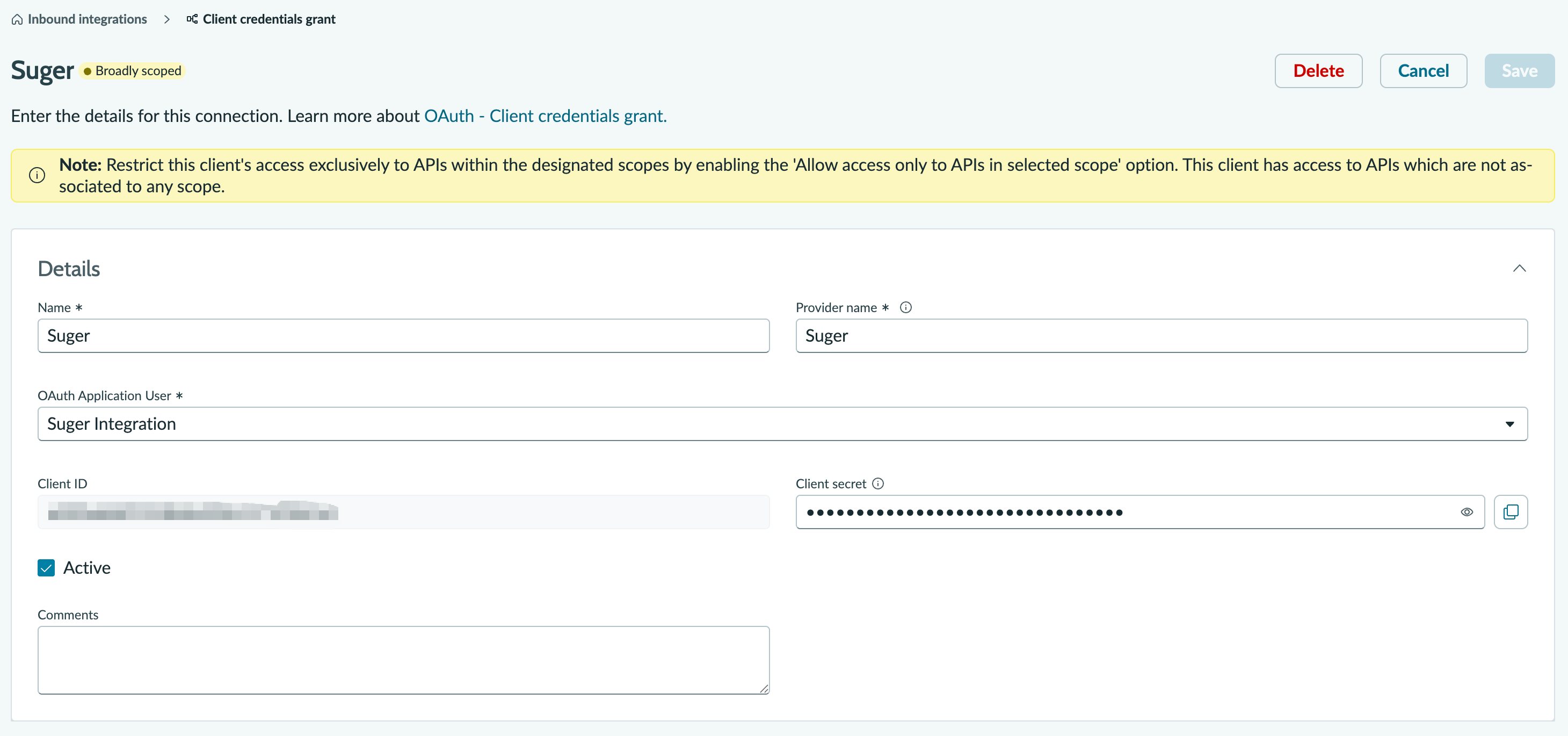
Fill in the Details section:
Field Value Name SugerProvider name Suger— free text naming the service you are integrating with; it is inventory metadata only and is not read during the token exchangeOAuth application user the user from step 2 Client ID / Client Secret generated by ServiceNow — copy both now Active checked
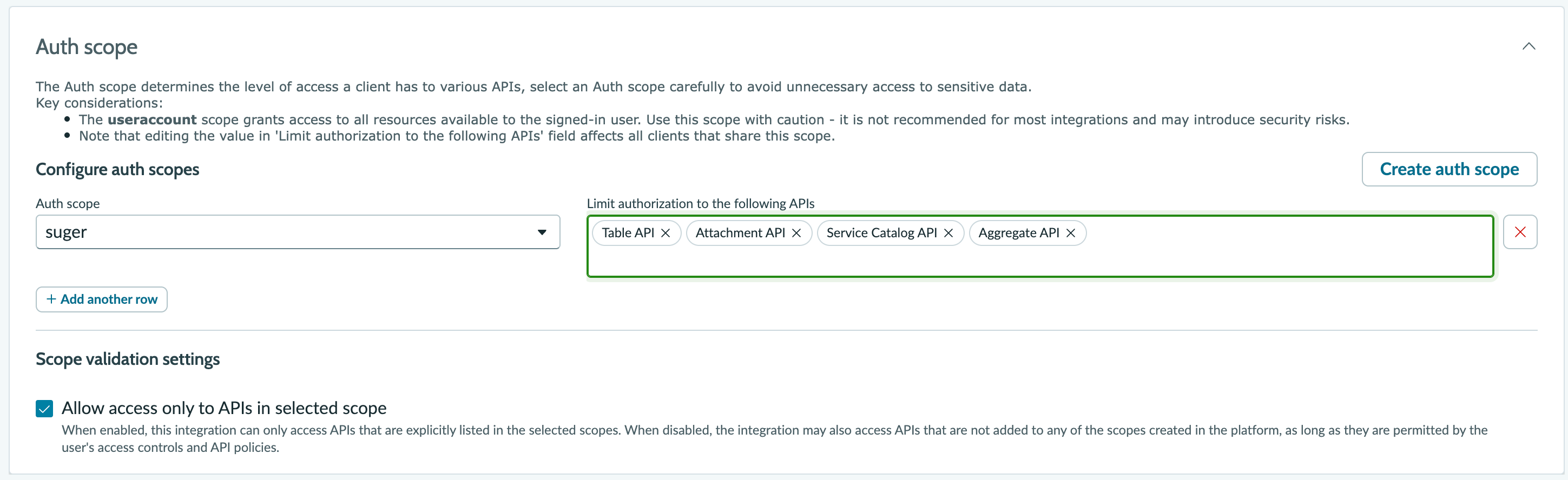
- Set the Auth scope section as described below, then save.
Step 4 — Connect in Suger
In the Suger console, open Settings → Integrations, click Connect on ServiceNow, and enter:
| Field | Value |
|---|---|
| ServiceNow Domain | your instance host, for example acme.service-now.com — host only, no https:// and no trailing slash |
| Client ID | from step 3 |
| Client Secret | from step 3 |
Suger exchanges the pair for an access token and re-mints it as needed. Client-credentials tokens last about 30 minutes and carry no refresh token, which is expected.
Auth scope
On releases with the Machine Identity Console, the inbound-integration form has an Auth scope section, and its Allow access only to APIs in selected scope checkbox is enabled by default with no scope selected. Saved in that state, the integration authenticates successfully and then returns 403 on every call, because a token with no scope matches no scope-listed API.
Two supported configurations. Prefer the first — it is verified to work and avoids ServiceNow labelling the client Broadly scoped.
Scope the client to the APIs Suger uses
Click Create auth scope, name it suger, then in Limit authorization to the following APIs — a multi-select of registered API definitions, not URL paths — add:
| API definition | Why Suger needs it |
|---|---|
| Table API | incidents, problems, change requests and tasks, groups, users, approvals, knowledge, and catalog records — everything under /api/now/table/ |
| Service Catalog API | get-catalog-item and order-catalog-item, which use /api/sn_sc/servicecatalog/ rather than the Table API |
| Attachment API | list-attachments |
| Aggregate API | not used by any tool today. Include it so counting and grouping tools do not require a scope revision later |
Leave Allow access only to APIs in selected scope checked, and save.
Create a dedicated scope rather than extending an existing one. ServiceNow warns that editing a scope’s API list affects every client sharing it — a scope used only by Suger keeps later revisions safe.
Fallback: turn enforcement off
Uncheck Allow access only to APIs in selected scope. Access then falls back to the acting user’s access controls and API policies, which is the model this connector was built around — the itil role on the OAuth Application User is the ceiling.
ServiceNow labels the client Broadly scoped in this state and flags it in the Machine Identity Console’s security findings. That is accurate: the role is the only boundary. It remains the configuration Suger is known to work with, so choose it deliberately rather than as an oversight, and keep the acting user’s roles as narrow as your tools require.
Troubleshooting
| Symptom | Cause |
|---|---|
unsupported_grant_type when minting a token | The glide.oauth.inbound.client.credential.grant_type.enabled property is missing or not in Global scope |
| Token mints, but every tool returns 403 | Auth scope enforcement is on with no matching scope — see Auth scope |
| Some tools work, user/group writes 403 | The OAuth Application User has itil but not admin |
invalid_client | Client ID and secret do not match the registry entry |
To check the ServiceNow half on its own, before involving Suger:
curl -s -X POST 'https://YOUR_INSTANCE.service-now.com/oauth_token.do' \
  -d 'grant_type=client_credentials' \
  -d 'client_id=YOUR_CLIENT_ID' \
  -d 'client_secret=YOUR_CLIENT_SECRET'
Suger AI Tools
When ServiceNow is connected, the Suger AI agent can work your ITSM records through Suger’s built-in tools (40 actions).
Org-level: Every tool runs as the instance’s OAuth Application User. If a tool returns a permission error, that user is missing a role — start with
itil.
| Capability | What the agent can do |
|---|---|
| Incidents | Create, read, update, delete, and list incidents (e.g. create-incident, update-incident, list-incidents) |
| Problems | Create, read, update, delete, and list problem records (e.g. create-problem, list-problems) |
| Change management | Full create/read/update/delete on change requests and change tasks (e.g. create-change-request, update-change-task) |
| Approvals | List approvals and record an approval decision (list-approvals, update-approval) |
| Service catalog | Browse catalog items, read a request and its items, and place an order (e.g. list-catalog-items, order-catalog-item) |
| Knowledge base | Read and list knowledge articles (get-knowledge-article, list-knowledge-articles) |
| Users & groups | Create, read, update, delete, and list users and groups (e.g. create-user, update-group) |
| Any table | Read or list records from an arbitrary table for cases the typed tools don’t cover (get-table-record, list-table-records) |
| Attachments | List attachments on a record (list-attachments) |
Edit Integration
Editing is not supported. To rotate the client secret or point Suger at a different instance, delete the integration and create it again.
Delete Integration
Click the 🗑️ button next to ServiceNow in the Integrations list. The stored client pair is destroyed with the integration record. Delete the application registry entry in ServiceNow too if you want to revoke access from that side.
Spotted something wrong or out of date on this page? Tell us and we'll correct it.