
GCP Co-Sell
Connect Suger to Google Cloud Co-Sell to sync co-selling opportunities and referrals with Google through the Google Cloud Partner Network program (formerly Google Cloud Partner Advantage).
Overview
The GCP Co-Sell program enables ISVs and partners to sell jointly with Google Cloud sales teams through the Google Cloud Partner Network, managed in the Partner Network Hub. With this integration, opportunities and referrals sync bidirectionally between Suger and the Partner Network Hub.
Create Integration
Prerequisites
- An active Google Cloud Partner Network membership — the program formerly called Partner Advantage
- Your company enrolled in the GCP Co-Sell program
- Admin permissions in the Partner Network Hub to authorize the integration
Step 1 — Grant Suger access to your Partner Network Hub
Add Suger’s Google Service Account as an Integrator so Suger can read and submit co-sell opportunities on your behalf.
- Log in to the Partner Network Hub and navigate to the Users section.
- Click Assign roles.
- For User email address, enter Suger’s Google Service Account email — contact support@suger.io to obtain it.
- Select the Integrator role.
- Click Save.
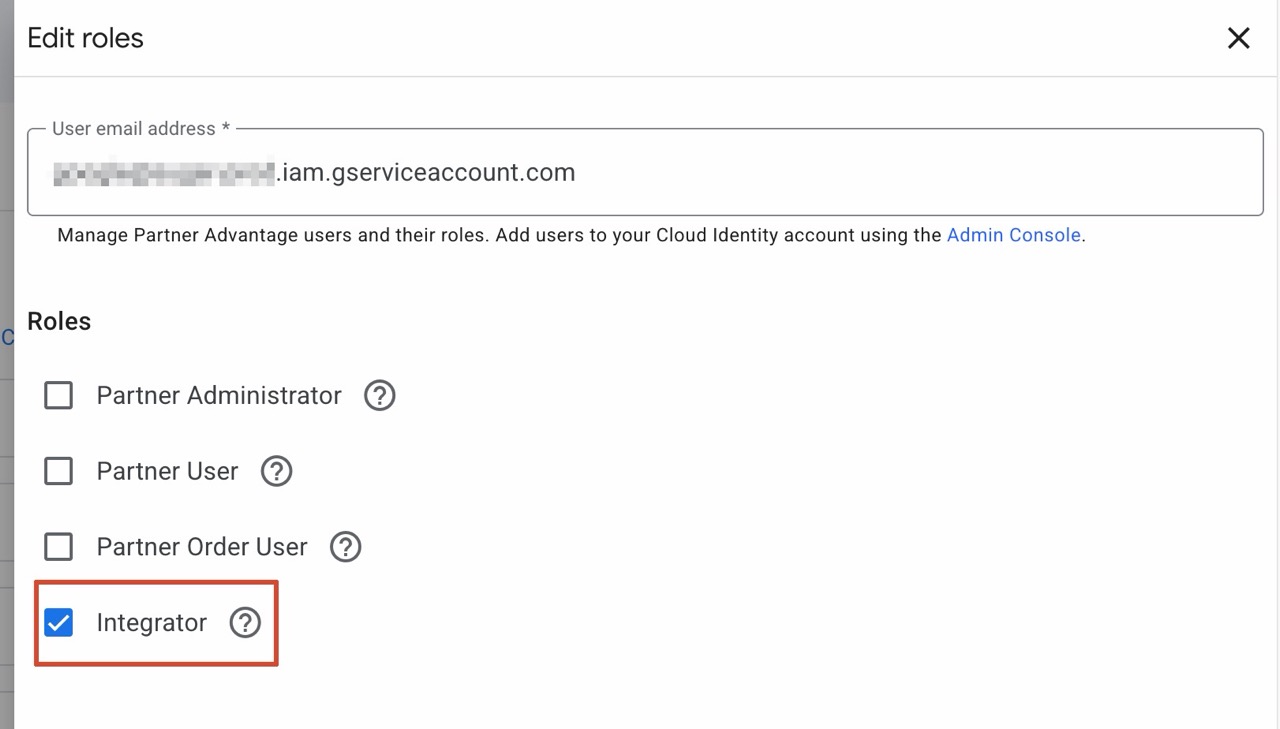
The screenshot above predates the rename — its helper text still reads “Manage Partner Advantage users and their roles.” You may still see the former name on some Google portal screens.
Step 2 — Find your Partner ID
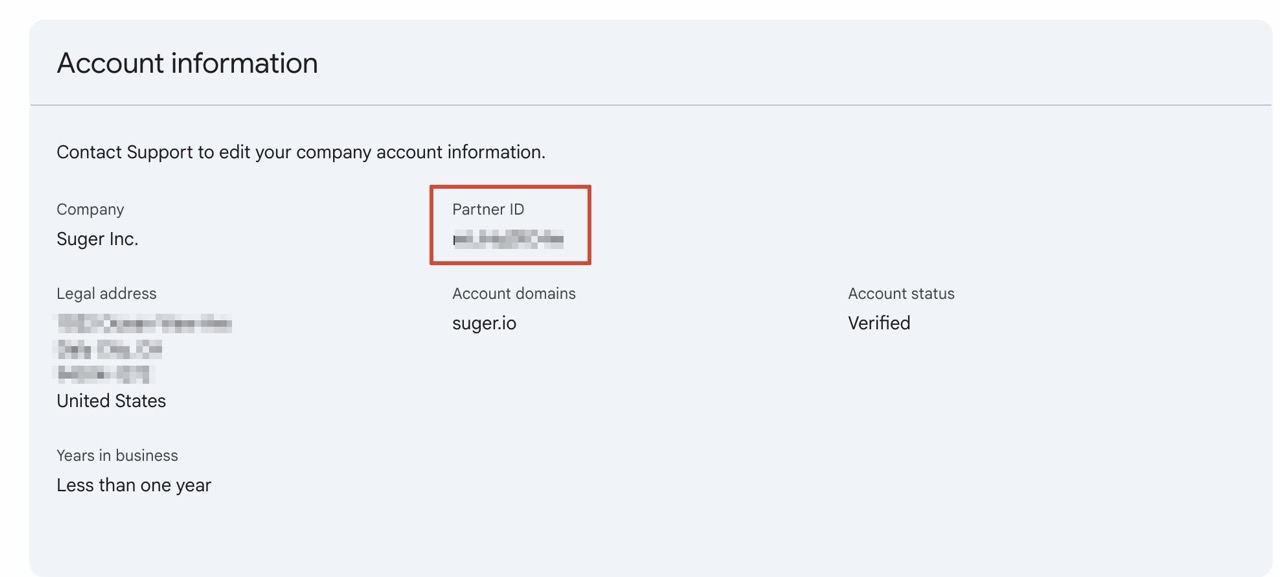
- Go to the Account section of the Partner Network Hub.
- Locate and copy your Partner ID under Account information. You will need this to finalize the connection in Suger.
Step 3 — Connect in Suger
-
Log in to the Suger Console and go to Settings > Integrations.
-
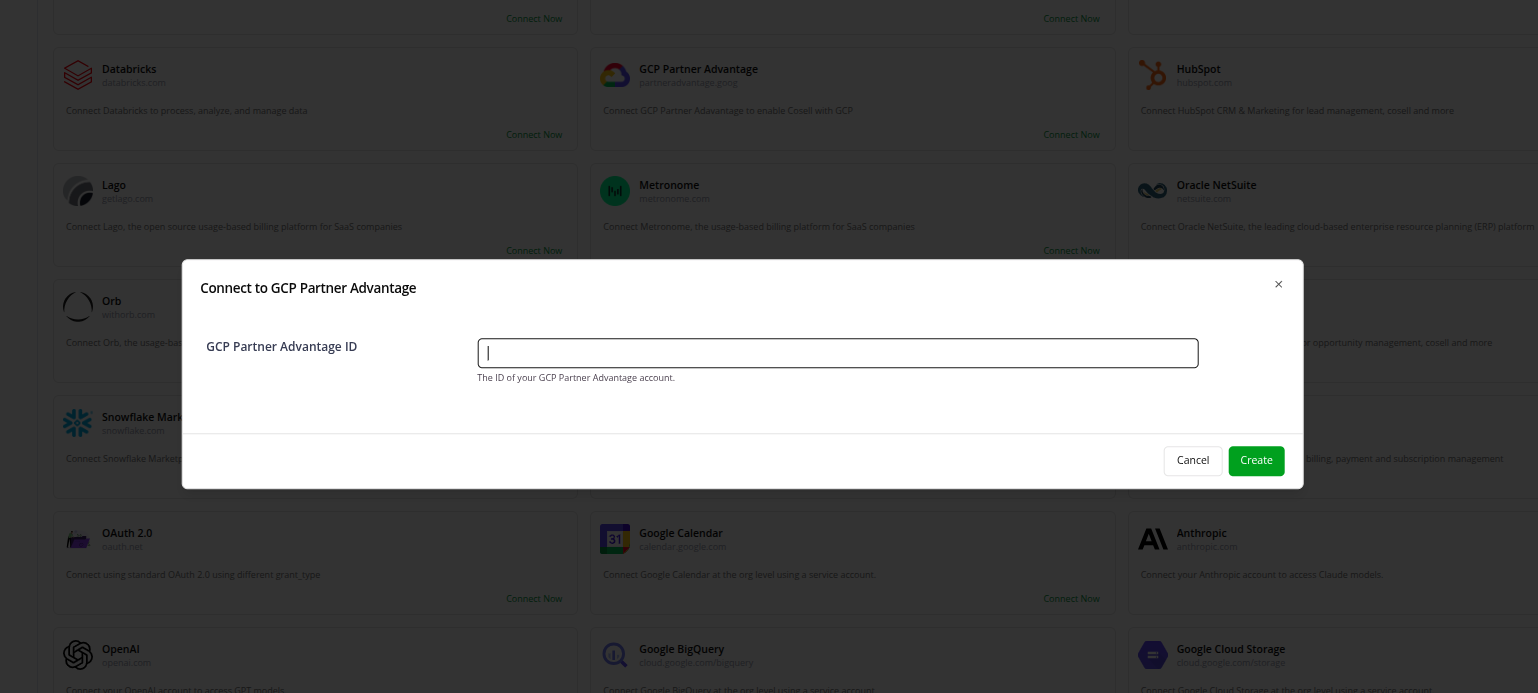
Find the GCP Partner Advantage card and click Connect Now. (Suger’s card still uses Google’s former program name — see the note above.)
-
Paste the Partner ID you retrieved in Step 2 into the GCP Partner Advantage ID field.
-
Click Create.
-
After creation succeeds, click Verify to confirm the connection is live and healthy.
Sync behaviour is configured after the integration exists — see Edit Integration below for the auto-delete toggle, and Co-Sell Configuration for field mapping.
Edit Integration
You can change the integration in place. You need the ADMIN role.
- On the GCP Partner Advantage card, open the actions menu and choose Edit.
- Update the GCP Partner Advantage ID, or toggle Auto-Delete Rejected Outbound Referrals.
- Click Save.
Delete Integration
Deleting removes the integration from Suger.
Troubleshooting
| Issue | Cause | Resolution |
|---|---|---|
| Need to update settings | You need to change a Partner ID or sync parameter. | Open the card’s actions menu, choose Edit, then click Save. |
| OAuth authorization fails | The Google account used does not have Admin rights. | Sign in with a Google account that has Admin permissions in the Partner Network Hub. |
| Sync not appearing | The Partner ID was entered incorrectly. | Open the card’s actions menu, choose Edit, double-check your ID against the Partner Network Hub, and click Save. |
FAQs
Can I set up a user-level integration for GCP Co-Sell?
No. This is an organization-level integration only, which keeps data consistent across your entire sales team rather than tied to a single user’s account.
Does this integration sync both ways?
Yes. It supports bidirectional syncing of opportunities and referrals between Suger and the Partner Network Hub.
Spotted something wrong or out of date on this page? Tell us and we'll correct it.