
Chargebee
Link your Chargebee instance to Suger to automate subscription and revenue operations, and to report the metered overage Chargebee prices onward to the cloud marketplaces.
Overview
Chargebee is a subscription management and recurring billing platform that empowers businesses to automate revenue operations. It offers comprehensive billing and revenue management solutions for modern SaaS and subscription-based businesses.
If you bill metered usage through Chargebee, Suger can also carry it onto the marketplace bill. With Enable Auto Report Usage on, Suger reads the overage Chargebee has priced for each linked buyer every hour and reports it to that buyer’s cloud marketplace entitlement, so nobody has to key it into the marketplace by hand. See How the usage sync works.
Org-Level vs User-Level
Org-Level: Uses an API key for organization-wide access. Best for company-wide subscription and billing management.
User-Level: Not typically supported for billing integrations.
How the usage sync works
| Direction | One-way: Chargebee → Suger → cloud marketplace. Suger reads subscriptions, usage charges and invoices from Chargebee and reports the amounts onward as usage record groups. The sync never writes to Chargebee. |
| Source of truth | Chargebee owns the priced overage and the invoices. Suger owns the link between a buyer and a Chargebee customer, the mapping to marketplace dimensions, and the records it reports. |
| Scope | Organization-level. Only buyers that carry a Chargebee customer ID are synced — see Connect Chargebee Customer. |
| Schedule | Every hour at 5 minutes past the hour, for a VERIFIED integration with Enable Auto Report Usage on and Billing Mode set to amount. |
| What is reported | Money, not units. Every amount goes out on the single source dimension key chargebee — see Billing Mode. |
When something fails
- One buyer does not stop the run. If Suger cannot report a buyer’s usage, it logs the failure and moves on to the next buyer. A run in which every linked buyer fails is marked failed and retried once.
- A window Suger cannot place is skipped, not guessed. A billing window whose currency differs from the entitlement’s, or that no single entitlement covers, is skipped while the rest of the buyer’s usage still reports. See Which entitlement a window is billed to.
- A missed hour catches up. Each run compares Chargebee’s current figure for a window with the running total Suger has already reported for it, so the next successful run reports everything a failed one would have.
- Running the sync twice does not bill twice. A repeated or retried run does not report the same usage a second time.
Create Integration (Org-Level)
Prerequisites
- Chargebee Site Name: The unique identifier for your Chargebee instance (found in your Chargebee URL).
- Full-Access API Key: An API key generated from your Chargebee dashboard. Refer to the Chargebee API Documentation for the specific generation steps.
Authenticate
-
In the Suger Console, navigate to Settings > Integrations.
-
Locate the Chargebee card and click Connect.
-
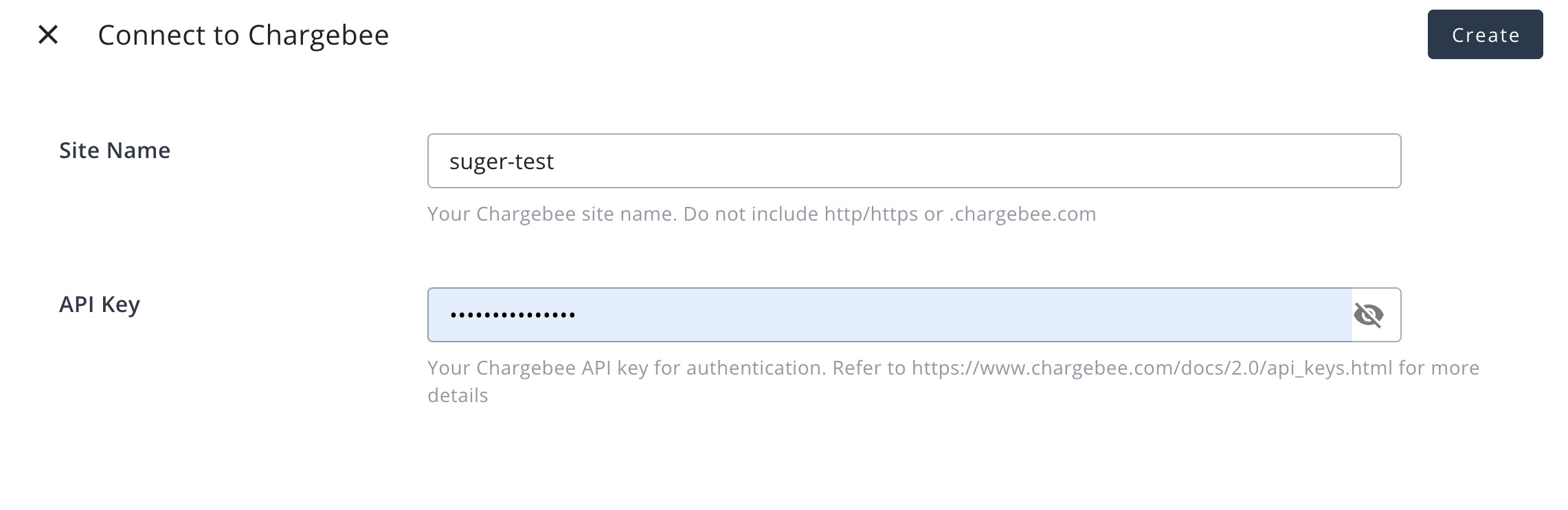
Enter your connection details:
- Site Name: Enter your Chargebee site identifier.
- API Key: Paste the API key generated from your Chargebee dashboard.
-
Click Create. Suger verifies the connection and begins identifying your Chargebee resources.
Edit Integration
Editing requires the Admin role. Open the ⋯ menu on the Chargebee card under Settings > Integrations and click Edit to open Edit Integration - Chargebee. It holds the usage-sync settings:
- Enable Auto Report Usage: When on, the hourly sync reports the metered overage Chargebee has priced to each linked buyer’s marketplace bill. Turning it on sets Billing Mode to
amountfor you, and turning it off clears the mode, so the integration cannot be saved half configured. - Billing Mode: Shown while Enable Auto Report Usage is on.
amountis the only mode — see Billing Mode.
Click Save to apply the change.
Credentials cannot be edited. To maintain a high security standard, Suger limits the modification of active credentials. If you need to rotate your API key or change your site name, delete the existing integration and reconnect using the new details — then turn Enable Auto Report Usage back on, because a new integration starts with it off.
Delete Integration
Click the 🗑️ icon on the Integrations page. This immediately and permanently removes all Chargebee credentials from Suger’s secure vault.
Billing Mode
Chargebee has one billing mode, amount: Suger reports the overage Chargebee has already priced, not raw usage quantities. Every amount is reported on the single source dimension key chargebee, where one unit is one unit of the entitlement’s currency — $1 on a USD entitlement.
How Suger settles each billing window
Chargebee shows a billing window’s priced overage in two places at different times: a live usage charge while the window is open, then the invoice once it closes. Suger reads both, separately for each metered addon on each of the buyer’s subscriptions:
- While the window is open, each hourly run reads the usage charges of the customer’s
activeandnon_renewingsubscriptions and reports only the growth since the previous read. - When the window closes, Suger settles it against its invoice — an invoice in
posted,payment_due,not_paidorpaidstatus, updated within the last two months. The metered line is taken net of Chargebee discounts, and whatever the hourly reads did not already cover is reported. Apendinginvoice is left until Chargebee closes it. - If the net invoice line is lower than what Suger already reported — typically because a coupon took money off — the difference cannot be pulled back from the marketplace. Suger adds it to the entitlement as credit instead, which is spent first on the buyer’s later usage.
- If an invoice is voided after Suger reported its window, Suger credits the reported amount back to the entitlement that was billed.
Suger timestamps each settlement inside the window it settles, so Suger’s own period views line up with the Chargebee invoice. The marketplace still bills a record when Suger submits it, so reconcile a Chargebee invoice against Suger’s records window by window rather than month by month.
Which entitlement a window is billed to
- Exactly one entitlement must cover the window’s start. Suger bills a window to the buyer’s active or pending-cancel entitlement whose term contains the moment the window opened. If none does — or more than one does, for example two of the buyer’s entitlements running at the same time — Suger skips the window rather than guess. If that entitlement renews while the window is still being reported, the rest of the window moves to the entitlement in force at that time.
- A closed window Suger never reported live is skipped. Suger settles a closed window only if it reported that window while it was open. Typical examples are windows that closed before you linked the buyer — whose invoice may already have been paid in Chargebee — and windows that closed while Enable Auto Report Usage was off. The first time Suger sees a window that is still open, it reports everything its usage charge already holds.
- Cancellation picks up the last window. When an AWS or Google Cloud entitlement is being cancelled, Suger runs the sync once more for that buyer, so the final window’s usage is reported.
Connect Chargebee Customer
To let Suger report a buyer’s Chargebee usage to the right cloud marketplace entitlement, connect the Buyer in Suger with its customer in Chargebee. Find the buyer on the Companies page (see Companies) and click the Edit action on its row — or open its company page and choose More actions → Edit info. In the Edit Buyer panel, under Integration Information, enter the Chargebee customer ID. Every hourly run then picks that buyer up. Keep the ID current — if the buyer moves to a different Chargebee customer, update it here. Buyers without a Chargebee customer ID are never synced.
Spotted something wrong or out of date on this page? Tell us and we'll correct it.