# Snowflake
Use the Snowflake node to automate work in Snowflake.
---
## Operations
### Execute an SQL query
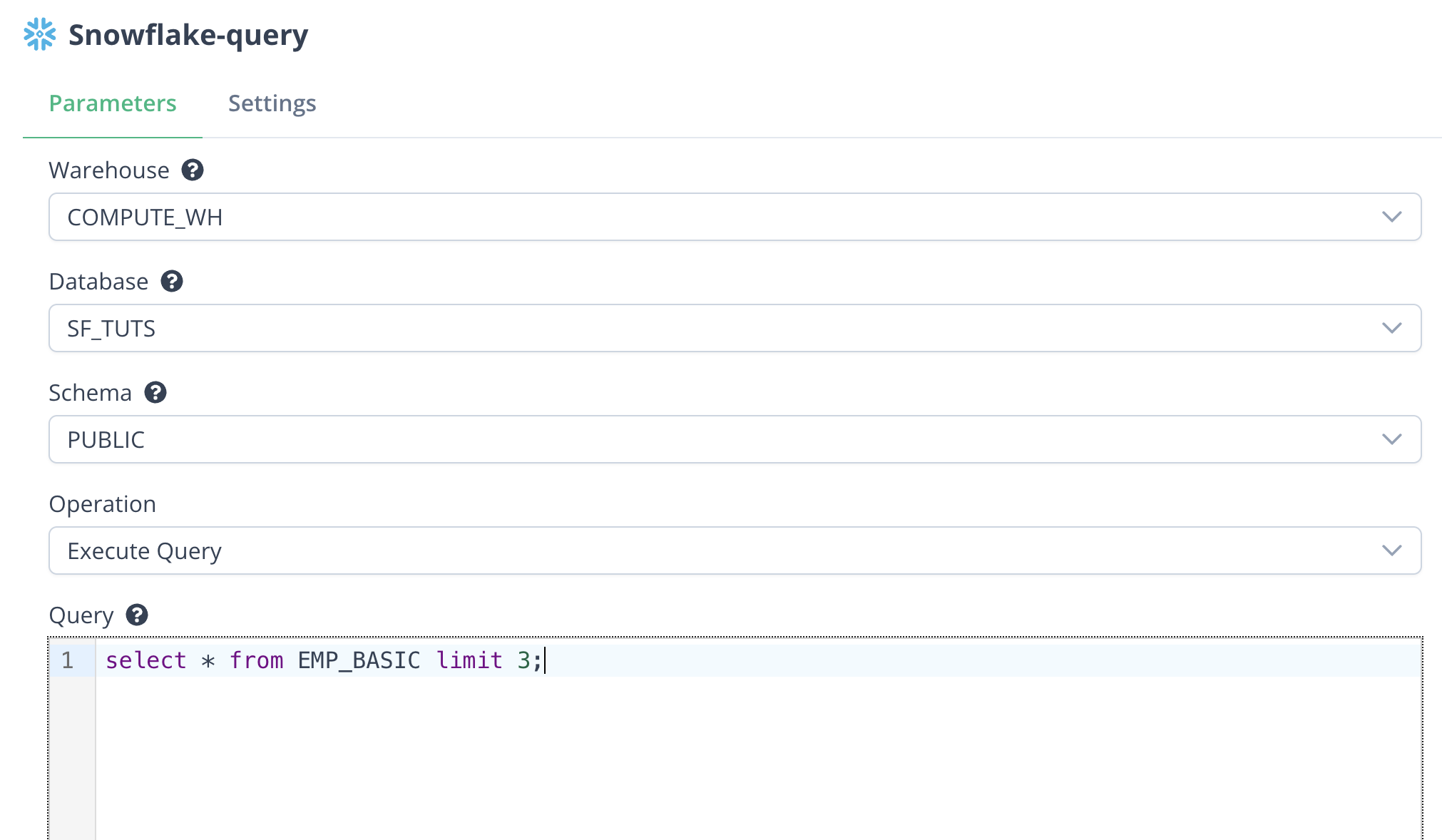
Use `Execute Query` operation to execute a SQL query.
For example, configure a snowflake node as below:
 The result data from the node is:
```json
[
{
"json": {
"CITY": "Meniko",
"EMAIL": "adavidovitsk@sf_tuts.com",
"FIRST_NAME": "Arlene",
"LAST_NAME": "Davidovits",
"START_DATE": "2017-05-03T00:00:00Z",
"STREETADDRESS": "7571 New Castle Circle"
}
},
{
"json": {
"CITY": "Troitsk",
"EMAIL": "vshermorel@sf_tuts.com",
"FIRST_NAME": "Violette",
"LAST_NAME": "Shermore",
"START_DATE": "2017-01-19T00:00:00Z",
"STREETADDRESS": "899 Merchant Center"
}
},
{
"json": {
"CITY": "Bayaguana",
"EMAIL": "rmattysm@sf_tuts.com",
"FIRST_NAME": "Ron",
"LAST_NAME": "Mattys",
"START_DATE": "2017-11-15T00:00:00Z",
"STREETADDRESS": "423 Lien Pass"
}
}
]
```
### Insert records into the database
Use `Insert` operation to insert records into the database.
For example, use the result data as input from the `Execute Query` operation above and use a [Suger Code](https://doc.suger.io/workflow/suger-code) node to update the `STREETADDRESS` field:
```javascript
// Loop over input items and update the STREETADDRESS field
for (const item of $input.all()) {
item.json.STREETADDRESS = "New Address";
}
return $input.all();
```
Then configure a snowflake node as below:
The result data from the node is:
```json
[
{
"json": {
"CITY": "Meniko",
"EMAIL": "adavidovitsk@sf_tuts.com",
"FIRST_NAME": "Arlene",
"LAST_NAME": "Davidovits",
"START_DATE": "2017-05-03T00:00:00Z",
"STREETADDRESS": "7571 New Castle Circle"
}
},
{
"json": {
"CITY": "Troitsk",
"EMAIL": "vshermorel@sf_tuts.com",
"FIRST_NAME": "Violette",
"LAST_NAME": "Shermore",
"START_DATE": "2017-01-19T00:00:00Z",
"STREETADDRESS": "899 Merchant Center"
}
},
{
"json": {
"CITY": "Bayaguana",
"EMAIL": "rmattysm@sf_tuts.com",
"FIRST_NAME": "Ron",
"LAST_NAME": "Mattys",
"START_DATE": "2017-11-15T00:00:00Z",
"STREETADDRESS": "423 Lien Pass"
}
}
]
```
### Insert records into the database
Use `Insert` operation to insert records into the database.
For example, use the result data as input from the `Execute Query` operation above and use a [Suger Code](https://doc.suger.io/workflow/suger-code) node to update the `STREETADDRESS` field:
```javascript
// Loop over input items and update the STREETADDRESS field
for (const item of $input.all()) {
item.json.STREETADDRESS = "New Address";
}
return $input.all();
```
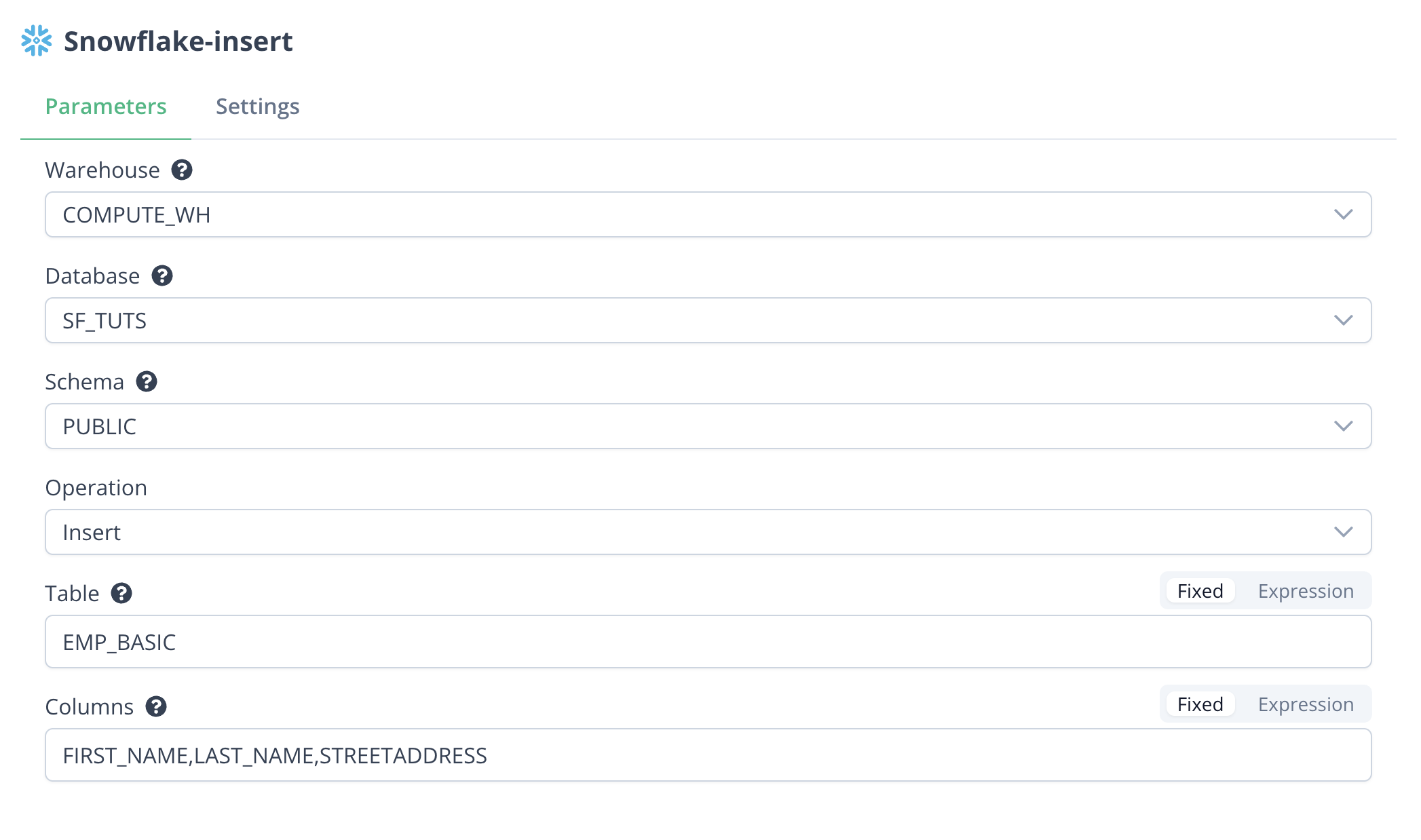
Then configure a snowflake node as below:
 The result data from the node is:
```json
[
{
"json": {
"success": true
}
}
]
```
Three new records with columns configured above are inserted into the database with the `STREETADDRESS` field as "New Address".
### Update existing records in the database
Use `Update` operation to update existing records in the database.
For example, use a [Suger Code](https://doc.suger.io/workflow/suger-code) node to generate the data to update the existing records:
```javascript
return [
{ FIRST_NAME: "jane1", LAST_NAME: "doe_updated_11" },
{ FIRST_NAME: "jane2", LAST_NAME: "doe_updated_22" },
];
```
Then configure a snowflake node as below:
The result data from the node is:
```json
[
{
"json": {
"success": true
}
}
]
```
Three new records with columns configured above are inserted into the database with the `STREETADDRESS` field as "New Address".
### Update existing records in the database
Use `Update` operation to update existing records in the database.
For example, use a [Suger Code](https://doc.suger.io/workflow/suger-code) node to generate the data to update the existing records:
```javascript
return [
{ FIRST_NAME: "jane1", LAST_NAME: "doe_updated_11" },
{ FIRST_NAME: "jane2", LAST_NAME: "doe_updated_22" },
];
```
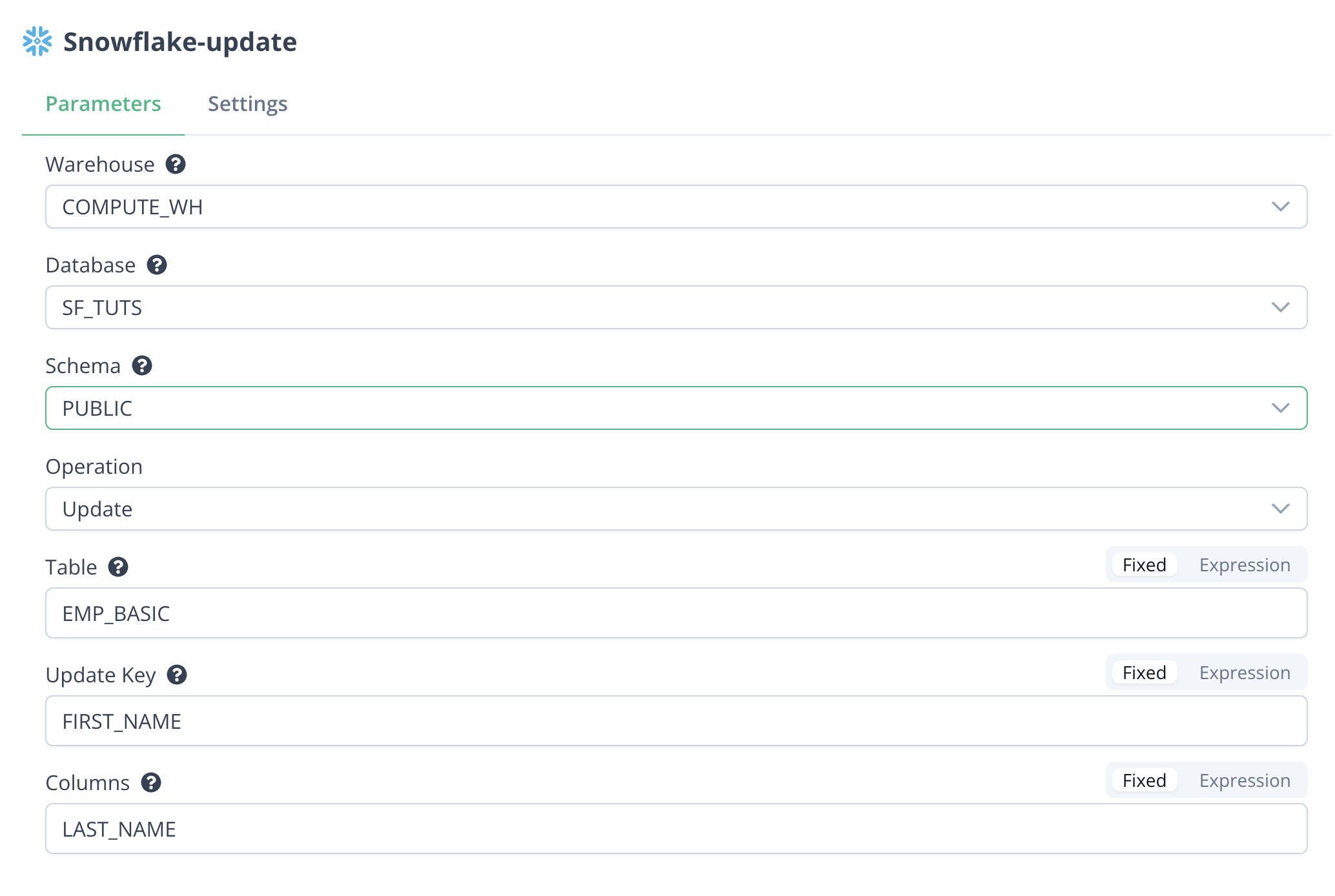
Then configure a snowflake node as below:
 The result data from the node is:
```json
[
{
"json": {
"index": 0,
"success": true
}
},
{
"json": {
"index": 1,
"success": true
}
}
]
```
All the **Columns** (`LAST_NAME` in this example) of the records that match the **Update Key** (`FIRST_NAME` in this example) are updated with the new values.
## Templates
### Entitlements to Snowflake Daily Sync
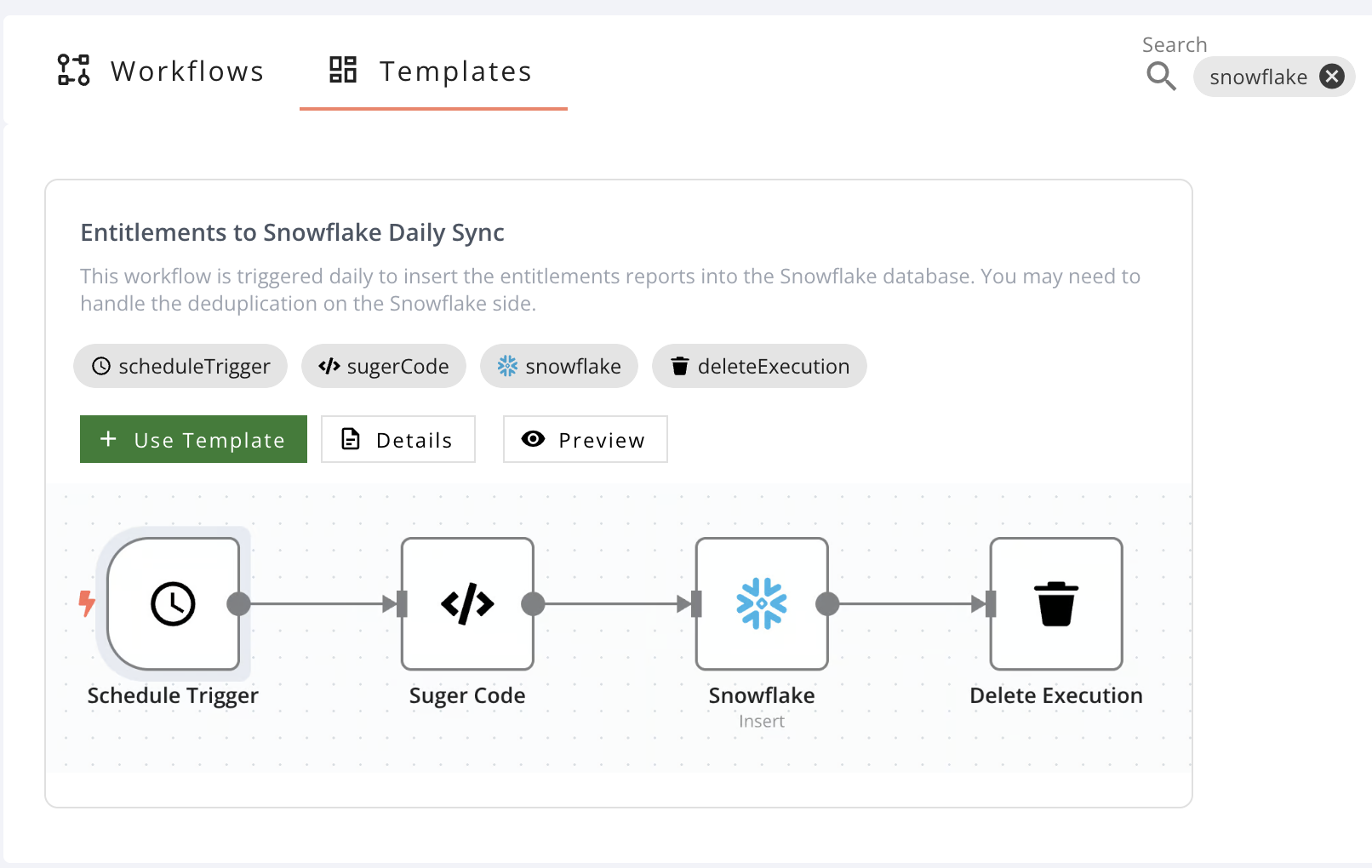
This workflow is triggered daily to insert the entitlements reports into the Snowflake database. You may need to handle the deduplication on the Snowflake side.
The result data from the node is:
```json
[
{
"json": {
"index": 0,
"success": true
}
},
{
"json": {
"index": 1,
"success": true
}
}
]
```
All the **Columns** (`LAST_NAME` in this example) of the records that match the **Update Key** (`FIRST_NAME` in this example) are updated with the new values.
## Templates
### Entitlements to Snowflake Daily Sync
This workflow is triggered daily to insert the entitlements reports into the Snowflake database. You may need to handle the deduplication on the Snowflake side.