# Metronome
Automate the usage metering from Metronome to all cloud marketplaces.
---
## Overview
If you currently rely on [Metronome](https://metronome.com/) as your metering/billing service and are looking to expand your business in cloud marketplaces, Suger offers the ideal solution to bridge the gap. With our no-code, fully automated integration, you can seamlessly meter usages from your existing Metronome instance to clients in all cloud marketplaces. There is no need for migration or extensive engineering efforts, making the process smooth and hassle-free.
:::warning
This integration does not currently disambiguate between a buyer's [AWS Concurrent Agreements](/aws-marketplace/integration/#enable-concurrent-agreements) for the same product — usage can be attributed to the wrong agreement. If your product has Concurrent Agreements enabled, report usage through Suger directly instead. See [Usage Metering for AWS Concurrent Agreements](/get-started/metering/#usage-metering-for-aws-concurrent-agreements).
:::
### Org-Level vs User-Level
> **Org-Level Only**: Metronome integration is available at the organization level only. All users in the organization share the same Metronome connection for usage metering.
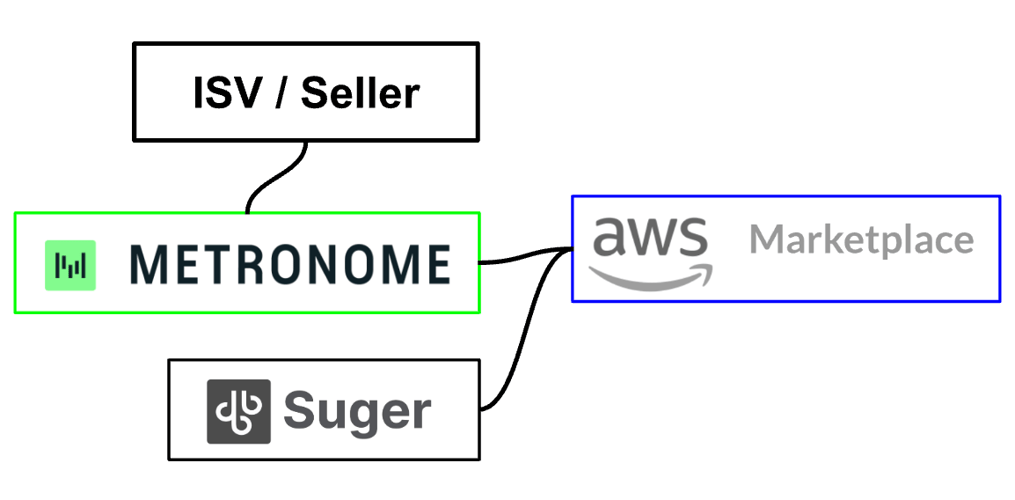
When it comes to adopting Suger with Metronome together, you have two options available. However, we highly recommend **Option 2**, and here's why:
| | Option 1 | Option 2 (recommend) |
| ----------- | ----------- | ------------ |
| Architecture |
 |
| 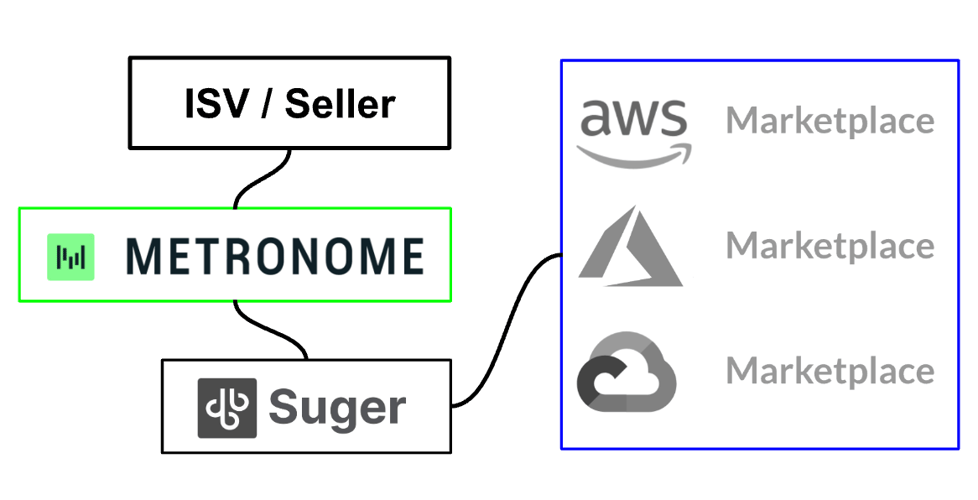 |
| Description | Metronome offers officially integrating with AWS Marketplace and sends usage metering to AWS Marketplace metering service directly. Here is the [official guidance](https://docs.metronome.com/integrations/marketplace-integrations/aws). | Suger provides pre-built integration to connect Metronome & cloud marketplaces. Hourly cron jobs automatically fetch aggregated usage events and report them to cloud marketplace in the right formats. |
| :white_check_mark: Pros |
|
| Description | Metronome offers officially integrating with AWS Marketplace and sends usage metering to AWS Marketplace metering service directly. Here is the [official guidance](https://docs.metronome.com/integrations/marketplace-integrations/aws). | Suger provides pre-built integration to connect Metronome & cloud marketplaces. Hourly cron jobs automatically fetch aggregated usage events and report them to cloud marketplace in the right formats. |
| :white_check_mark: Pros | - Officially supported by Metronome.
| - Support all cloud marketplaces (AWS, Azure & GCP).
- No manual work in Metronome to support private offer in cloud marketplace.
- Support usage metering verification to avoid overcharge or undercharge.
- Fully support AutoRenew, Manual Renew / Upsell, Change Plan.
- Easy configuration, no-code & engineering-free.
|
| :no_entry_sign: Cons | - Only AWS Marketplace, GCP or Azure is not supported
- Require mannual creation of plan & credit in Metronome for each private offer in cloud marketplace.
- No usage metering verification
- No support AutoRenew, Manual Renew / Upsell, Change Plan
- Non-trivial configuration & setup
| - Up to 2 hours delay of reporting usage events to cloud marketplaces
|
## How the sync works
| | |
| --- | --- |
| **Direction** | One-way: Metronome → Suger → cloud marketplace. Suger reads usage and invoices from Metronome and reports them onward as [usage record groups](/get-started/metering/). Suger never writes back to Metronome. |
| **Source of truth** | Metronome owns usage and invoice amounts. Suger owns the mapping to marketplace dimensions and the reported records. |
| **Scope** | Organization-level only — one Metronome connection per Suger organization, shared by all users. |
| **Schedule** | An hourly job at **35 minutes past the hour**, when **Enable Auto Report Usage** is on and the integration is `VERIFIED`. In `amount_daily` billing mode the amount is reported daily rather than hourly. |
| **Credentials** | A Metronome API token, sent as a bearer token. Suger stores it in a secret manager, not in the integration record, and deleting the integration deletes it immediately and permanently. Give the token access to the invoice and usage endpoints Suger reads — Metronome's [authentication guide](https://docs.metronome.com/api-reference/authentication) covers issuing one. |
### When something fails
- **One bad buyer or invoice does not stop the run.** The sync logs the failure and continues to the next buyer and the next invoice, so a single unmappable record cannot block every other customer's usage for that hour.
- **Transient failures are retried automatically** — the per-organization sync retries after a 10-second delay, and the run has a 60-minute ceiling.
- **A failed hour is not skipped forever.** The job re-reads current usage and invoice state on its next pass, so a recovered outage catches up on the following run rather than needing a manual backfill.
- **Duplicate reporting is guarded by amount history, not by retry count.** In `amount_hourly` and `amount_daily` modes Suger tracks the highest invoice total it has already reported per Metronome invoice ID and only reports increases — so a retried or repeated run does not double-charge.
## Create Integration
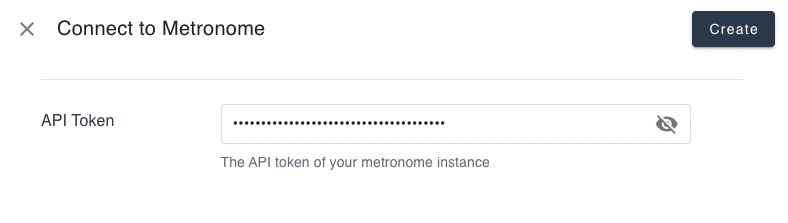
In your [Suger Console Integration](https://console.suger.io/settings?tab=integrations), you will see the Metronome integration connection. Click the `Connect` button to create an integration with your Metronome instance. This will open an dialog for you to input
- **API Token**: The [Metronome API token](https://docs.metronome.com/api-reference/authentication).
- **Billing Mode**: Select one of `quantity`, `amount_hourly` or `amount_daily`. Details about their difference can be found [here](#billing-mode)
>  Once the integration process is finished, you can proceed by clicking the `VERIFY` button. This action triggers the Suger service to test the connection to the APIs of your Metronome instance. If everything is configured correctly, the integration status will be updated as `VERIFIED`.
## Edit Integration
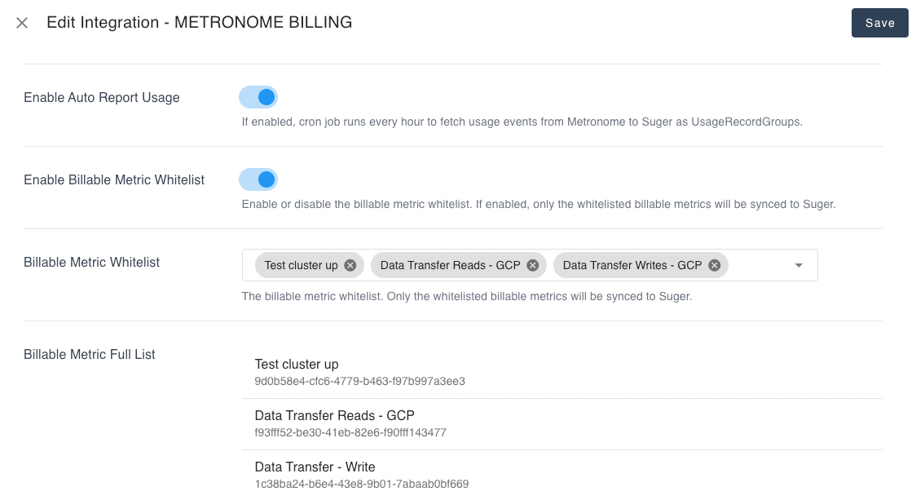
Editing an existing Metronome integration is supported. Click the `Edit` button to open the dialog of editing Metronome integration as shown below.
- **Enable Auto Report Usage**. You can choose to enable or disable the automatic usage report feature for Metronome. Enabling this feature allows Suger to run an hourly cron job to retrieve the aggregated usage events from Metronome and report them as UsageRecordGroups to the [Suger metering API](/get-started/metering). On the other hand, disabling this feature means that no cron job will be scheduled for this purpose.
- **Billing Mode**: `quantity`, `amount_hourly` or `amount_daily`. Details about their difference can be found [here](#billing-mode)
Following features are available when the billing mode is `amount_hourly` or `amount_daily`:
- **Enable Report Finalized Invoice Only**: If enabled, Suger will only report finalized invoices to cloud marketplaces. By default, Suger will also report draft invoices to cloud marketplaces.
- **Enable Invoice End Date Check**: If enabled, Suger will check the `end date` of the invoice. If the `end date` is not in the entitlement time window, Suger will not report the usage to cloud marketplaces.
- **Enable Auto Credit Back for Voided Invoices**: If enabled, Suger will automatically add reported amount of voided invoices to the entitlement as credit. By default, Suger will not add the voided invoices to the entitlement as credit.
- **Enable Invoice Filter**: If enabled, a JavaScript filter you supply decides which invoices Suger ingests. Leave it off to ingest every invoice that passes the other checks above.
- **Invoice Filter Code**: Applicable only when **Enable Invoice Filter** is on. Your code receives `$invoices` (the array of invoice objects fetched from Metronome) and must set `$target.invoiceIds` to the IDs it wants to keep. For example, to ingest only invoices a Metronome custom field has not opted out:
```javascript
const invoiceIds = [];
for (const invoice of $invoices) {
if (invoice.custom_fields && invoice.custom_fields.suger_ingest_invoice !== 'false') {
invoiceIds.push(invoice.id);
}
}
$target.invoiceIds = invoiceIds;
```
- **Allow Zero Usage Record Group**. By default Suger skips creating a usage record group when a sync produces no usage. Enable this to create the zero-record group anyway — it is still not reported to the cloud marketplace, but it makes "we synced and there was genuinely no usage" distinguishable from "the sync did not run".
> 
:::warning
- Suger only sync invoices with billing periods that **begin on or after the first day of the previous month**. Any billing periods that start before this date will not be reported to cloud marketplaces.
- If the **start date** of the invoice is in the future, Suger will not report the usage to cloud marketplaces.
- **Enable Billable Metric Whitelist**. If enabled, only the billable metrics in the whitelist will be metered & reported from Metronome to cloud marketplaces. Otherwise all the metrics listed in the `Billable Metric Full List` will be metered & reported to cloud marketplaces.
- **Billable Metric Whitelist**. Applicable only when the `Enable Billable Metric Whitelist` is true.
- **Billable Metric Full List**. The full list of billable metrics fetched from Metronome for all available Metronome customers. It is auto fetched from Metronome, not editable.
:::warning
- If the billing mode is `quantity`, please ensure all billable metrics in the `Whitelist` (if the whitelist is enabled) or the `Full List` (if the whitelist is not enabled) have been mapped to their respective cloud marketplace dimensions in the [Metering Dimension Conversion](/get-started/metering#metering-dimension-conversion).
- Metronome Auto Fetch & Report Job: In case any billable metrics from Metronome cannot be successfully converted to metering dimensions in the cloud marketplace, it may result in the entire Metronome auto fetch and report job failing.
- If you notice any discrepancies or missing usage reporting, please verify whether this is caused by incomplete mapping of billable metrics to cloud marketplace dimensions. If so, rectify the mapping accordingly to ensure accurate reporting.
:::
>
Once the integration process is finished, you can proceed by clicking the `VERIFY` button. This action triggers the Suger service to test the connection to the APIs of your Metronome instance. If everything is configured correctly, the integration status will be updated as `VERIFIED`.
## Edit Integration
Editing an existing Metronome integration is supported. Click the `Edit` button to open the dialog of editing Metronome integration as shown below.
- **Enable Auto Report Usage**. You can choose to enable or disable the automatic usage report feature for Metronome. Enabling this feature allows Suger to run an hourly cron job to retrieve the aggregated usage events from Metronome and report them as UsageRecordGroups to the [Suger metering API](/get-started/metering). On the other hand, disabling this feature means that no cron job will be scheduled for this purpose.
- **Billing Mode**: `quantity`, `amount_hourly` or `amount_daily`. Details about their difference can be found [here](#billing-mode)
Following features are available when the billing mode is `amount_hourly` or `amount_daily`:
- **Enable Report Finalized Invoice Only**: If enabled, Suger will only report finalized invoices to cloud marketplaces. By default, Suger will also report draft invoices to cloud marketplaces.
- **Enable Invoice End Date Check**: If enabled, Suger will check the `end date` of the invoice. If the `end date` is not in the entitlement time window, Suger will not report the usage to cloud marketplaces.
- **Enable Auto Credit Back for Voided Invoices**: If enabled, Suger will automatically add reported amount of voided invoices to the entitlement as credit. By default, Suger will not add the voided invoices to the entitlement as credit.
- **Enable Invoice Filter**: If enabled, a JavaScript filter you supply decides which invoices Suger ingests. Leave it off to ingest every invoice that passes the other checks above.
- **Invoice Filter Code**: Applicable only when **Enable Invoice Filter** is on. Your code receives `$invoices` (the array of invoice objects fetched from Metronome) and must set `$target.invoiceIds` to the IDs it wants to keep. For example, to ingest only invoices a Metronome custom field has not opted out:
```javascript
const invoiceIds = [];
for (const invoice of $invoices) {
if (invoice.custom_fields && invoice.custom_fields.suger_ingest_invoice !== 'false') {
invoiceIds.push(invoice.id);
}
}
$target.invoiceIds = invoiceIds;
```
- **Allow Zero Usage Record Group**. By default Suger skips creating a usage record group when a sync produces no usage. Enable this to create the zero-record group anyway — it is still not reported to the cloud marketplace, but it makes "we synced and there was genuinely no usage" distinguishable from "the sync did not run".
> 
:::warning
- Suger only sync invoices with billing periods that **begin on or after the first day of the previous month**. Any billing periods that start before this date will not be reported to cloud marketplaces.
- If the **start date** of the invoice is in the future, Suger will not report the usage to cloud marketplaces.
- **Enable Billable Metric Whitelist**. If enabled, only the billable metrics in the whitelist will be metered & reported from Metronome to cloud marketplaces. Otherwise all the metrics listed in the `Billable Metric Full List` will be metered & reported to cloud marketplaces.
- **Billable Metric Whitelist**. Applicable only when the `Enable Billable Metric Whitelist` is true.
- **Billable Metric Full List**. The full list of billable metrics fetched from Metronome for all available Metronome customers. It is auto fetched from Metronome, not editable.
:::warning
- If the billing mode is `quantity`, please ensure all billable metrics in the `Whitelist` (if the whitelist is enabled) or the `Full List` (if the whitelist is not enabled) have been mapped to their respective cloud marketplace dimensions in the [Metering Dimension Conversion](/get-started/metering#metering-dimension-conversion).
- Metronome Auto Fetch & Report Job: In case any billable metrics from Metronome cannot be successfully converted to metering dimensions in the cloud marketplace, it may result in the entire Metronome auto fetch and report job failing.
- If you notice any discrepancies or missing usage reporting, please verify whether this is caused by incomplete mapping of billable metrics to cloud marketplace dimensions. If so, rectify the mapping accordingly to ensure accurate reporting.
:::
>  ## Delete Integration
The Metronome integration can be deleted like all other integrations. Once the deletion is triggered, all integration info including the API token will be deleted immediately & permanently from Suger. No time window or methods to recover.
## Billing Mode
There are three billing modes available for Suger-Metronome integration: **quantity**, **amount_hourly** or **amount_daily**.
1. **quantity**: Suger fetch & report the billable metrics by quantity every one **HOUR**. Use the original Metronome billable metrics as the source dimension keys in the configuration of [metering dimension conversion](/get-started/metering#metering-dimension-conversion)
2. **amount_hourly**: Suger fetch & report `invoice total amount` every one **HOUR**. The `invoice total amount` is converted to the dimension `metronome` with fixed unit price as **$1**. Use `metronome` as the only source dimension key in the configuration of [metering dimension conversion](/get-started/metering#metering-dimension-conversion).
:::tip
- Suger fetches [Metronome Invoice API](https://docs.metronome.com/api/#operation/listInvoices) every one hour. If there is an increase in the `invoice total amount`, Suger will generate a new usage record and report it to cloud marketplaces. However, if the `invoice total amount` remains the same or decreases, Suger will refrain from creating new usage records..
- In cases where credits are granted to the customer in Metronome, resulting in a potential decrease in the `invoice total amount`, Suger retains a comprehensive history of invoice total amounts and monitors any changes. If the `invoice total amount` decreases or remains unchanged, Suger will suspend the automatic fetching and reporting of usage until it surpasses the maximum value recorded in its history.
:::
3. **amount_daily**: Suger fetch & report the `invoice total amount` every one **DAY**. The total amount is converted to the dimension `metronome` with fixed unit price as **$1**. Use `metronome` as the only source dimension key in the configuration of [metering dimension conversion](/get-started/metering#metering-dimension-conversion).
:::warning
When using the `amount_hourly` or `amount_daily` billing modes, pay attentions to the following:
- Suger tracks each invoice amount using the Metronome `invoice ID` and reports increases to the cloud marketplace on an hourly or daily basis. If a customer’s contract is modified or an operation changes the `invoice ID`, Suger will start reporting amounts based on the new invoice ID. This can lead to a sudden spike in the usage report.
- To avoid this, **schedule contract changes or similar operations to take effect at the beginning of the month**. This approach minimizes disruptions and ensures a smoother and more consistent usage reporting process.
:::
## Delete Integration
The Metronome integration can be deleted like all other integrations. Once the deletion is triggered, all integration info including the API token will be deleted immediately & permanently from Suger. No time window or methods to recover.
## Billing Mode
There are three billing modes available for Suger-Metronome integration: **quantity**, **amount_hourly** or **amount_daily**.
1. **quantity**: Suger fetch & report the billable metrics by quantity every one **HOUR**. Use the original Metronome billable metrics as the source dimension keys in the configuration of [metering dimension conversion](/get-started/metering#metering-dimension-conversion)
2. **amount_hourly**: Suger fetch & report `invoice total amount` every one **HOUR**. The `invoice total amount` is converted to the dimension `metronome` with fixed unit price as **$1**. Use `metronome` as the only source dimension key in the configuration of [metering dimension conversion](/get-started/metering#metering-dimension-conversion).
:::tip
- Suger fetches [Metronome Invoice API](https://docs.metronome.com/api/#operation/listInvoices) every one hour. If there is an increase in the `invoice total amount`, Suger will generate a new usage record and report it to cloud marketplaces. However, if the `invoice total amount` remains the same or decreases, Suger will refrain from creating new usage records..
- In cases where credits are granted to the customer in Metronome, resulting in a potential decrease in the `invoice total amount`, Suger retains a comprehensive history of invoice total amounts and monitors any changes. If the `invoice total amount` decreases or remains unchanged, Suger will suspend the automatic fetching and reporting of usage until it surpasses the maximum value recorded in its history.
:::
3. **amount_daily**: Suger fetch & report the `invoice total amount` every one **DAY**. The total amount is converted to the dimension `metronome` with fixed unit price as **$1**. Use `metronome` as the only source dimension key in the configuration of [metering dimension conversion](/get-started/metering#metering-dimension-conversion).
:::warning
When using the `amount_hourly` or `amount_daily` billing modes, pay attentions to the following:
- Suger tracks each invoice amount using the Metronome `invoice ID` and reports increases to the cloud marketplace on an hourly or daily basis. If a customer’s contract is modified or an operation changes the `invoice ID`, Suger will start reporting amounts based on the new invoice ID. This can lead to a sudden spike in the usage report.
- To avoid this, **schedule contract changes or similar operations to take effect at the beginning of the month**. This approach minimizes disruptions and ensures a smoother and more consistent usage reporting process.
:::