# Webhook
Build & set up the webhook to subscribe to events from Suger service
---
## Overview
Webhooks allow you to build or set up integrations by subscribing to certain events on Suger platform. When one event is triggered, we'll send a `HTTP POST` payload to the webhook's configured URL. Webhooks can be used to update the entitlement status & metering/billing of your clients to your production server.
## Create Webhook
Creating a webhook is a two-step process. You'll first need to set up how you want your webhook to behave through Suger: what events should it listen to. After that, you'll set up your server to receive and manage the payload.
To set up a webhook, go to the [settings page](https://console.suger.io/settings) and find the `Notification` section. From there, click button `Create Webhook`. Webhooks require a few configuration options before you can make use of them. We'll go through each of these settings below.
>  >
>  :::warning
- Each `organization` can only have a single `Webhook`. If your `organization` already has one and would like to create a new one, the old one has to be deleted first.
:::
- #### Payload URL
The payload URL is the URL of the server that will receive the webhook `POST` requests.
- #### Secret
Setting a webhook secret allows you to ensure that `POST` requests sent to the payload URL are from Suger. When you set a secret, you'll receive the `X-Suger-Signature-256` headers in the webhook `POST` request. For more information on how to use a secret with a signature header to secure your webhook payloads, see [Secure Your Webhook](#secure-your-webhook).
- #### Content Type
The webhook request is sent using the default content type as `application/json`, which delivers the JSON payload directly as the body of the `POST` request.
## Edit Webhook
You can edit the webhook by changing the `Payload URL`, `Secret` or both.
>
:::warning
- Each `organization` can only have a single `Webhook`. If your `organization` already has one and would like to create a new one, the old one has to be deleted first.
:::
- #### Payload URL
The payload URL is the URL of the server that will receive the webhook `POST` requests.
- #### Secret
Setting a webhook secret allows you to ensure that `POST` requests sent to the payload URL are from Suger. When you set a secret, you'll receive the `X-Suger-Signature-256` headers in the webhook `POST` request. For more information on how to use a secret with a signature header to secure your webhook payloads, see [Secure Your Webhook](#secure-your-webhook).
- #### Content Type
The webhook request is sent using the default content type as `application/json`, which delivers the JSON payload directly as the body of the `POST` request.
## Edit Webhook
You can edit the webhook by changing the `Payload URL`, `Secret` or both.
>  ## Test Webhook
The webhook can be tested by clicking the button `TEST`. A test event is sent as `POST` request from Suger to the payload URL. See the [event payload schema](#webhook-event-payload) for details. You can verify whether your webhook endpoint could receive the request and validate the `signature` (more details see [Secure Your Webhook](#secure-your-webhook)).
```json [Payload of webhook test event]
{
"organizationID": "your-suger-organization-id",
"action": "TEST",
"entityType": "ORGANIZATION",
"entityID": "your-suger-organization-id",
"timestamp": "2023-02-03T03:47:09.128234Z"
}
```
## Configure Webhook Scope
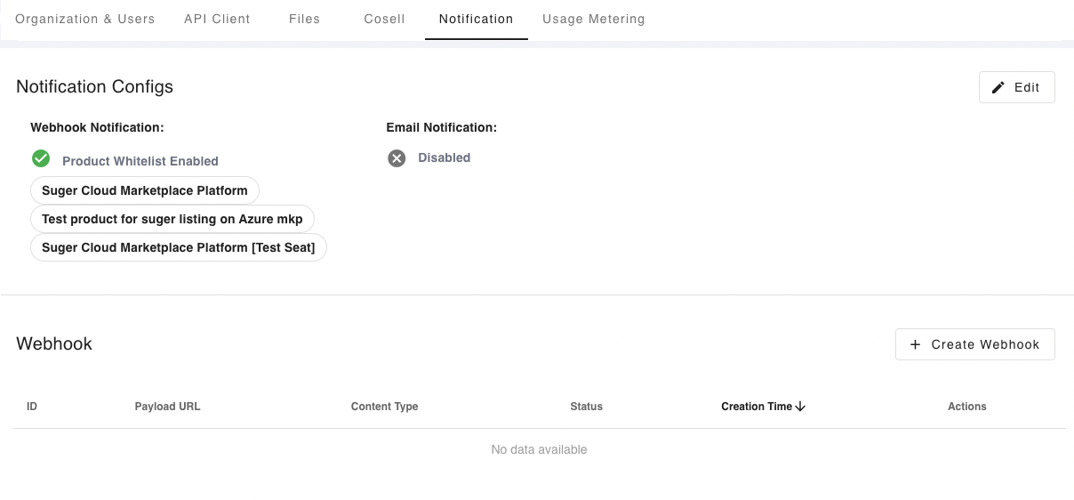
By enabling the webhook scope configuration, you can create a whitelist of products for the events to be notified via webhook. Go to the [settings page](https://console.suger.io/settings) and find the `Notification` section. From there, click the button `Edit` of Notification Configs. Now you can specify the webhook scope as shown below.
>
## Test Webhook
The webhook can be tested by clicking the button `TEST`. A test event is sent as `POST` request from Suger to the payload URL. See the [event payload schema](#webhook-event-payload) for details. You can verify whether your webhook endpoint could receive the request and validate the `signature` (more details see [Secure Your Webhook](#secure-your-webhook)).
```json [Payload of webhook test event]
{
"organizationID": "your-suger-organization-id",
"action": "TEST",
"entityType": "ORGANIZATION",
"entityID": "your-suger-organization-id",
"timestamp": "2023-02-03T03:47:09.128234Z"
}
```
## Configure Webhook Scope
By enabling the webhook scope configuration, you can create a whitelist of products for the events to be notified via webhook. Go to the [settings page](https://console.suger.io/settings) and find the `Notification` section. From there, click the button `Edit` of Notification Configs. Now you can specify the webhook scope as shown below.
>  ## Secure Your Webhook
Ensure your server is only receiving the expected Suger requests for security reasons. Once your server is configured to receive payloads, it'll listen for any payload sent to the endpoint you configured. For security reasons, you probably want to limit requests to those coming from Suger.
When your secret token is set, Suger uses it to create a hash signature ([`HMAC SHA 256`](https://docs.microsoft.com/en-us/dotnet/api/system.security.cryptography.hmacsha256?view=net-6.0)) with each payload. This hash signature is included with the headers of each request as `X-Suger-Signature-256`. You can validate it by computing the signature in your server like this:
### Ruby
```ruby
def verify_signature(payload_body, webhook_secret, signature_from_request)
signature = "sha256=" + OpenSSL::HMAC.hexdigest(
OpenSSL::Digest.new("sha256"),
webhook_secret,
payload_body,
)
return halt 500, "Signatures didn't match!" unless Rack::Utils.secure_compare(
signature,
signature_from_request,
)
end
```
### Golang
```go
func verify_signature(payload_body []byte, webhook_secret string, signature_from_request string) bool {
h := hmac.New(sha256.New, []byte(webhook_secret))
h.Write(payload_body)
signature := "sha256=" + hex.EncodeToString(h.Sum(nil))
return signature == signature_from_request
}
```
### Elixir
```elixir
hash =
:crypto.mac(:hmac, :sha256, secret, payload)
|> Base.encode16()
|> then(&("SHA256=" <> &1))
[signature] = get_req_header(conn, "X-suger-signature-256")
if String.upcase(signature) == hash do
true
end
```
Here is an example of signature you can use to test your code:
| | |
| ---------------- | :------ |
| Webhook Secret | new-test-webhook-secret |
| Payload Body | `{"organizationID":"gYZf-_JtH","action":"TEST","entityType":"ORGANIZATION","entityID":"gYZf-_JtH"}` |
| X-suger-signature-256 | sha256=5bc797b5f4508d4424edbe608faf1b57fe613b5d08256495e6c8cac0ef5b2584 |
:::danger
- Your language and server implementations may differ from this example code. However, no matter which implementation you use, the hash signature starts with "`sha256=`", using the key of your secret token and your payload body.
:::
## Webhook Event Payload
After the webhook is created & configured, the triggered event is sent as `POST` request to the `Payload URL`. Each webhook event payload also contains properties unique to the event. You can find the unique properties in the sections below.
| Key | Type | Description |
| ---------------- | ------ | :-------- |
| `organizationID` | `string` | The ID of Suger `organization` |
| `action` | `string` | The action performed. Can be one of:
## Secure Your Webhook
Ensure your server is only receiving the expected Suger requests for security reasons. Once your server is configured to receive payloads, it'll listen for any payload sent to the endpoint you configured. For security reasons, you probably want to limit requests to those coming from Suger.
When your secret token is set, Suger uses it to create a hash signature ([`HMAC SHA 256`](https://docs.microsoft.com/en-us/dotnet/api/system.security.cryptography.hmacsha256?view=net-6.0)) with each payload. This hash signature is included with the headers of each request as `X-Suger-Signature-256`. You can validate it by computing the signature in your server like this:
### Ruby
```ruby
def verify_signature(payload_body, webhook_secret, signature_from_request)
signature = "sha256=" + OpenSSL::HMAC.hexdigest(
OpenSSL::Digest.new("sha256"),
webhook_secret,
payload_body,
)
return halt 500, "Signatures didn't match!" unless Rack::Utils.secure_compare(
signature,
signature_from_request,
)
end
```
### Golang
```go
func verify_signature(payload_body []byte, webhook_secret string, signature_from_request string) bool {
h := hmac.New(sha256.New, []byte(webhook_secret))
h.Write(payload_body)
signature := "sha256=" + hex.EncodeToString(h.Sum(nil))
return signature == signature_from_request
}
```
### Elixir
```elixir
hash =
:crypto.mac(:hmac, :sha256, secret, payload)
|> Base.encode16()
|> then(&("SHA256=" <> &1))
[signature] = get_req_header(conn, "X-suger-signature-256")
if String.upcase(signature) == hash do
true
end
```
Here is an example of signature you can use to test your code:
| | |
| ---------------- | :------ |
| Webhook Secret | new-test-webhook-secret |
| Payload Body | `{"organizationID":"gYZf-_JtH","action":"TEST","entityType":"ORGANIZATION","entityID":"gYZf-_JtH"}` |
| X-suger-signature-256 | sha256=5bc797b5f4508d4424edbe608faf1b57fe613b5d08256495e6c8cac0ef5b2584 |
:::danger
- Your language and server implementations may differ from this example code. However, no matter which implementation you use, the hash signature starts with "`sha256=`", using the key of your secret token and your payload body.
:::
## Webhook Event Payload
After the webhook is created & configured, the triggered event is sent as `POST` request to the `Payload URL`. Each webhook event payload also contains properties unique to the event. You can find the unique properties in the sections below.
| Key | Type | Description |
| ---------------- | ------ | :-------- |
| `organizationID` | `string` | The ID of Suger `organization` |
| `action` | `string` | The action performed. Can be one of:- `ACCEPT`: the offer is accept.
- `CREATE`: the entity is created.
- `CANCEL`: the entity is cancelled.
- `METER`: for usage metering.
- `PENDING_CANCEL`: the entity is pending to be cancelled.
- `SUSPEND`: the entity is suspended, it may be reinstated or cancelled in the future.
- `REINSTATE`: the entity is reinstated from suspended state.
- `UPDATE`: the entity is updated.
- `TEST`: for testing purpose only. [More details](#test-webhook).
|
| `entityType` | `string` | The type of the `entity` who are under the `action`. Can be one of:- `ORGANIZATION`
- `PRODUCT`
- `OFFER`
- `ENTITLEMENT`
- `INTEGRATION`
|
| `entityID` | `string` | The ID of the `entity` |
:::warning
- For the event with `entityType` = `ENTITLEMENT` and `action` = `PENDING_CANCEL`, the entitlement will be cancelled within ONE hour. Your service is responsible to report all remaining usage records to Suger within 30 minutes once receiving this event.
- For the event with `entityType` = `ENTITLEMENT` and `action` = `SUSPEND`, the most common reason is the buyer's cloud billing account fails to pay the invoice in cloud marketplaces. It requires your revenue team or customer account manager to investigate the issue together with your clients.
- Full list of `action` and `entityType` can be found in the [API definition of notification events](https://doc.suger.io/api/list-notification-events/#responses) -> Responses -> Schema -> notificationEvents.
:::
## Webhook Retry & Expire
1. Suger service sends each webhook event only once if succeed (receive `HTTP status 200`). Otherwise it will retry to send events after 10 seconds, 20 seconds, 40 seconds and then 1 minute (max retry gap duration) for 12 hours. The events who have not been sent successfully for 12 hours will expire and no retry any more.
2. For the same `entity`, if the previous event is not sent successfully, but the new one has come, then the previous one expires immediately. Your webhook endpoint only receive the latest event for each `entity`.