# Usage Metering
Unified Usage Metering interface to cover all pricing models crossing all marketplaces
---
## Overview
There are varies of pricing models crossing the cloud marketplaces. Some of them share the same name, but have totally different models. For example, `AWS Subscription` is Pay-as-you-go (usage-based metering), but `GCP Subscription` is flat-monthly-commit without usage-based metering.
| Vendor | Pricing Model | Description | Support Usage-based Metering |
| --------- | :----------: | :-------- | :-------: |
| `AWS` | `Subscription` | `Pay-as-you-go`, no commit, buyers can cancel any time. | YES |
| `AWS` | `Contract` | Commit contract, can't be cancelled, buyers can also pay for additional usage above their contract. | YES |
| `Azure` | `Flat Rate` | Monthly or annually commit contract, buyers can also pay for additional usage above their contract (included quantity). | YES |
| `Azure` | `Per User` | Monthly or annually commit contract per user, support updating user quantity, buyers can also pay for additional usage above their contract (included quantity). | YES |
| `GCP` | `Subscription-based` | Flat rate commit contract. | NO |
| `GCP` | `Usage-based` | `Pay-as-you-go`, no commit. | YES |
| `GCP` | `Combined` | Flat rate commit + `Usage-based` together. | YES |
| `Oracle` | `Private Offer` | Commit contract. Metered usage is reported as a **monetary amount** rather than a quantity — see [Oracle usage metering](/oracle-marketplace/usage-metering). | YES |
## Report Usage from the Console
You can report usage manually from the Suger Console without calling the API.
1. Go to the **Suger Console**.
2. Navigate to the **Usage Metering** tab.
3. Click **+ Report Usage**.
4. Fill in all required fields, including:
- Customer details.
- Usage metrics and metering data.
5. Click **Report** to submit the usage.
## Meter Usage Records
To meter usages for an active `Entitlement` in `AWS`, `Azure`, `GCP` or `Oracle`, your service can send a `POST` request to the [Suger Metering API](https://doc.suger.io/api/report-usage-record-group) with a body similar to the following example. Suger will validate, aggregate & report them to the right vendor within the right pricing model format.
For `Oracle`, note that the reported value is the **monetary amount**, not a quantity, and usage keys do not need to be configured in advance — see [Oracle usage metering](/oracle-marketplace/usage-metering).
```json
{
"ID": "uuid", # optional, if not provided, suger will generate one and return in the response.
"organizationID": "your-suger-org-id",
"entitlementID": "your-suger-entitlement-id",
"records": {
"dimension-key-or-name-0": 2,
"dimension-key-or-name-2": 6,
"dimension-key-or-name-3": 10,
}
}
```
:::warning
- It is highly recommended to provide `ID` in the metering usage records request body. Suger service can deduplicate the metering requests if they have the same `ID`. The duplicate request will return HTTP error 409.
- The 'key' in the records map can be either the usage metering `Dimension Key` or `Dimension Name`. They are available inside the entitlement's `info.dimensions` — see [List Entitlements](/api/list-entitlements/).
:::
## Usage Metering for AWS Concurrent Agreements
Once a product is opted into [AWS Marketplace Concurrent Agreements](/aws-marketplace/integration/#enable-concurrent-agreements), a buyer can hold multiple active agreements for the same product in the same AWS account at the same time. This changes how usage needs to be reported — a plain product-code-and-customer-account usage report is no longer enough for AWS to tell which of the buyer's agreements the usage belongs to.
:::warning
Orb and Metronome usage-sync integrations do not currently disambiguate between a buyer's concurrent agreements for the same product. If your product has Concurrent Agreements enabled, usage reported through Orb or Metronome can be attributed to the wrong agreement. We recommend reporting usage through Suger directly instead — see below.
:::
### Recommended: report through Suger
If you already report usage through the [Suger Metering API](https://doc.suger.io/api/report-usage-record-group) using `entitlementID`, no changes are needed on your end. Suger creates a separate `Entitlement` for each concurrent agreement, tied to its unique AWS `LicenseArn`, and automatically includes the correct `LicenseArn` when reporting usage to AWS on your behalf.
### Reporting directly to AWS yourself
If you report usage straight to AWS's `BatchMeterUsage` API instead of through Suger, include the buyer's `LicenseArn` for the specific agreement so AWS knows which agreement the usage applies to.
:::danger
Do **not** include `ProductCode` on the usage record — for concurrent-agreement products, AWS identifies the agreement by `LicenseArn` alone, and including `ProductCode` alongside it will cause AWS to reject the record.
:::
```json
{
"UsageRecords": [
{
"CustomerAWSAccountId": "123456789012",
"LicenseArn": "arn:aws:license-manager:us-east-1:123456789012:license:l-example",
"Dimension": "users",
"Timestamp": "2026-07-24T18:00:00Z",
"Quantity": 25
}
]
}
```
`LicenseArn` above is a placeholder — replace it with the buyer's actual agreement ARN.
Check AWS Marketplace API Reference for more details on the `BatchMeterUsage` API: [https://docs.aws.amazon.com/marketplace/latest/userguide/saas-metering.html](https://docs.aws.amazon.com/marketplace/latest/APIReference/API_marketplace-metering_BatchMeterUsage.html).
## AMI & Container Products
:::important
For AMI & container usage products, the usage must be reported directly from within the EC2 instance or container at runtime via [MeterUsage API](https://docs.aws.amazon.com/marketplace/latest/APIReference/API_marketplace-metering_MeterUsage.html). Also see the language-specific SDK documentation for [MeterUsage](https://docs.aws.amazon.com/java/api/latest/software/amazon/awssdk/services/marketplacemetering/MarketplaceMeteringClient.html)
Suger does not support reporting usage for container products on your behalf.
:::
## Usage Allocation with Tags (for AWS Marketplace)
For sellers on AWS Marketplace, Suger supports [Vendor-metered tagging](https://docs.aws.amazon.com/marketplace/latest/userguide/metering-for-usage.html#saas-vendor-metered-tagging). This feature allows you to provide buyers with a more granular view of their software usage, which helps them with cost allocation.
You can define usage allocation tags, create your own cost categories, and then allocate customer usage across those categories. These tags are propagated to the buyer's AWS Billing Console, allowing customers to view their charges broken down by the tag values.
To use this feature, include the optional `usageAllocations` field in your `POST` request to the [Suger Metering API](https://doc.suger.io/api/report-usage-record-group).
The `usageAllocations` field is a map where:
- The **key** is the metering dimension key you want to allocate.
- The **value** is an array of `UsageAllocation` objects.
Each `UsageAllocation` object contains:
- `quantity`: The portion of usage to allocate.
- `tags`: An array of `UsageAllocationTag` objects (key-value pairs) that categorize the usage.
For a given dimension, the sum of all `quantity` values in the `usageAllocations` array must equal the total quantity for that dimension in the `records` map.
### Example
Here's how to report usage for a dimension `seats` and allocate it to two different teams, "Engineering" and "Sales":
```json
{
"entitlementID": "your-suger-entitlement-id",
"records": {
"seats": 15
},
"usageAllocations": {
"seats": [
{
"quantity": 10,
"tags": [
{ "key": "cost-center", "value": "engineering" }
]
},
{
"quantity": 5,
"tags": [
{ "key": "cost-center", "value": "sales" }
]
}
]
}
}
```
In this example:
- Total usage for the `seats` dimension is 15.
- 10 units are allocated to the `engineering` cost center.
- 5 units are allocated to the `sales` cost center.
- The buyer will see these costs broken down by the `cost-center` tag in their AWS Billing Console.
:::warning
- Currently, this feature is only supported for AWS Marketplace.
- AWS has some limitations: you can define up to 5 tag keys per resource. Each tag key can have up to 100 unique values.
- The sum of `allocatedUsage` quantities must equal the total reported usage for that dimension.
:::
## Batch Meter Usage Records
You can efficiently report multiple usage records for various entitlements or buyers simultaneously using either the Suger Console or the [Suger API doc](https://doc.suger.io/api/batch-report-usage-record-groups).
### Upload CSV
By simply uploading a CSV file containing raw usage data, you can quickly and effortlessly report multiple records. The CSV file should include specific required columns as show below, which are crucial for accurate reporting.
| Column Name | Requirements | Description |
| :----------- | :----------- | :----------- |
| sugerBuyerId | Only require one of `sugerBuyerId`, `sugerExternalBuyerId`, `customerId` or `sugerExternalEntitlementId` | The buyer ID in Suger platform |
| sugerExternalBuyerId | Only require one of `sugerBuyerId`, `sugerExternalBuyerId`, `customerId` or `sugerExternalEntitlementId` | The external buyer ID in Suger platform, which comes from marketplaces |
| customerId | Only require one of `sugerBuyerId`, `sugerExternalBuyerId`, `customerId` or `sugerExternalEntitlementId` | The buyer ID in your own system |
| sugerExternalEntitlementId | Only require one of `sugerBuyerId`, `sugerExternalBuyerId`, `customerId` or `sugerExternalEntitlementId` | The external entitlement ID in Suger platform, which comes from marketplaces |
| dimension | Required | The dimension key used to meter the customer |
| quantity | Required, float or integer number | The quantity of the usage dimension |
| timestamp | Optional, must be in format of `YYYY-MM-DD` or ISO 8601 `2023-09-07T15:30:00Z` | The date/timestamp when the usage were recorded in your metering/billing system. NOT the date/timestamp when the usage are reported to the Suger |
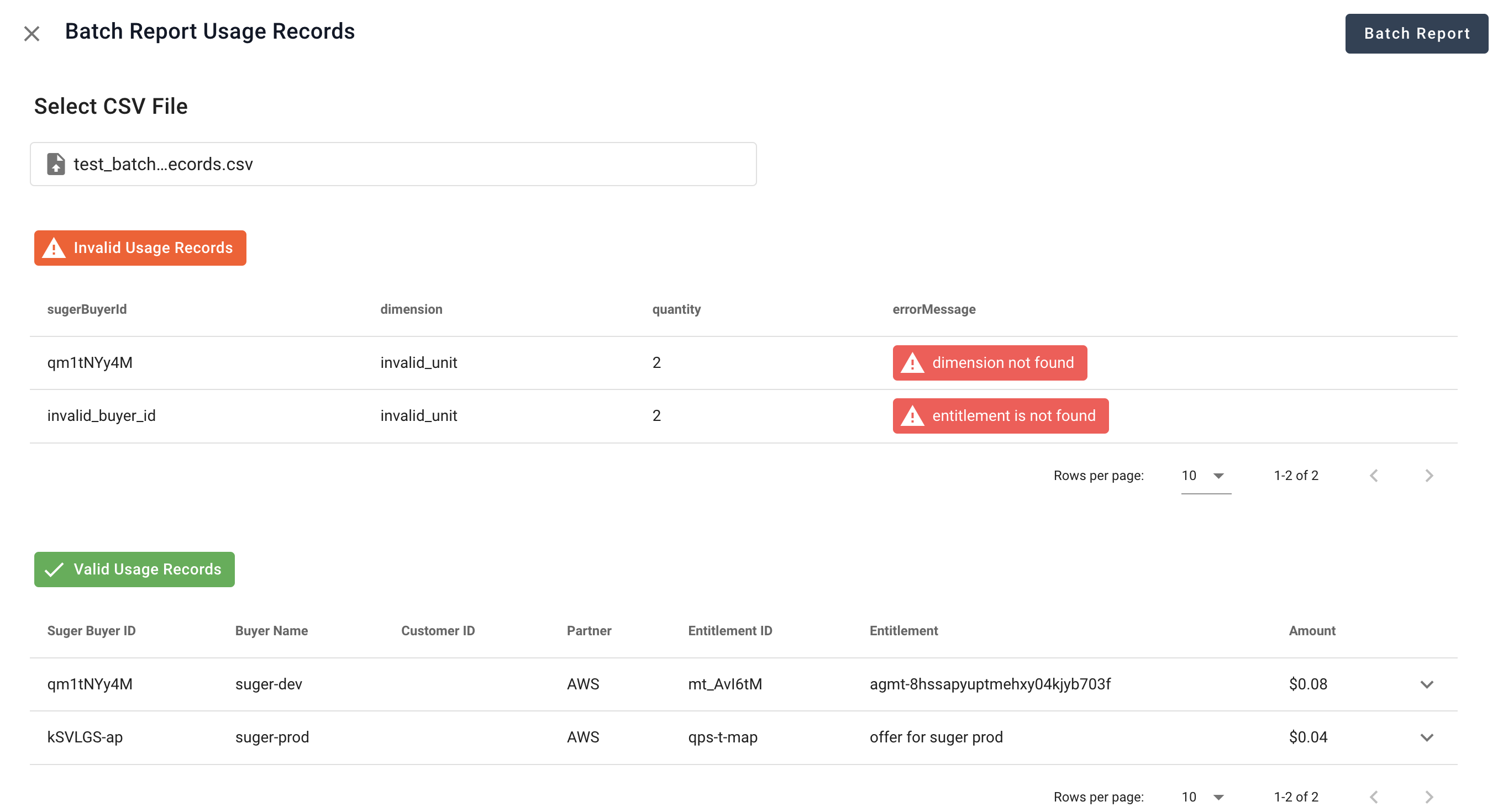
Once uploaded, Suger will validate the usage records within the CSV and highlight any invalid entries with corresponding error messages. This ensures that only valid usage records are eligible for batch reporting to Suger.
>  ## Limit to Report Old Usage Records
Most cloud marketplaces recommend reporting usage records within 1 hour of their metering. However, they do allow some flexibility for reporting older usage records as shown below table. If a usage record has a timestamp later than the official hard limit, the marketplace's metering service will not accept or process it.
:::warning
- To provide a safety margin, the Suger metering service reduces the official limit by one hour..
- Usage records with timestamps within the Suger limit are reported with their original timestamp, while those outside this limit are reported with the timestamp of the Suger limit.
:::
| | Official Hard Limit | Suger Limit |
| ----------- | ------------------- | ----------- |
| AWS | 6 hours | 5 hours |
| AZURE | 24 hours | 23 hours |
| GCP | 6 hours | 5 hours |
## Usage Records Validation
When the usage records are sent to Suger via the [Suger Metering API](/api/report-usage-record-group/), they are validated immediately, and return errors if they are not valid. Here is the list of all rules used for validation in Suger service, and their returned error.
| Rule | Error If Invalid |
| ---- | ---------------- |
| The `ID` in the request body should be unique | HTTP Conflict request with code 409 |
| The length of `ID` in the request body should not exceed 36 | HTTP bad request with code 400 |
| The target `Entitlement` must be in `ACTIVE`, `SUSPENDED` or `PENDING_CANCEL` status | HTTP bad request with code 400 |
| The `Key` in the Record should be valid for the target `Entitlement`. It is either the Dimension Key or the Dimension Name | HTTP bad request with code 400 |
| The `Quantity` in the usage Record should be non-negative | HTTP bad request with code 400 |
| At least one usage Record has positive `Quantity` | HTTP bad request with code 400 |
## Metering Dimension Conversion
Under certain scenarios below, you may consider to enable & configure `Metering Dimension Conversion`.
- The dimension names in your metering system are different from those in cloud marketplaces, and you don't want to change either.
- A new metering dimension is added to your product, and you want to meter your existing clients in cloud marketplace, however their entitlements do not include new metering dimension.
>
## Limit to Report Old Usage Records
Most cloud marketplaces recommend reporting usage records within 1 hour of their metering. However, they do allow some flexibility for reporting older usage records as shown below table. If a usage record has a timestamp later than the official hard limit, the marketplace's metering service will not accept or process it.
:::warning
- To provide a safety margin, the Suger metering service reduces the official limit by one hour..
- Usage records with timestamps within the Suger limit are reported with their original timestamp, while those outside this limit are reported with the timestamp of the Suger limit.
:::
| | Official Hard Limit | Suger Limit |
| ----------- | ------------------- | ----------- |
| AWS | 6 hours | 5 hours |
| AZURE | 24 hours | 23 hours |
| GCP | 6 hours | 5 hours |
## Usage Records Validation
When the usage records are sent to Suger via the [Suger Metering API](/api/report-usage-record-group/), they are validated immediately, and return errors if they are not valid. Here is the list of all rules used for validation in Suger service, and their returned error.
| Rule | Error If Invalid |
| ---- | ---------------- |
| The `ID` in the request body should be unique | HTTP Conflict request with code 409 |
| The length of `ID` in the request body should not exceed 36 | HTTP bad request with code 400 |
| The target `Entitlement` must be in `ACTIVE`, `SUSPENDED` or `PENDING_CANCEL` status | HTTP bad request with code 400 |
| The `Key` in the Record should be valid for the target `Entitlement`. It is either the Dimension Key or the Dimension Name | HTTP bad request with code 400 |
| The `Quantity` in the usage Record should be non-negative | HTTP bad request with code 400 |
| At least one usage Record has positive `Quantity` | HTTP bad request with code 400 |
## Metering Dimension Conversion
Under certain scenarios below, you may consider to enable & configure `Metering Dimension Conversion`.
- The dimension names in your metering system are different from those in cloud marketplaces, and you don't want to change either.
- A new metering dimension is added to your product, and you want to meter your existing clients in cloud marketplace, however their entitlements do not include new metering dimension.
>  By enable & configure `Metering Dimension Conversion`, you can map your dimension keys from your metering system to the cloud marketplace by using multiplier factor.
>
By enable & configure `Metering Dimension Conversion`, you can map your dimension keys from your metering system to the cloud marketplace by using multiplier factor.
>  :::danger
- Once you enable & configure the `Metering Dimension Conversion` for one cloud marketplace, it is applied to all entitlements in this cloud marketplace.
- When the Suger metering API receives usage records, it applies a predefined mapping (if it is enabled) to convert the dimensions. Any dimensions that cannot be mapped will be left **unchanged**.
- You can map multiple source dimensions to single destination dimensions with different multiplier value.
:::
## Commit with Additional Usage Metering
In AWS or Azure Marketplace, a contract or entitlement with commit and usage metering doesn't accumulate usage by default, and consumes the commit first. This means that ISVs or sellers have to set up their own metering system to track usage, and report any extra usage to the marketplace if it exceeds the prepaid commit.
To simplify the configuration and remove friction, Suger offers an optional feature called **Commit with additional usage metering**. When enabled, Suger automatically accumulates all usage records and compares them with the commit. If the commit isn't fully used, the usage records won't be reported to the marketplace. Only usage records that exceed the commit are reported to the marketplace. This feature streamlines the process and reduces the need for sellers to set up their own metering system.
How to enable **Commit with additional usage metering**? Visit [Suger Console Settings](https://console.suger.io/settings) and select the `Usage Metering` tab. Click the editing icon to enable or disable the **Commit with additional usage metering** for the target marketplace.
:::warning
- We don't recommend to enable `Commit with additional usage metering` in GCP Marketplace since it hase the native pricing model to support the same function.
:::
## Commit with Additional Usage at List Price
In both AWS and Azure Marketplaces, the usage metering price is typically the negotiated price after the commit amount has been used up. They do not support metering of extra usage beyond the committed amount at the list price.
To make the configuration process simpler and more streamlined, Suger offers an optional feature called **Commit with Additional Usage at List Price**. When this feature is enabled, Suger automatically adjusts the quantity of received usage records by calculating the ratio of the list price to the negotiated price. This ensures that buyers are billed at the list price for any additional usage beyond the committed amount.
How to enable **Commit with additional usage at list price**? Visit [Suger Console Settings](https://console.suger.io/settings) and select the `Usage Metering` tab. Click the editing icon to enable or disable the **Commit with additional usage at list price** for the target marketplace.
:::warning
- We don't recommend to enable `Commit with additional usage at list price` in GCP Marketplace since it hase the native pricing model to support the same function.
- Before enabling `Commit with Additional Usage at List Price`, you must first activate `Commit with Additional Usage Metering`.
:::
## Divide Entitlement Commit
The GCP, Azure, and AWS Marketplaces do not currently offer support for the pricing model that combines a prepay one-year commitment with monthly overage metering. For instance, a private offer might include a one-year commitment of $120K, paid upfront by the client. The client then receives $10K in credits for prepaid usage each month. If the client's actual usage within a particular month is below $10K, there will be no overage usage metering, and no additional charges will apply. However, if the client's usage exceeds $10K during any month, they will be billed for the overage usage that exceeds the prepaid amount.
Suger introduces the flexibility to divide upfront/parent entitlement commit to multiple sub entitlement terms of credits. So the overage usage can be metered more granularly within each sub entitlement term.
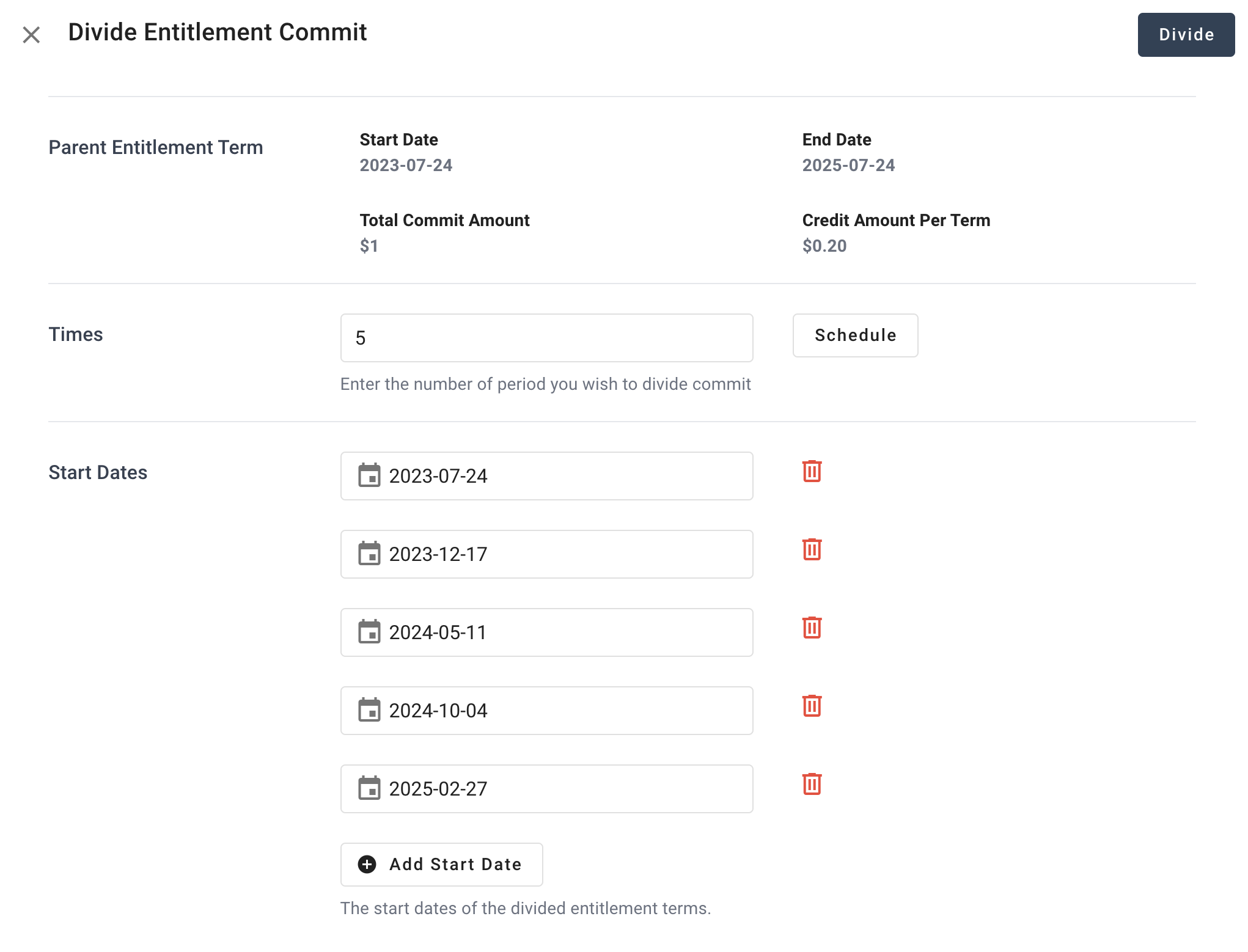
1. Click the button `Divide Commit` to open the dialog below. Configure the start dates for each sub entitlement terms, and click the button `Divide`.
>
:::danger
- Once you enable & configure the `Metering Dimension Conversion` for one cloud marketplace, it is applied to all entitlements in this cloud marketplace.
- When the Suger metering API receives usage records, it applies a predefined mapping (if it is enabled) to convert the dimensions. Any dimensions that cannot be mapped will be left **unchanged**.
- You can map multiple source dimensions to single destination dimensions with different multiplier value.
:::
## Commit with Additional Usage Metering
In AWS or Azure Marketplace, a contract or entitlement with commit and usage metering doesn't accumulate usage by default, and consumes the commit first. This means that ISVs or sellers have to set up their own metering system to track usage, and report any extra usage to the marketplace if it exceeds the prepaid commit.
To simplify the configuration and remove friction, Suger offers an optional feature called **Commit with additional usage metering**. When enabled, Suger automatically accumulates all usage records and compares them with the commit. If the commit isn't fully used, the usage records won't be reported to the marketplace. Only usage records that exceed the commit are reported to the marketplace. This feature streamlines the process and reduces the need for sellers to set up their own metering system.
How to enable **Commit with additional usage metering**? Visit [Suger Console Settings](https://console.suger.io/settings) and select the `Usage Metering` tab. Click the editing icon to enable or disable the **Commit with additional usage metering** for the target marketplace.
:::warning
- We don't recommend to enable `Commit with additional usage metering` in GCP Marketplace since it hase the native pricing model to support the same function.
:::
## Commit with Additional Usage at List Price
In both AWS and Azure Marketplaces, the usage metering price is typically the negotiated price after the commit amount has been used up. They do not support metering of extra usage beyond the committed amount at the list price.
To make the configuration process simpler and more streamlined, Suger offers an optional feature called **Commit with Additional Usage at List Price**. When this feature is enabled, Suger automatically adjusts the quantity of received usage records by calculating the ratio of the list price to the negotiated price. This ensures that buyers are billed at the list price for any additional usage beyond the committed amount.
How to enable **Commit with additional usage at list price**? Visit [Suger Console Settings](https://console.suger.io/settings) and select the `Usage Metering` tab. Click the editing icon to enable or disable the **Commit with additional usage at list price** for the target marketplace.
:::warning
- We don't recommend to enable `Commit with additional usage at list price` in GCP Marketplace since it hase the native pricing model to support the same function.
- Before enabling `Commit with Additional Usage at List Price`, you must first activate `Commit with Additional Usage Metering`.
:::
## Divide Entitlement Commit
The GCP, Azure, and AWS Marketplaces do not currently offer support for the pricing model that combines a prepay one-year commitment with monthly overage metering. For instance, a private offer might include a one-year commitment of $120K, paid upfront by the client. The client then receives $10K in credits for prepaid usage each month. If the client's actual usage within a particular month is below $10K, there will be no overage usage metering, and no additional charges will apply. However, if the client's usage exceeds $10K during any month, they will be billed for the overage usage that exceeds the prepaid amount.
Suger introduces the flexibility to divide upfront/parent entitlement commit to multiple sub entitlement terms of credits. So the overage usage can be metered more granularly within each sub entitlement term.
1. Click the button `Divide Commit` to open the dialog below. Configure the start dates for each sub entitlement terms, and click the button `Divide`.
>  2. There are multiple sub entitlement terms created on top of the original upfront/parent entitlement term, with type of `DivideCommit` as shown below.
>
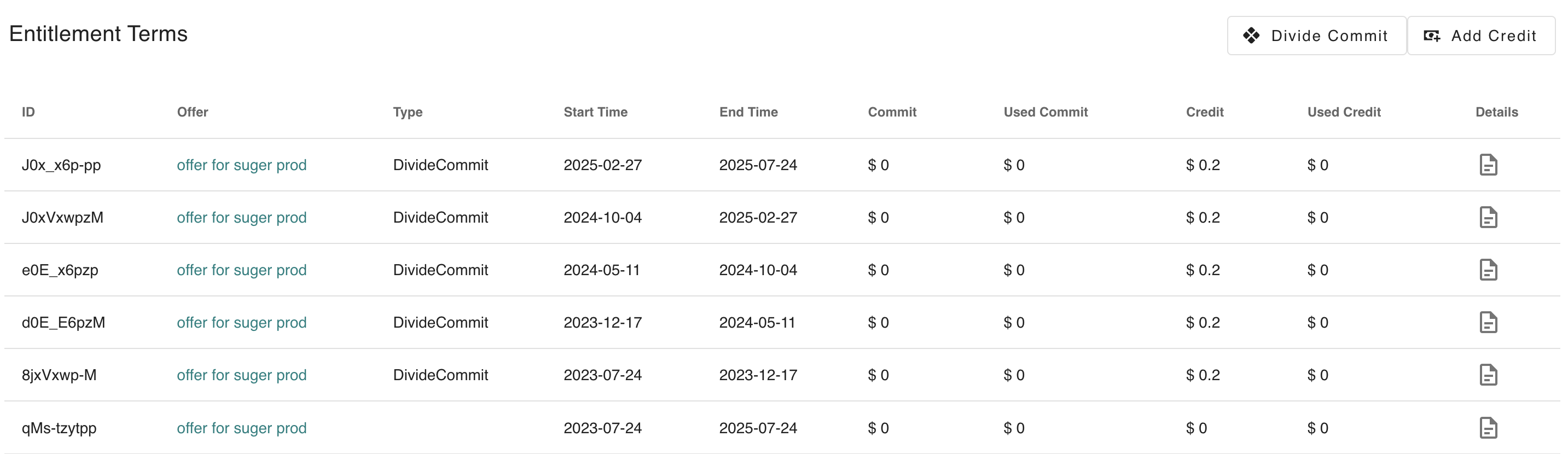
2. There are multiple sub entitlement terms created on top of the original upfront/parent entitlement term, with type of `DivideCommit` as shown below.
>