# Billable Metrics
Define metrics to track usage and consumption.
---
The Billable Metrics are used to define the goals and aggregation type of metering.
You can define the metrics according to your business needs, such as the number of API calls, the amount of storage, the number of users, etc.
Billable metrics are the master templates for what you measure. Before you can report usage to AWS, Azure, or GCP, you must define the unit of measurement within Suger.
## Create billable metric
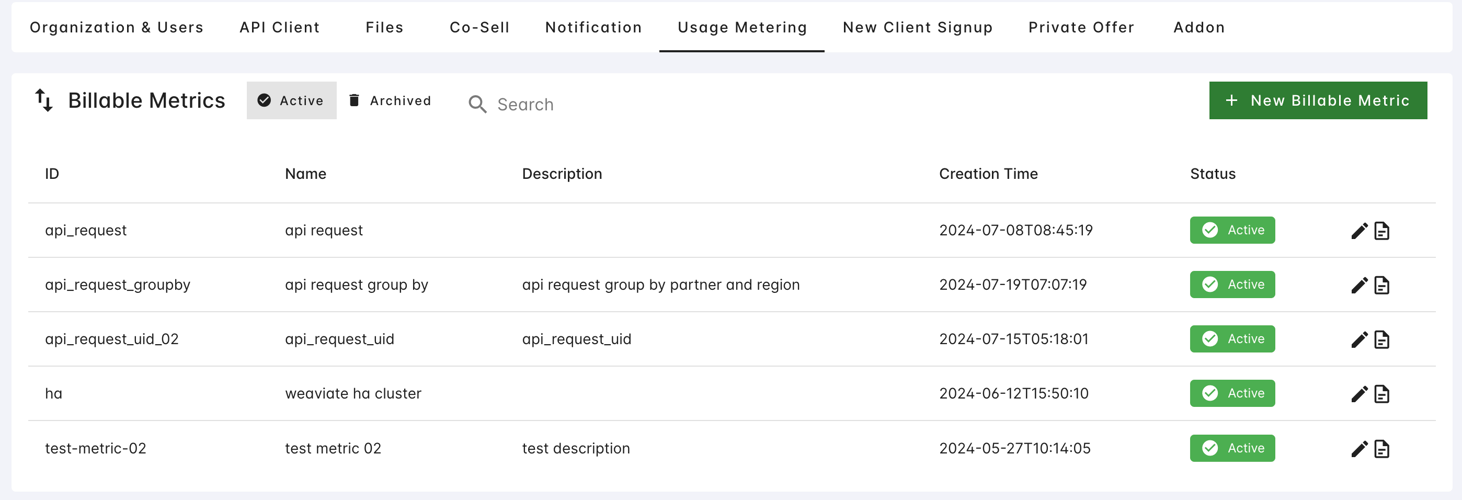
You can create a new billable metric in the [**Settings > Usage Metering**](https://console.suger.io/settings?tab=usage_metering) page.
They should be created before creating the offer which contains a usage-based price model.
1. **Navigate to Settings**: In the Suger Console, go to [**Settings > Usage Metering**](https://console.suger.io/settings?tab=usage_metering).
2. **Add Metric**: Click the **+ Add billable metric** button.
3. **Configure the basic information** and rules described below.
4. Click **Create**.
> 
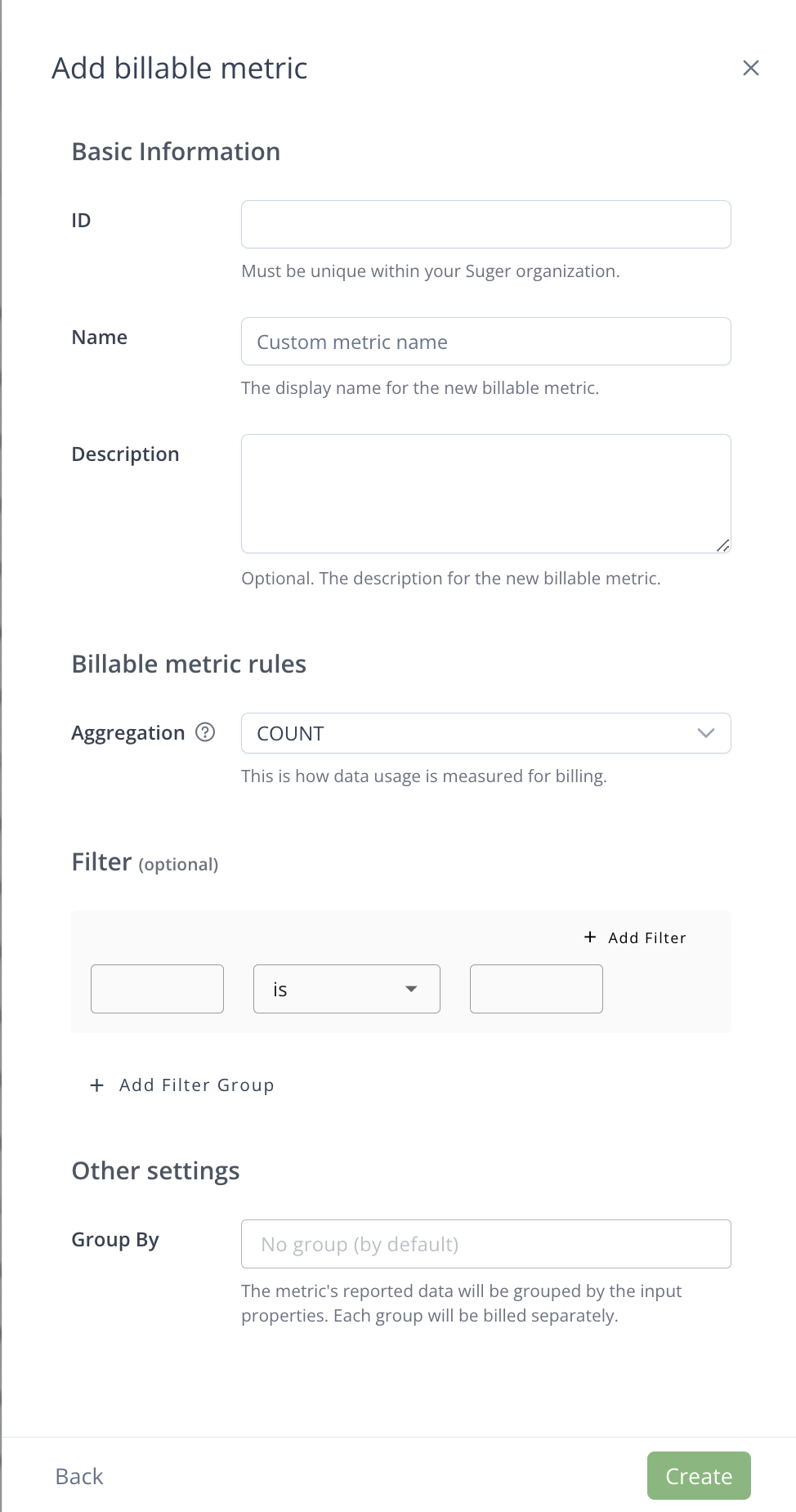 
A billable metric is defined by the following properties:
- **ID**: Used to report usage records. It should be unique in your organization, and must match the ID used in your API calls or CSV uploads.
- **Name**: Display name that your team can easily identify.
- **Description**: (Optional) Context regarding what this metric measures for future reference.
- **Filter Groups**: Criteria to filter the reported usage data.
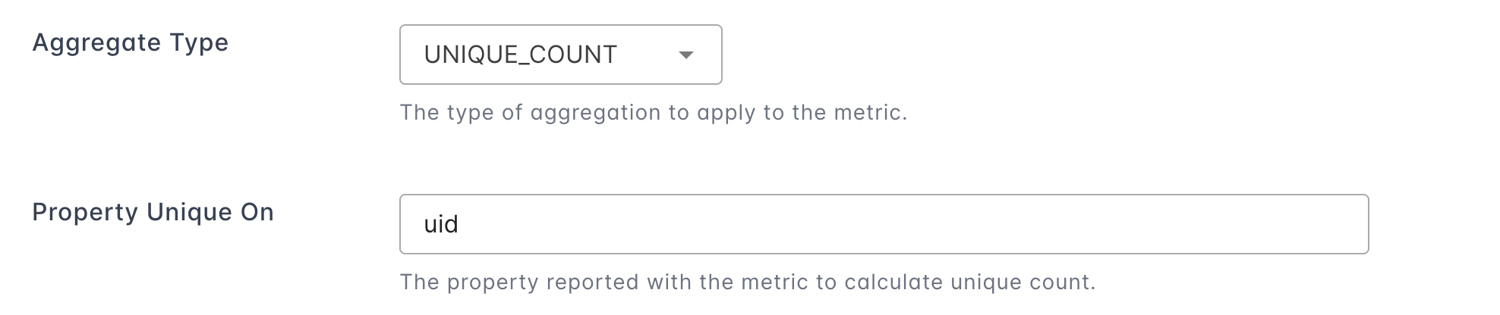
- **Aggregation Type**: How to aggregate the reported usage data.
- **Property Unique On**: Used for distinct counting when the aggregation type is UNIQUE COUNT.
- **Group By**: Used to divide usage data into different groups by properties. Each group will be billed separately.
## Filter groups
`Filter Groups` are used to filter usage records you reported, only those meet the filtering criteria will participate in the aggregation.

A billable metric is defined by the following properties:
- **ID**: Used to report usage records. It should be unique in your organization, and must match the ID used in your API calls or CSV uploads.
- **Name**: Display name that your team can easily identify.
- **Description**: (Optional) Context regarding what this metric measures for future reference.
- **Filter Groups**: Criteria to filter the reported usage data.
- **Aggregation Type**: How to aggregate the reported usage data.
- **Property Unique On**: Used for distinct counting when the aggregation type is UNIQUE COUNT.
- **Group By**: Used to divide usage data into different groups by properties. Each group will be billed separately.
## Filter groups
`Filter Groups` are used to filter usage records you reported, only those meet the filtering criteria will participate in the aggregation.
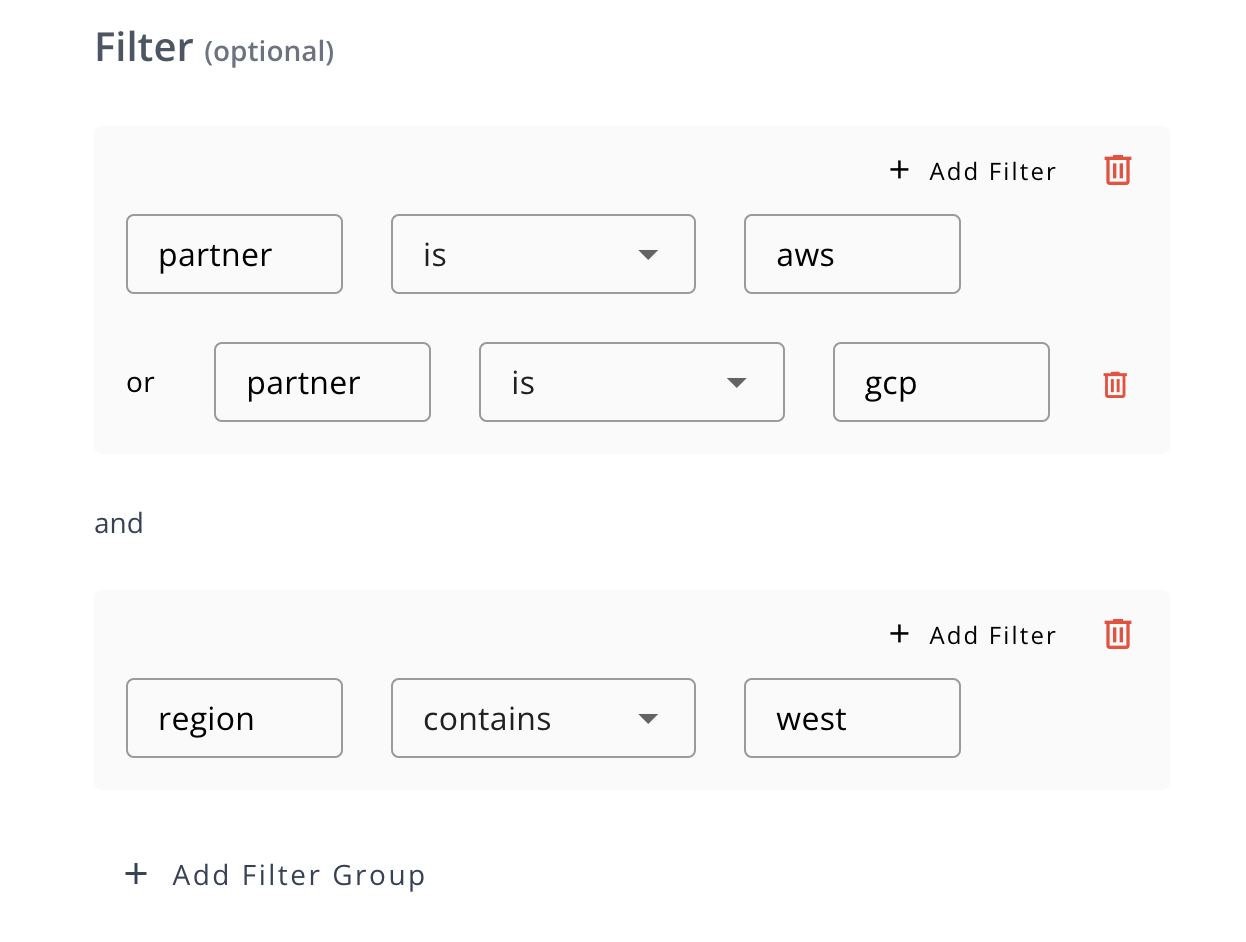 - Different groups have an "AND" relationship, while the filters within each group have an "OR" relationship.
- Each Filter expression left side is a Property name carried when reporting Usage Records, and the right side is the target value.
- Filter operators for string properties: `is`, `not is`, `contains`, `not contains`, `exists`, `not exists`.
- Filter operators for numeric properties: `greater than`, `greater than equal`, `less than`, `less than equal`, `equal`, `not equal`.
## Aggregation types
How the reported usage data will be aggregated before calculating the fee.
Suger supports the following aggregation types:
| Aggregation Type | Description |
| ---------------- | --------------------------------------------------------------------- |
| COUNT | The count of usage records reported. |
| UNIQUE COUNT | The distinct count of usage records reported on a specified property. |
| SUM | The total sum of the quantity values from usage records. |
| MAX | The maximum value of the quantity value from usage records. |
| LATEST | The latest value of the quantity value from usage records reported. |
## Property unique on
When selecting `UNIQUE COUNT` as the aggregation type, you need to specify the property to count. And the usage data you reported should contains the specified property.
>
- Different groups have an "AND" relationship, while the filters within each group have an "OR" relationship.
- Each Filter expression left side is a Property name carried when reporting Usage Records, and the right side is the target value.
- Filter operators for string properties: `is`, `not is`, `contains`, `not contains`, `exists`, `not exists`.
- Filter operators for numeric properties: `greater than`, `greater than equal`, `less than`, `less than equal`, `equal`, `not equal`.
## Aggregation types
How the reported usage data will be aggregated before calculating the fee.
Suger supports the following aggregation types:
| Aggregation Type | Description |
| ---------------- | --------------------------------------------------------------------- |
| COUNT | The count of usage records reported. |
| UNIQUE COUNT | The distinct count of usage records reported on a specified property. |
| SUM | The total sum of the quantity values from usage records. |
| MAX | The maximum value of the quantity value from usage records. |
| LATEST | The latest value of the quantity value from usage records reported. |
## Property unique on
When selecting `UNIQUE COUNT` as the aggregation type, you need to specify the property to count. And the usage data you reported should contains the specified property.
>  ## Group By
`Group By` will divide usage records reported into different groups according to the specified dimensions. When reporting usage data, the specified dimensions should be used as keys in the properties field of usage records.
:::info
- Each group will be calculated separately by price model.
- Currently, a maximum of `3` dimensions are supported for group by.
:::
In the below example, we choose `partner` and `region` as the group by dimensions, if property `partner` in our usage data has the following values: `aws`, `azure`, `gcp`, and property `region` has the following values: `us-east`, `eu-west`, then the usage data will be divided into 6 groups.
>
## Group By
`Group By` will divide usage records reported into different groups according to the specified dimensions. When reporting usage data, the specified dimensions should be used as keys in the properties field of usage records.
:::info
- Each group will be calculated separately by price model.
- Currently, a maximum of `3` dimensions are supported for group by.
:::
In the below example, we choose `partner` and `region` as the group by dimensions, if property `partner` in our usage data has the following values: `aws`, `azure`, `gcp`, and property `region` has the following values: `us-east`, `eu-west`, then the usage data will be divided into 6 groups.
>  ## Configure partner-specific settings
Once a metric is defined, you must tell Suger how that metric interacts with a specific cloud partner. Each marketplace has unique rules for how usage is aggregated and billed.
| Setting | Operational purpose |
| --- | --- |
| Commit With Additional Usage | When enabled, you can bill for "overages" even if a buyer has a fixed-price contract (commit). |
| Commit With List Price | Determines whether additional usage is billed at your custom negotiated rate or the standard marketplace list price. |
| Dimension Mapping | Maps your internal billable metric ID to the specific dimension ID defined in your marketplace product listing. You must enable this for usage to be reported to the partner. |
## The pricing dimension rule
Usage metering only functions if the underlying product listing supports it. Suger generates the marketplace invoice using this calculation:
**Usage Amount = Quantity Reported × Dimension Unit Price**
- **Requirement**: If your product listing in the marketplace (AWS/GCP/Azure) was built as "commit-only" (fixed price) without usage pricing dimensions, usage **cannot** be reported.
- **Verification**: If usage options are missing from an entitlement, check that the listing includes the necessary dimensions. If you add a new dimension to a listing, you must **Refresh** the product in the Suger Console to sync the changes.
## Troubleshooting
Usage metering is technically complex and direct changes can have immediate financial consequences. Work through the checklist below before making changes.
- **Inactive configs**: Ensure the **Dimension Mapping** status is **Enabled** for the specific partner (for example, AWS) you are currently billing.
- **ID mismatch**: Verify that the **Billable Metric ID** in Suger matches the external ID expected by your metering provider or your manual CSV headers.
- **Sync issues**: If a dimension was recently added to the marketplace, refresh the product in Suger so the dimension appears in your metering configs.
:::warning
If questions arise regarding usage discrepancies, contact Suger Support or your Customer Success Manager rather than making ad-hoc changes to the mapping configuration.
:::
## Edit billable metric
Most parts of the billable metric's information can not be edited because they may be already used.
You can archive a billable metric if you don't need it anymore.
## Configure partner-specific settings
Once a metric is defined, you must tell Suger how that metric interacts with a specific cloud partner. Each marketplace has unique rules for how usage is aggregated and billed.
| Setting | Operational purpose |
| --- | --- |
| Commit With Additional Usage | When enabled, you can bill for "overages" even if a buyer has a fixed-price contract (commit). |
| Commit With List Price | Determines whether additional usage is billed at your custom negotiated rate or the standard marketplace list price. |
| Dimension Mapping | Maps your internal billable metric ID to the specific dimension ID defined in your marketplace product listing. You must enable this for usage to be reported to the partner. |
## The pricing dimension rule
Usage metering only functions if the underlying product listing supports it. Suger generates the marketplace invoice using this calculation:
**Usage Amount = Quantity Reported × Dimension Unit Price**
- **Requirement**: If your product listing in the marketplace (AWS/GCP/Azure) was built as "commit-only" (fixed price) without usage pricing dimensions, usage **cannot** be reported.
- **Verification**: If usage options are missing from an entitlement, check that the listing includes the necessary dimensions. If you add a new dimension to a listing, you must **Refresh** the product in the Suger Console to sync the changes.
## Troubleshooting
Usage metering is technically complex and direct changes can have immediate financial consequences. Work through the checklist below before making changes.
- **Inactive configs**: Ensure the **Dimension Mapping** status is **Enabled** for the specific partner (for example, AWS) you are currently billing.
- **ID mismatch**: Verify that the **Billable Metric ID** in Suger matches the external ID expected by your metering provider or your manual CSV headers.
- **Sync issues**: If a dimension was recently added to the marketplace, refresh the product in Suger so the dimension appears in your metering configs.
:::warning
If questions arise regarding usage discrepancies, contact Suger Support or your Customer Success Manager rather than making ad-hoc changes to the mapping configuration.
:::
## Edit billable metric
Most parts of the billable metric's information can not be edited because they may be already used.
You can archive a billable metric if you don't need it anymore.